Cloud Governance & Security: Azure at its best
From Landing Zone to Zero Trust: how to set up governance, networking, identity and workload protection in Azure with Azure Policy, Microsoft Defender for Cloud, Azure Bastion and Entra ID PIM.
- Events
-
- Webinar WeAreProject — Cloud Governance & Security · · Online · Webinar
- Level
- Intermediate
The problem and the context
Many Azure environments grow project by project: one subscription, a few VMs, a VNet, and then pieces get bolted on. A couple of years later you end up with scattered permissions, networks that are hard to govern, VMs with exposed management ports and no clear view of the security posture.
In this WeAreProject webinar I start from a simple thesis: governance and security aren’t added at the end, they’re designed from day one. The session is for IT managers, sysadmins and architects who need to set up, or clean up, an Azure environment and want a logical thread running from the Landing Zone down to the protection of individual workloads.
Key content
Everything starts from the Landing Zone
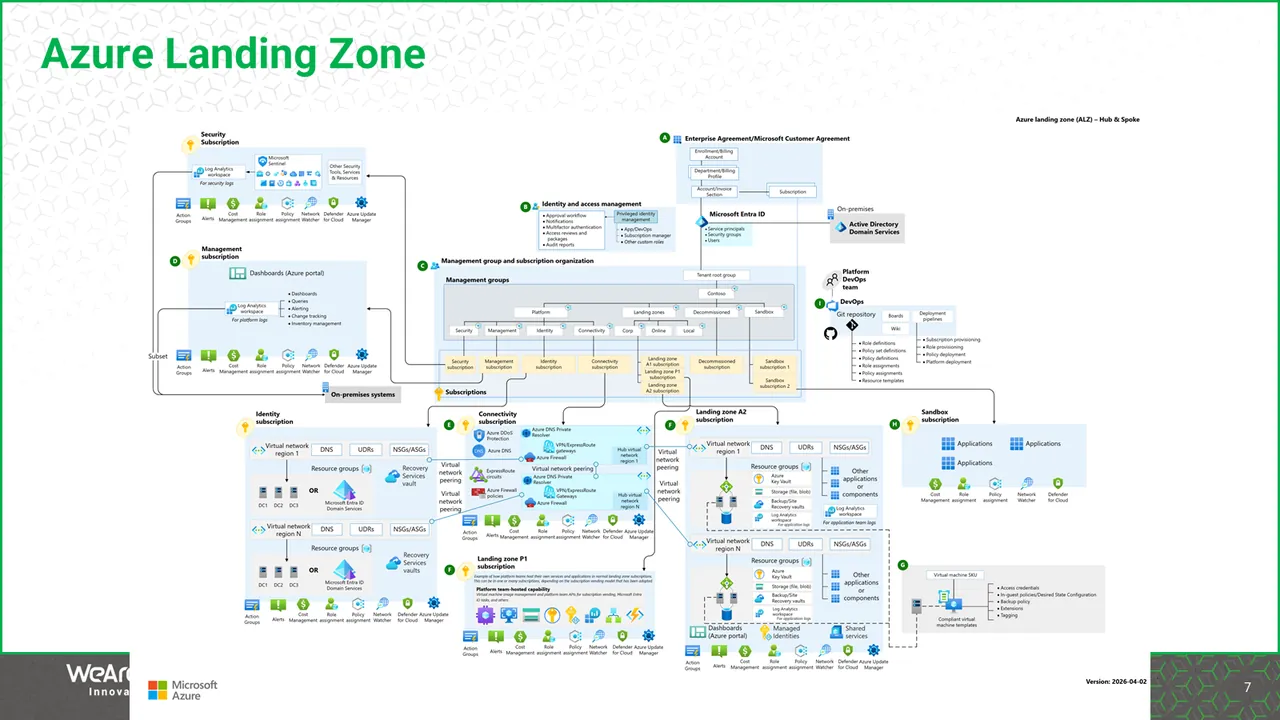
The starting point is the Microsoft Cloud Adoption Framework and its phases: Define Strategy, Plan, Ready and Adopt. The Landing Zone belongs to Ready: once motivations, goals, skills and operating model are clear, you design and implement the foundation that workloads will be migrated to and modernized on.
In the session I walk through the main building blocks:
- Management groups: a hierarchy separating platform, application landing zones, decommissioned environments and sandboxes, where policies and permissions are attached once.
- Multi-subscription environment: dedicated subscriptions for identity, management, connectivity and individual workloads, to isolate responsibilities and limits.
- Hub and spoke: a hub with Azure Firewall, Azure Bastion and VPN/ExpressRoute gateways, and production and non-production spokes peered to it, with traffic forced through the hub.
Governance and observability
On top of that come Azure Policy and Azure Monitor. Azure Policy enforces organizational standards at scale: aggregated compliance dashboards, bulk remediation for existing resources and automatic remediation for new ones. Azure Monitor, integrated with Azure Arc, extends collection and analysis to on-premises and multi-cloud servers, centralizes logs in Log Analytics with RBAC, and integrates with Microsoft Defender for Cloud and Microsoft Sentinel.
Zero Trust and an identity-first approach
The second part is about Zero Trust and its three principles: verify explicitly, use least-privilege access (just-in-time and just-enough-access) and assume breach. In Azure this becomes an “identity first” approach: identity is the new perimeter, privileged accounts must be managed with Just-in-Time Administration and least privilege, and the identity solution must be centralized and integrated with the whole technology estate.
I then show how to apply Zero Trust principles to a hub VNet and to spoke VNets, for both IaaS and PaaS workloads, following Microsoft’s guidance, plus the mapping of Microsoft capabilities onto the NIST Zero Trust architecture.
Landing Zone first, then identity as the perimeter, then workload protection: security in Azure is a consequence of governance, not an add-on.
Microsoft Defender for Cloud and beyond
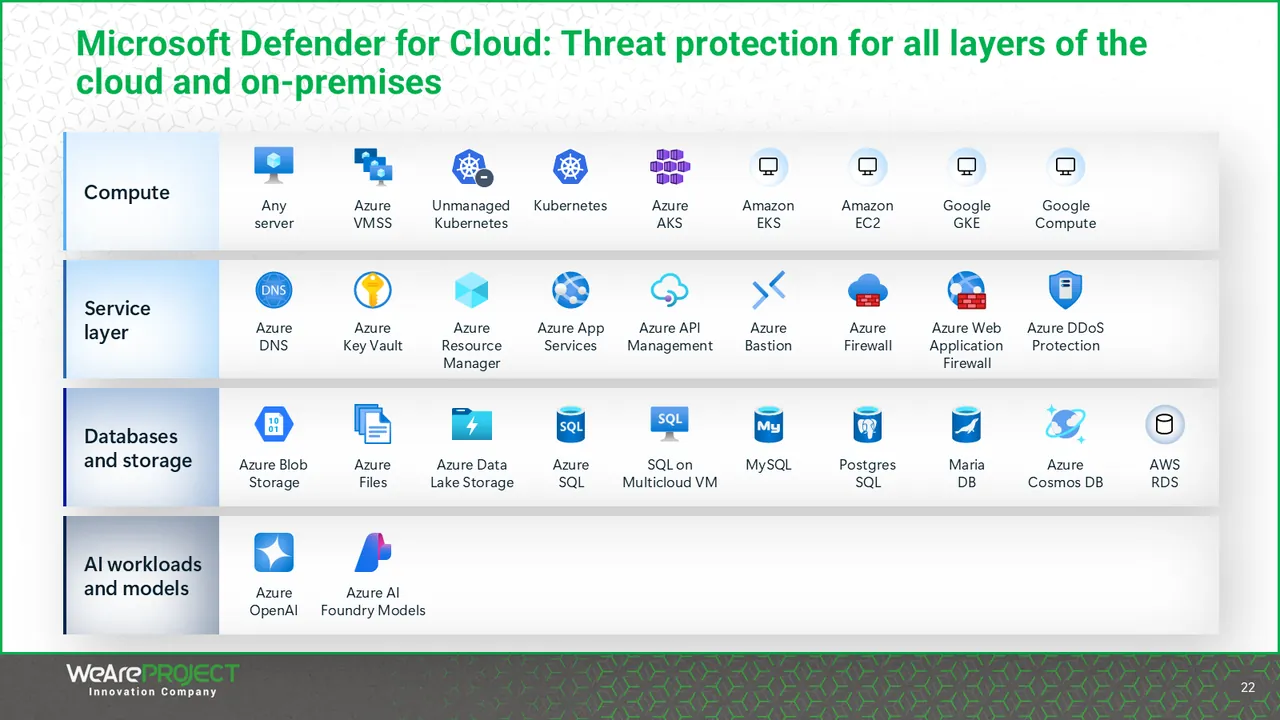
Microsoft Defender for Cloud covers three areas: security posture management (CSPM), cloud workload protection (CWP) and DevOps security, across Azure, AWS, Google Cloud and on-premises. Protection spans compute, the service layer, databases and storage, all the way to AI workloads.
| Layer | What it protects | Tool |
|---|---|---|
| Governance | Hierarchy, standards, compliance | Management groups, Azure Policy |
| Network | Segmentation and traffic | Hub and spoke, Azure Firewall, NSGs |
| Identity | Privileged access | Microsoft Entra ID, Entra ID PIM |
| VM access | Management ports | Just-in-Time VM access, Azure Bastion |
| Workloads | Posture and threats | Microsoft Defender for Cloud |
Multilayered VM protection
The practical case I bring is the combination of Defender for Cloud Just-in-Time VM access, Azure Bastion and Entra ID PIM. With PIM I manage the privileged groups assigned to Azure resources, designing a least-privilege policy up front; with JIT I open access only when needed, only on the required ports and for a limited time; with Bastion I avoid exposing RDP and SSH. I wrote about it in detail in the posts on multilayered protection for Azure VMs, Entra ID PIM and PIM Managed Groups.
Architectures and demos
The opening image is the Azure Landing Zone reference architecture: management groups, platform subscriptions for identity, management and connectivity, and application landing zones.
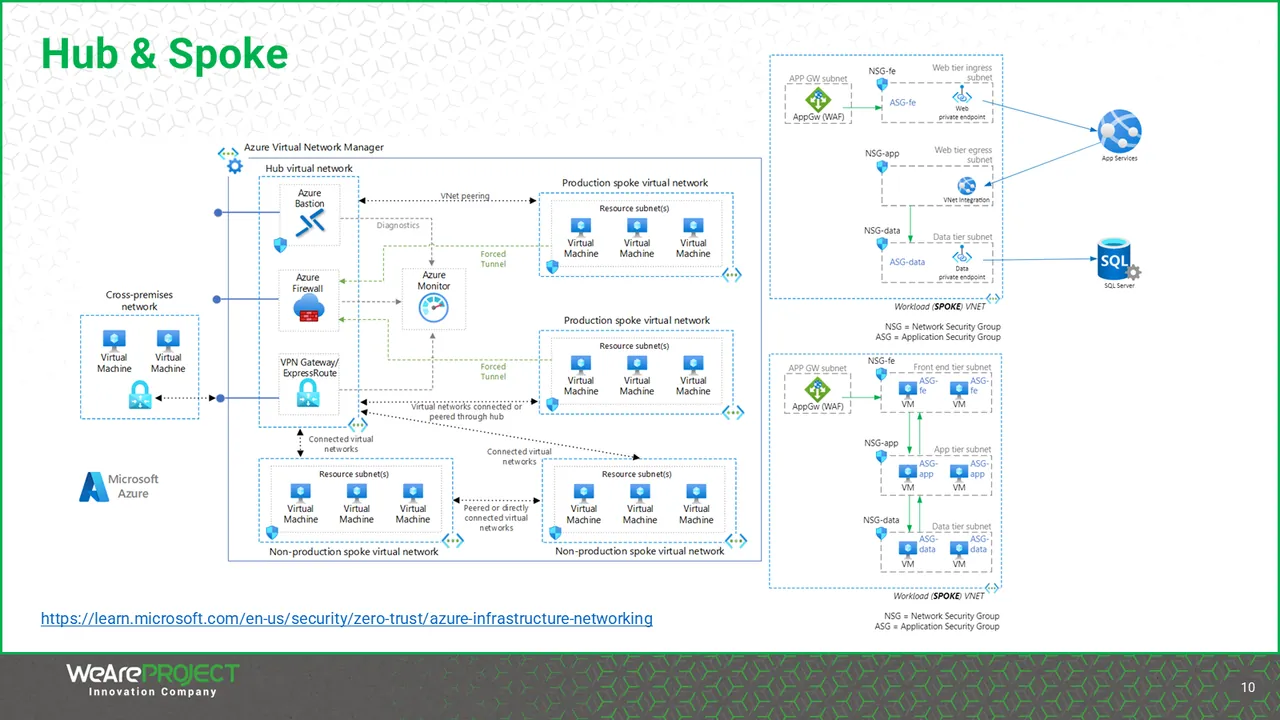
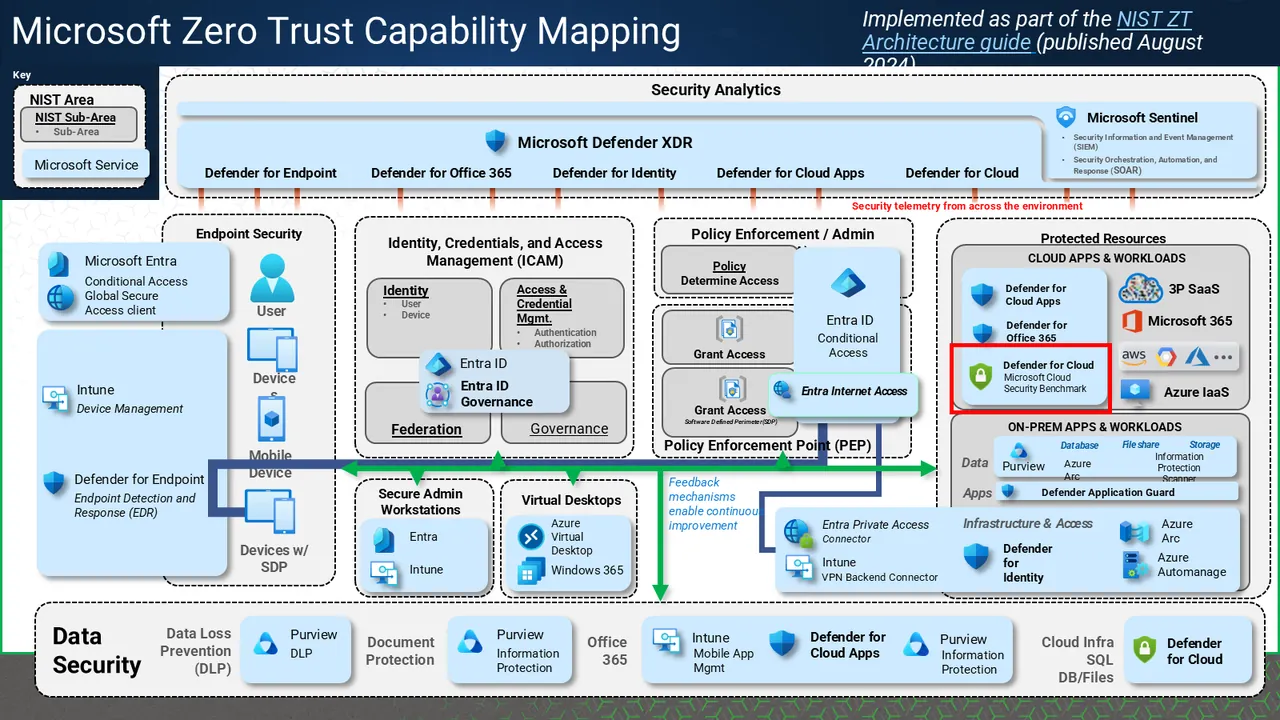
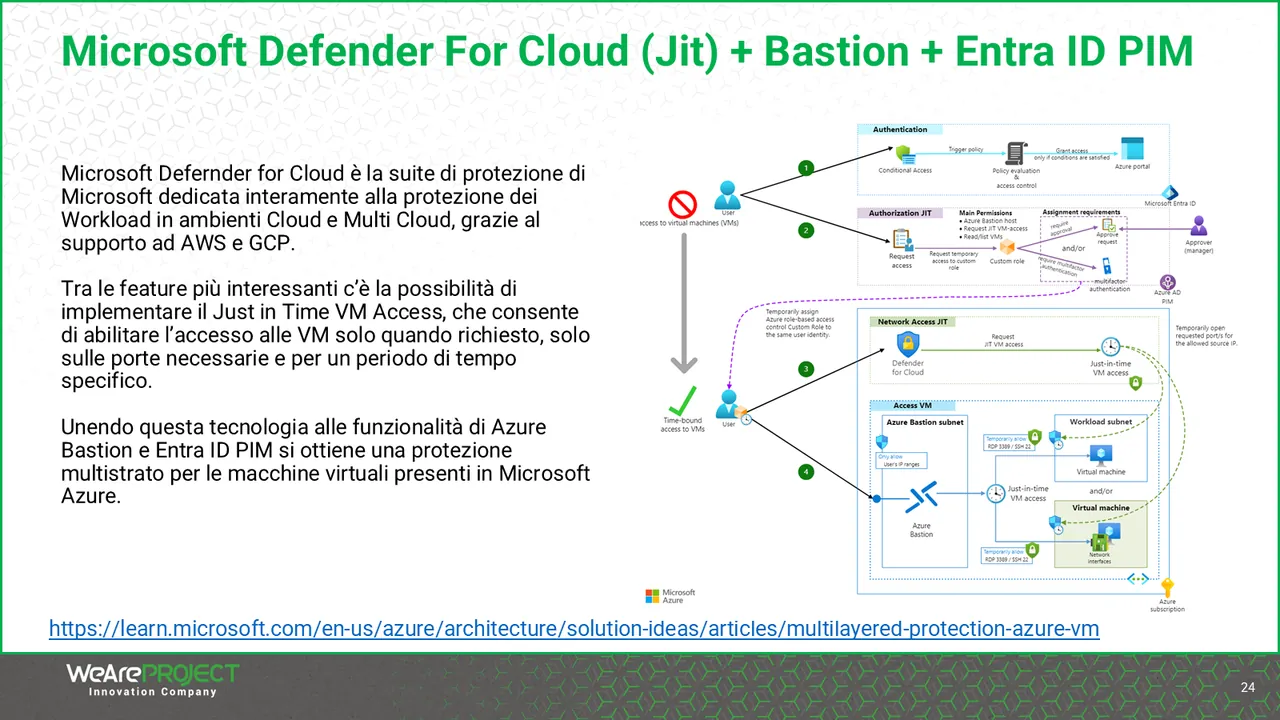
The demos, recorded in the Azure portal, walked through an example hub and spoke infrastructure and the concepts covered in the session.
Lessons from the field and takeaways
- Start from the Cloud Adoption Framework: the Landing Zone is the foundation, not a technical detail.
- Use management groups to apply policies and permissions once, inherited downwards.
- Separate platform and workloads into different subscriptions and centralize connectivity in a hub.
- Azure Policy brings both existing and new resources into compliance.
- Treat identity as the new perimeter: least privilege and Just-in-Time for privileged accounts.
- Never expose RDP/SSH: combine JIT, Azure Bastion and Entra ID PIM.
- Use Microsoft Defender for Cloud for a single view of your posture, multi-cloud included.
Resources
Microsoft Learn documentation
- What is an Azure landing zone?
- Apply Zero Trust principles to Azure infrastructure networking
- What is Microsoft Defender for Cloud?
- Multilayered protection for Azure virtual machine access
- What is Microsoft Entra Privileged Identity Management?
- Overview of Azure Policy
Related blog posts
Other sessions
Secure your Azure Landing Zone
A well-designed Landing Zone is not enough: it has to be protected. Identity as the new perimeter, just-in-time access, Zero Trust networking and compliance, with PIM and Bastion demos and a serverless case study.
- 1nn0va Saturday 2024 · September 2024
- #POWERCON2024 — Rivoluzione digitale in azione · 14 June 2024
- Microsoft Entra ID
- Azure Bastion
- Azure Firewall
- Azure Application Gateway
- Microsoft Defender for Cloud
- Azure Policy
- +1
Agents at work – l'intelligenza che agisce
Three digital colleagues in half an hour: GitHub Copilot for developers, Microsoft Scout for people working across mail, files and portals, Microsoft Foundry for enterprise agents. Real cases, demos and one rule: delegate the work, not the responsibility.
- Agents at Work: Meet Your New Colleagues — WeAreProject · 13 October 2026
- GitHub Copilot
- Microsoft Scout
- Microsoft Foundry
- Work IQ
- Microsoft Entra ID
- Microsoft Intune