Multilayer protection for Azure virtual machines: JIT, Bastion, PIM
Multilayer protection for Azure virtual machines: Defender for Cloud JIT, Azure Bastion and Entra ID PIM combined for secure, audited VM access.
Last updated on
Table of Contents
- The three building blocks
- Defender for Cloud and just-in-time VM access
- Azure Bastion
- Entra ID PIM for Groups
- The access flow, step by step
- The demo: enabling JIT and reaching the VM
- On the user side: sign-in, PIM and visible resources
- The NSG rule and JIT access
- Why I think it’s worth it
- Key takeaways
- Watch the video and let’s talk
One of the questions I get most often is about secure access to cloud virtual machines: how do I let a vendor, a consultant or a colleague into a VM only when needed, and only for as long as needed? My answer is multilayer protection for Azure virtual machines, built by combining three Microsoft technologies you very likely already own: Defender for Cloud just-in-time VM access, Azure Bastion and Entra ID PIM. In this Azure Tips & Tricks episode I explain how they fit together and what happens, step by step, when a user tries to sign in.
The three building blocks
The idea is simple: a user managed in your own tenant, or a guest user, must be able to reach the Azure portal and the virtual machine for a limited time. To get there we combine three components, each with a precise job.
| Component | What it protects | Notes |
|---|---|---|
| Entra ID PIM for Groups | Portal access and RBAC roles on resources | The group stays empty until the user activates membership |
| Defender for Cloud JIT VM access | The network port to the VM on the NSG | Prerequisite: Defender for Servers Plan 2 |
| Azure Bastion | RDP/SSH connection from the browser | No VPN client for vendors and consultants |
Defender for Cloud and just-in-time VM access
Just-in-time VM access temporarily opens a port on the VM’s NSG. What I find really interesting is that you choose the port: not just RDP, but also SSH or WinRM. The prerequisite is Defender for Servers Plan 2.
Azure Bastion
Installing a VPN client on the PCs of software vendors and consultants can be a real pain. With Bastion, a web browser is all you need to RDP or SSH into your virtual machines. I wrote a dedicated article on Azure Bastion and secure VM access.
Entra ID PIM for Groups
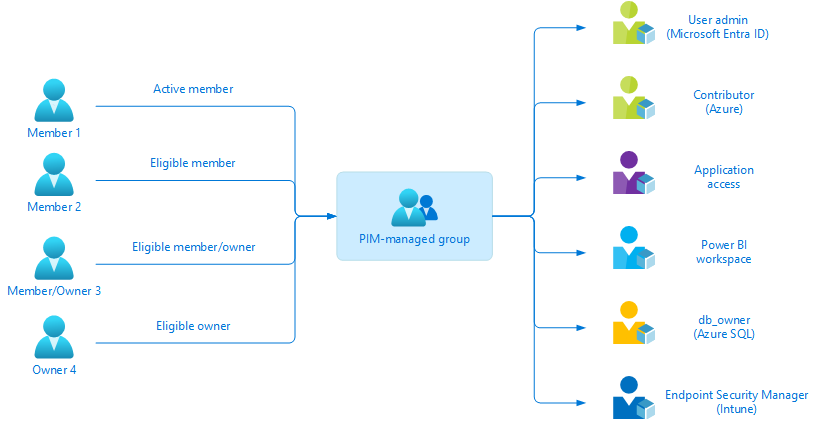
Closing the loop is access to the Azure portal, which goes through PIM. A group holds specific RBAC roles and is managed by PIM; the key point is that the group is always empty. Permissions arrive only when PIM places the user in the group. I covered this in detail in the article on Entra ID PIM.
Why do I like it so much? Because nobody needs permanent access to the Azure portal, and that access is sensitive. I can approve an external vendor’s request myself, or let them self-activate as long as they provide a justification. Either way, everything is tracked.
The access flow, step by step
I presented these slides at WPC in 2024 and, at the time of recording, the technology had not changed.
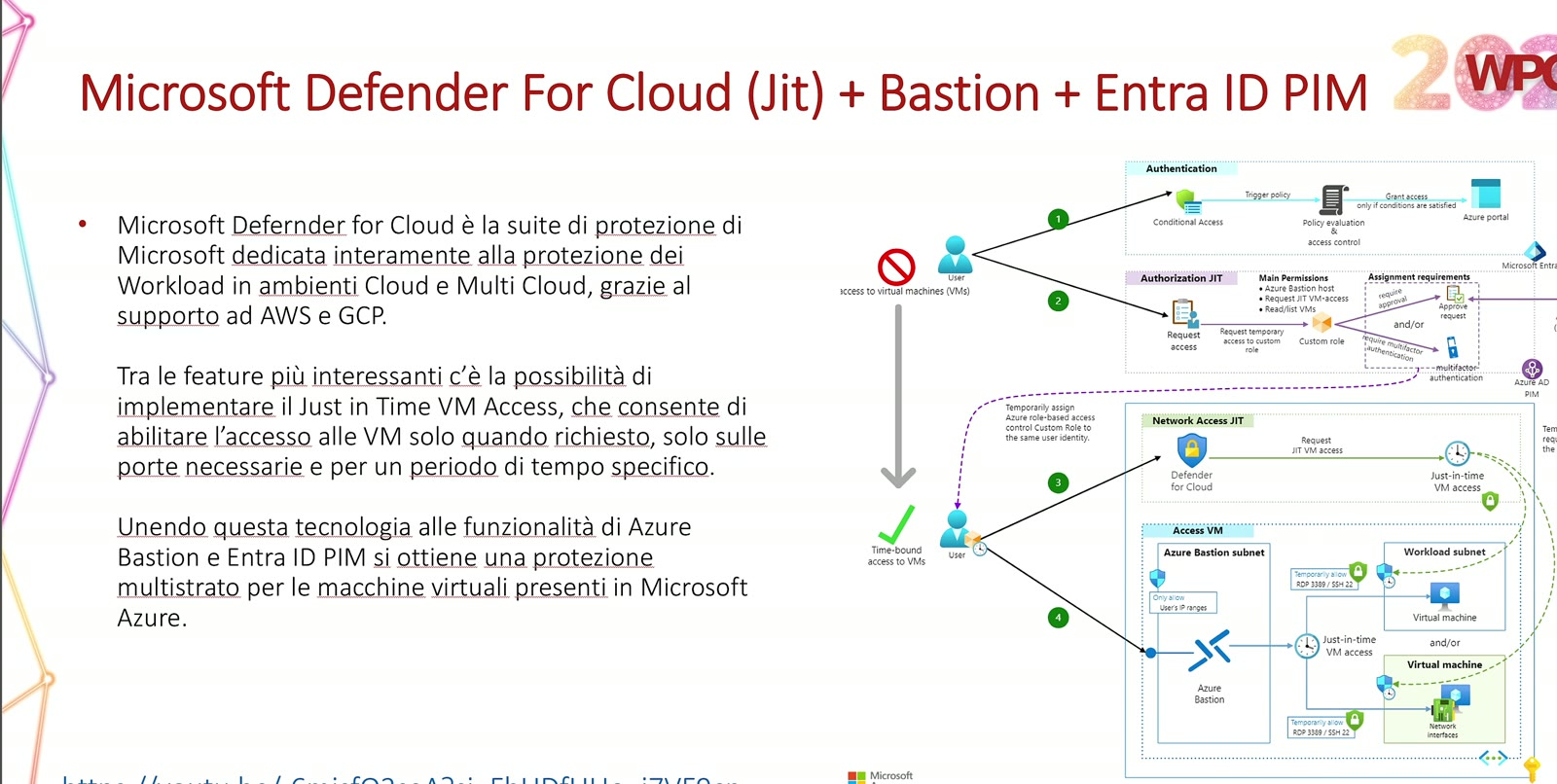
- Authentication: the user signs in to the Azure portal through Conditional Access. You can also consider phishing-resistant MFA here, for example with FIDO keys.
- Authorization with PIM: the portal looks empty, because the user has no access to any resource. From PIM they request assignment to the group, approved by an approver or self-approved depending on the configuration, plus another MFA prompt. Once in the group, they inherit the RBAC roles and can see the resource.
- JIT network access: seeing the VM doesn’t mean being able to get in. The user asks Defender for Cloud for just-in-time access, which creates a temporary NSG rule for the requested port.
- Bastion: only now can the user connect to the machine through Azure Bastion.
The split between step 2 and step 3 is not a detail: whoever manages the Azure resource doesn’t necessarily need access to the guest operating system, perhaps because of sensitive data. In some contexts that distinction makes all the difference.
People working in IT and security are not supposed to make your life easier: they are supposed to make it safer. That’s a line from one of my mentors, and this solution goes exactly in that direction.
The demo: enabling JIT and reaching the VM
In the demo the goal is to connect securely to the AZFS01 machine. At first the NSG has no special rules and the VM is not yet under JIT: the just-in-time VM access list only shows another machine, AZDC01.
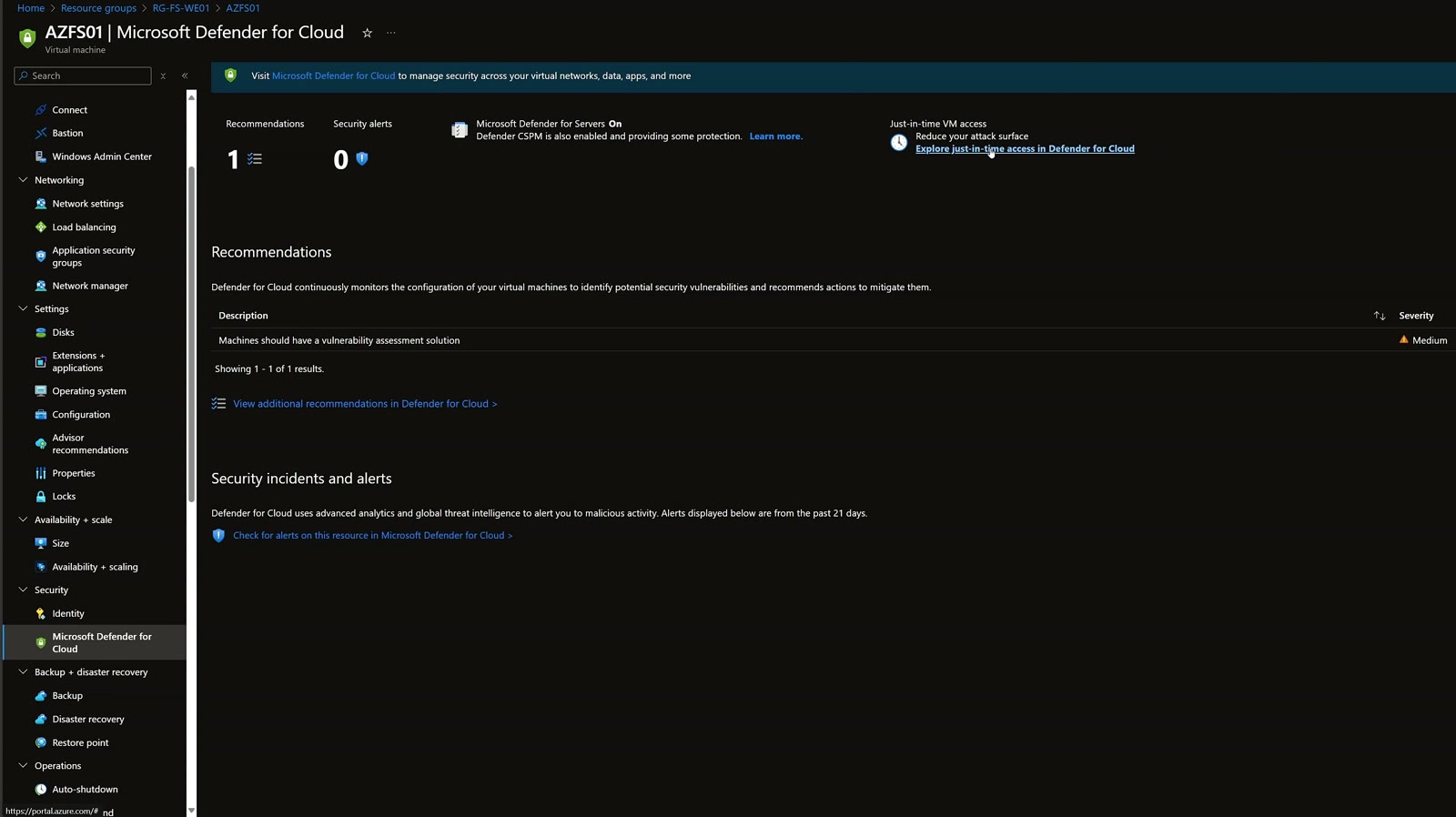
From the VM list you use the button to enable JIT on a single machine. The main ports are proposed by default: RDP 3389, SSH, WinRM 5985 and WinRM over HTTPS 5986. You can remove the ones you don’t need. For each port you define number, protocol, allowed IPs and maximum request time; then you confirm and save.
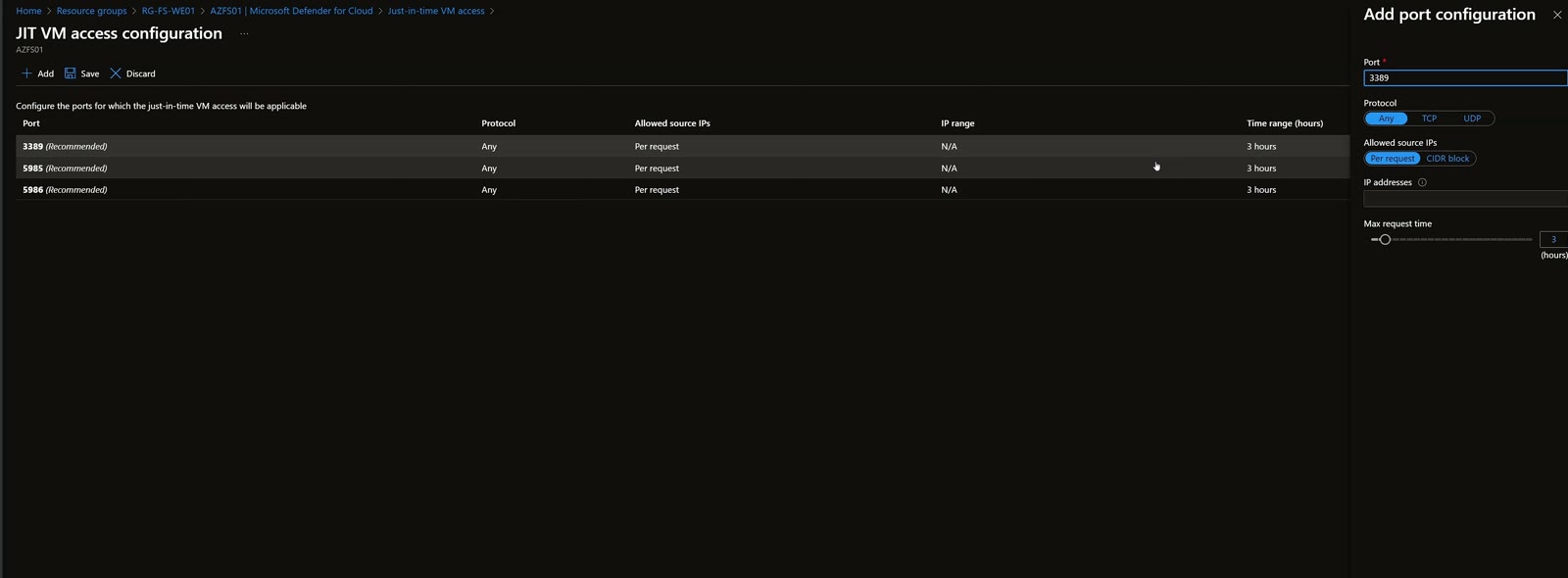
After saving, both machines, AZDC01 and AZFS01, are listed under JIT.
On the user side: sign-in, PIM and visible resources
The user signs in with username, password and MFA: the first layer of protection. Right after sign-in they see no subscription and no resource group, so full least privilege. From PIM they request group activation, setting the duration (within the configured limits) and a justification, and activate the membership.
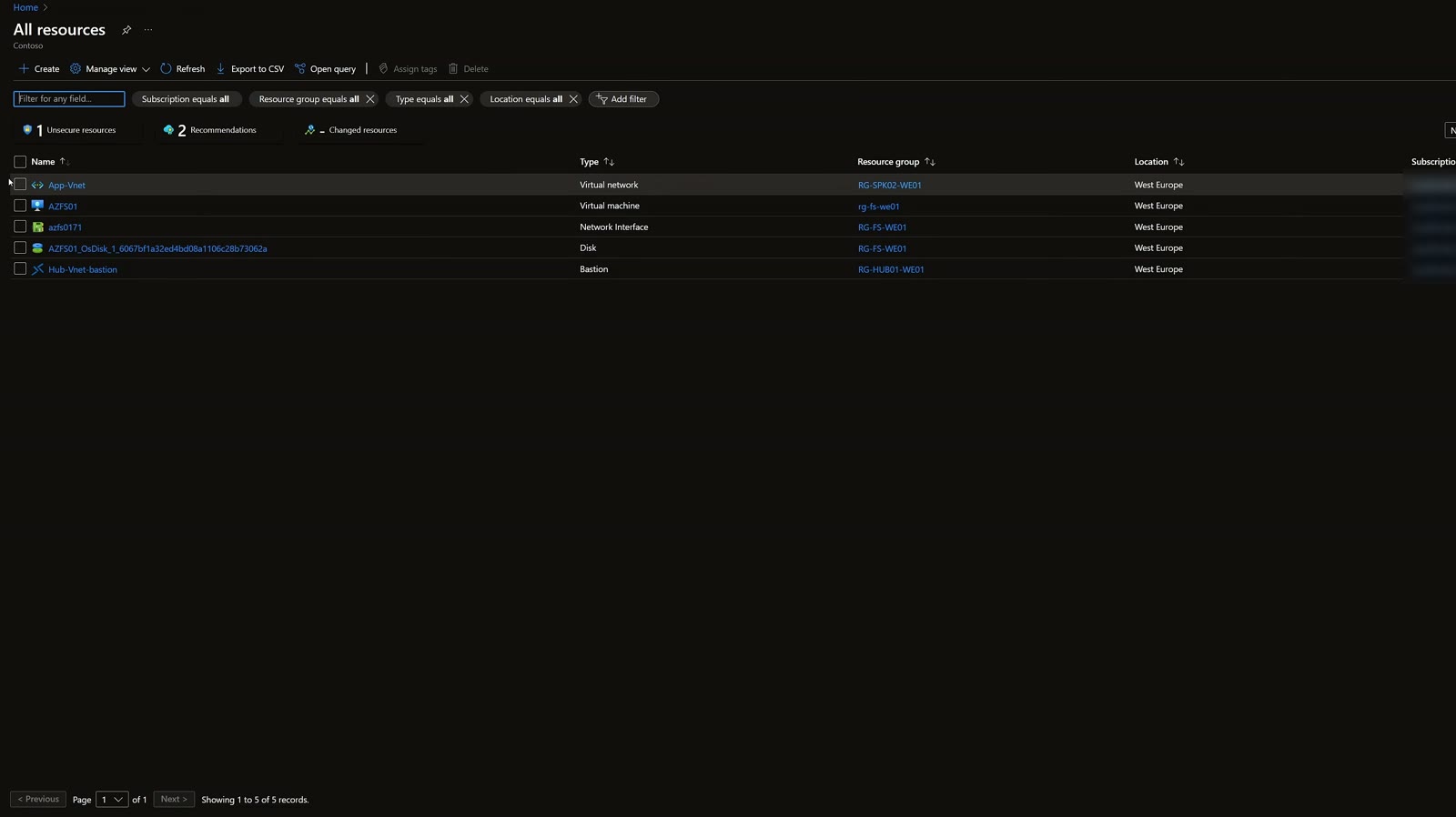
At that point All Resources shows five resources: the application VNet, the VM, the network interface, the disk and the Bastion. Why the VNet and Bastion too? Because the connection requires the Reader role on the VNet and on Bastion, plus the roles needed to connect to the VM; in the demo, to keep things quick, I assigned Contributor on the virtual machine.
The NSG rule and JIT access
In the VM’s Network settings there is an inbound rule with priority 4096 created by JIT: a deny on the configured ports. If I try to connect through Bastion, even with the permissions granted by PIM, the rule blocks the connection: I haven’t requested just-in-time access yet.
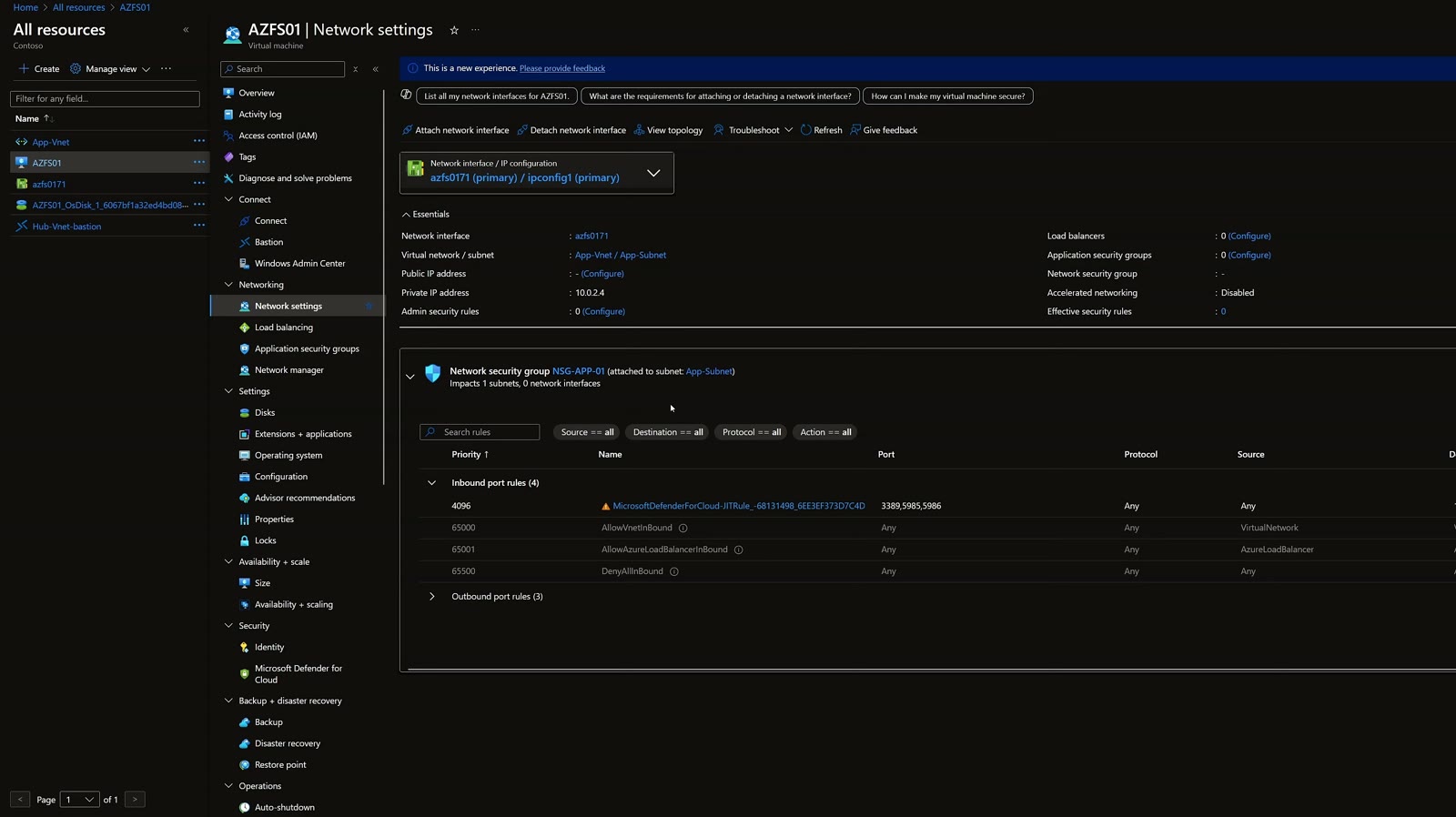
I request access to port 3389 and, very quickly, a new rule with priority 100 allowing the traffic appears in the NSG. Only now does the Bastion connection succeed.
Why I think it’s worth it
With two or three tools you’re probably already using (PIM, Defender for Cloud to protect your machines, Bastion to reach them) you raise your VM protection level dramatically without buying anything new. Add Bastion Premium, with user session recording, and you get an end-to-end solution that protects every single step. Costs for each component should of course be checked on Microsoft’s website.
I always tell colleagues and customers: if we buy something, whether it’s the Microsoft cloud or 365 licenses, let’s use it to the fullest. If a license has a hundred features and I need eighty, let’s put those eighty into production. Only then are we truly paying for what we use.
Key takeaways
- Multilayer protection combines Entra ID PIM for Groups, Defender for Cloud JIT and Azure Bastion.
- JIT requires Defender for Servers Plan 2 and temporarily opens on the NSG the port you choose (RDP, SSH, WinRM).
- The PIM group stays empty: RBAC roles arrive only on activation, approved or self-approved with a justification.
- Seeing the Azure resource doesn’t mean being able to access the guest operating system.
- Bastion removes VPN clients; Bastion Premium adds session recording.
Watch the video and let’s talk
You’ll find the full demo in the YouTube video, more a showcase than a step-by-step tutorial. If you’d like a hands-on demo of how to enable it, reach out on LinkedIn or leave a comment. More episodes are on my YouTube channel, my sessions are on Sessionize and you can learn more about me on the about page. If you’re designing the network side, also check out the article on Azure Virtual Network Manager in a hub-spoke topology.

Written by
Cloud Solution Architect and Microsoft Azure MVP: landing zones, networking, security and hybrid cloud from the field.
Related articles

Azure Bastion: secure access to Azure VMs with no public IP
Azure Bastion step by step: dedicated subnet, Standard SKU deploy, browser RDP/SSH to VMs in hub and spoke, PIM and shareable links.
Entra ID PIM: just-in-time privileged access to resource groups
How I use Entra ID PIM for groups: eligible Azure roles, activation with MFA and justification, notifications and least privilege on landing zones.
Leveraging PIM Managed Groups to manage Just-in-Time access to Azure resources
A guide to using Microsoft Entra ID PIM Managed Groups to manage Just-in-Time access to the RBAC roles of Azure resources.