Azure Security: tools and strategies for a Zero Trust approach
A webinar on bringing Zero Trust principles into Azure infrastructure: hub & spoke network design, identity as the new perimeter, just-in-time access and the services that make security concrete.
- Events
-
- Webinar WeAreProject — Azure Security · · Online · Webinar
- Level
- Intermediate
The problem and the context
When people talk about Zero Trust they almost always think about identity: MFA, Conditional Access, risk-based sign-ins. That’s right, but it’s only half of the job. Once identity is covered, the second front is infrastructure: how networks are built, how traffic flows, who can get onto the machines and for how long.
That’s where this webinar comes from. The security level we built over the years in our on-premises datacenters has to be matched, and ideally improved, in Azure as well. The session is aimed at IT managers, sysadmins and architects who already run workloads in Azure (or are about to) and want to understand which design choices and which services let them apply Zero Trust principles in practice.
Key content
Start from network design
In the first part I go through the design principles I apply in every project, based on the “Network topology and connectivity” design area of the Cloud Adoption Framework. Six points that look trivial, but get expensive to fix if you get them wrong at the start:
- a written, unique naming convention across the whole environment;
- the region choice, based on distance from your production datacenters;
- planning the number of subscriptions;
- a private IP addressing plan aligned with company standards and without overlaps;
- aggressive network segmentation;
- traffic filtering, allowing only the flows considered legitimate.
On top of that, the model I recommend almost every time is hub & spoke: it lets you govern North-South and East-West flows from a central point without heavy admin effort, and it’s conceptually the closest topology to the on-premises world. That’s also why IT teams adopt it more easily. I covered it in the post on hub & spoke with Virtual Network Manager.
Zero Trust principles
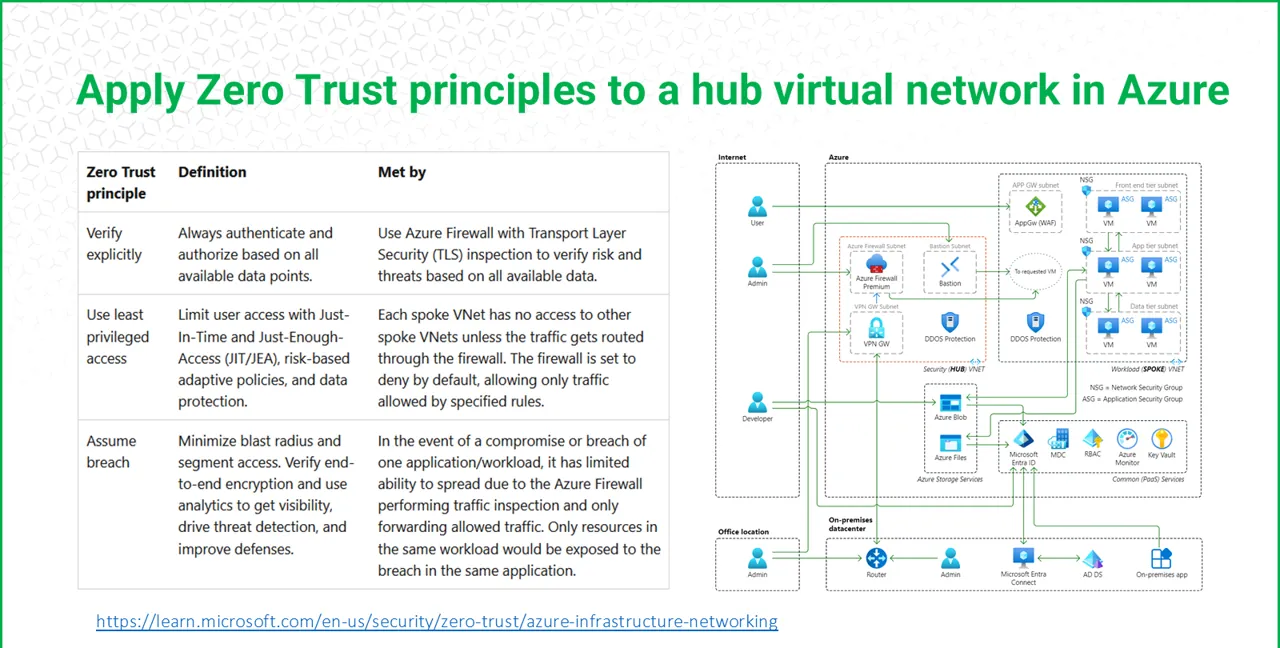
Then I recap the three principles behind Microsoft’s model:
- Verify explicitly: every access decision must use all the relevant information and telemetry available;
- Use least-privilege access: limit access with just-in-time and just-enough-access and risk-based policies;
- Assume breach: assume an attacker can compromise any component (identity, network, device, app) and design accordingly.
Identity first
Identity is the new perimeter. In my projects the identity solution must be centralized and integrated with the whole technology stack, and privileged accounts must follow just-in-time administration and least privilege. The tool I use is Entra ID PIM for Azure resources: privileged groups are assigned to resources and membership is activated only when needed. That way least privilege is designed upfront rather than patched afterwards. More on this in my post on Entra ID PIM.
Security people aren’t there to make life easier for IT or end users: they’re there to make it safer.
Supporting tools
The second part covers the services that make the model workable:
| Service | Role in the Zero Trust model |
|---|---|
| Azure Virtual Network Manager | Centralized VNet management, direct connectivity, Security Admin Rules and IPAM (in preview at the time of the session), including cross-tenant and multi-subscription scenarios |
| Azure Firewall | North-South and East-West traffic control, deployable across Availability Zones (99.99% SLA), centrally managed with Azure Firewall Manager; Basic, Standard and Premium SKUs |
| Azure Bastion | Browser-based RDP/SSH access to VMs without exposing them to the Internet, with session recording on the Premium SKU |
| Microsoft Defender for Cloud | Workload protection for cloud and multicloud (AWS and GCP too), security posture and Just-in-Time VM Access |
Platform changes you can’t ignore
I wrap up with platform changes that directly affect security and design: the retirement of default outbound access for new VMs from 30 September 2025 (you’ll need an explicit method such as NAT Gateway, Load Balancer outbound rules or a public IP), and the retirement of Basic public IPs, non-”AZ” Virtual Network Gateways, unmanaged disks, plus the end of TLS 1.0 and 1.1 in favour of TLS 1.2.
Architectures and demos
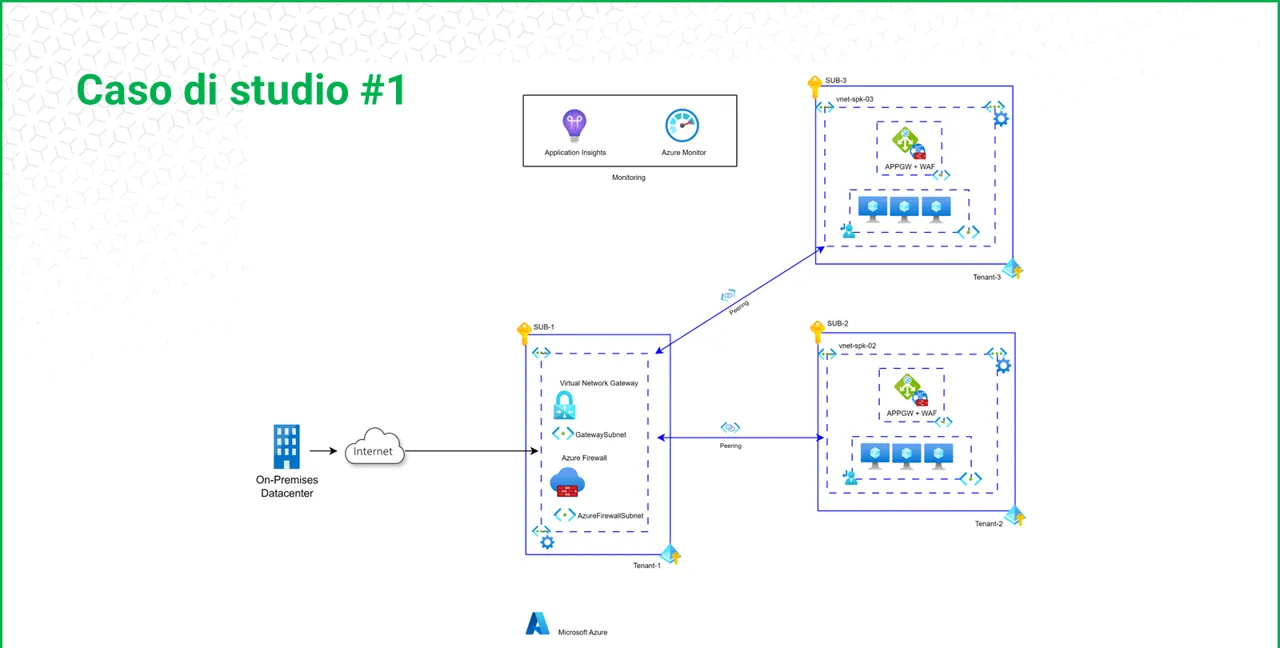
The first case study, which is also the cover image, is a hub & spoke architecture spread across three tenants and three subscriptions: the hub holds the Virtual Network Gateway and Azure Firewall and connects the on-premises datacenter, while the spokes, in different tenants, host workloads published through Application Gateway with WAF. Monitoring relies on Application Insights and Azure Monitor. This is exactly the kind of scenario where Azure Virtual Network Manager shines.
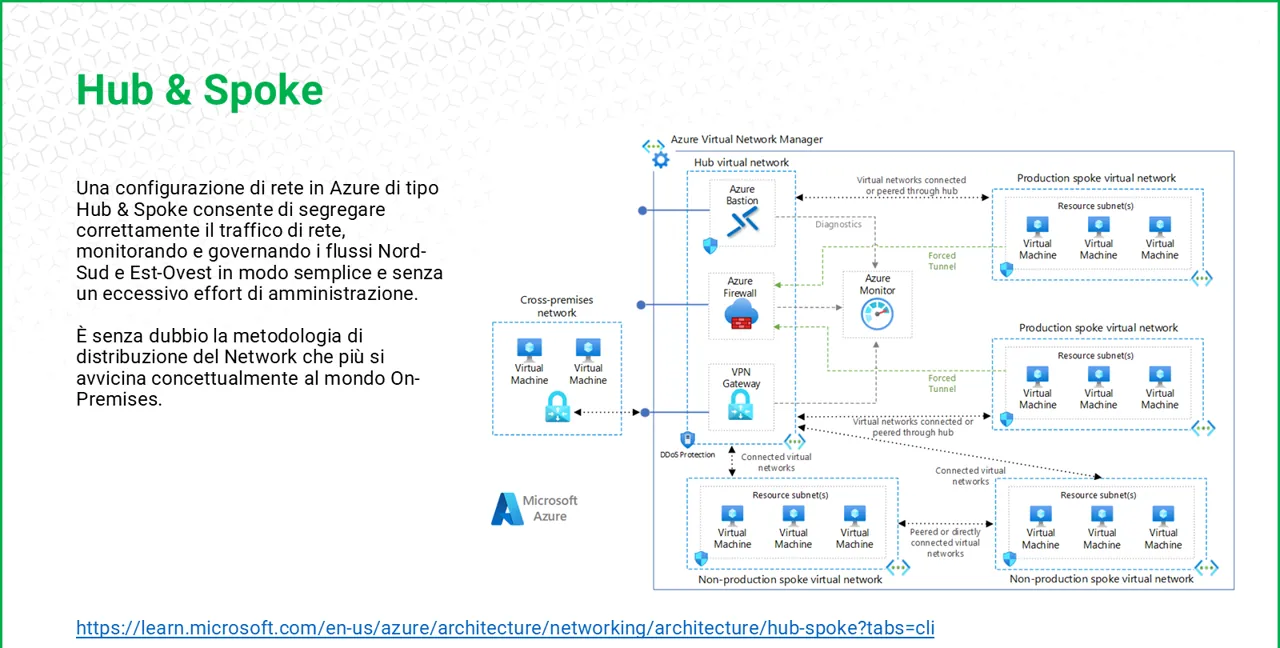
To apply Zero Trust to the network I used Microsoft’s reference diagrams for hub and spoke: the hub concentrates firewall, gateways and controls; the spokes handle segmentation and filtering close to the workload.
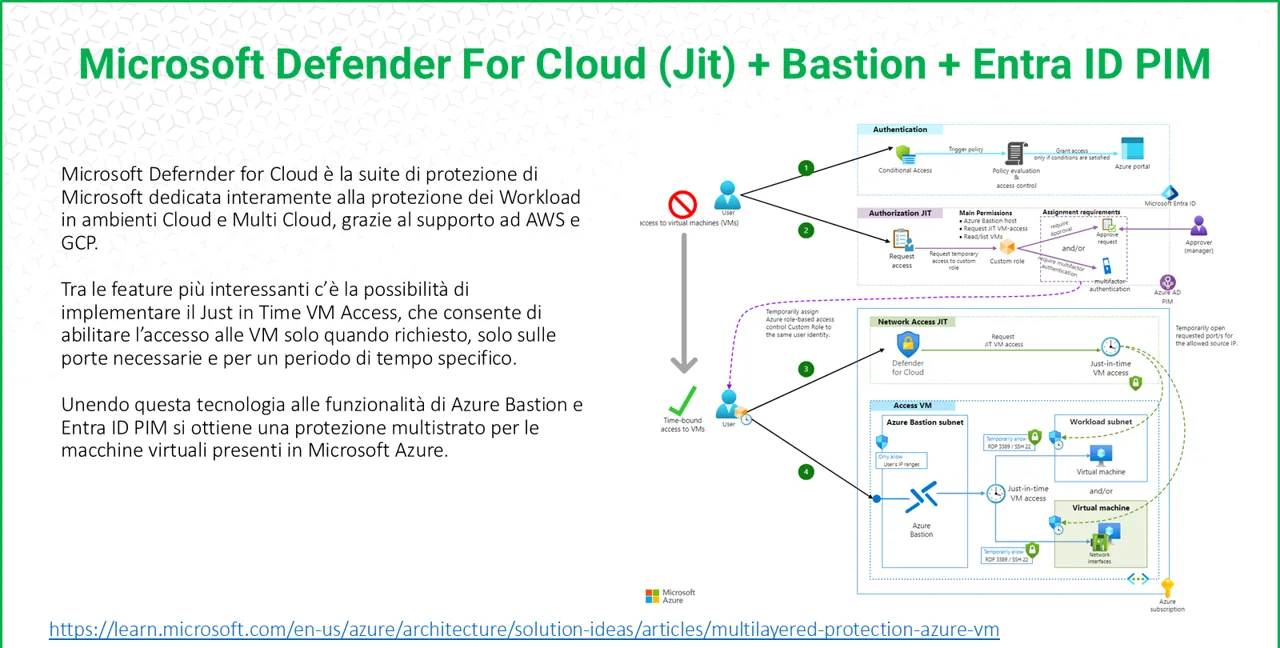
The first demo was on Azure Virtual Network Manager, showing centralized connectivity management. The second covered the most effective combo to protect VMs: Defender for Cloud Just-in-Time VM Access, Azure Bastion and Entra ID PIM. The user activates the role through PIM, requests JIT access that opens only the required ports for a limited time, and connects through Bastion with no public IPs. I wrote about it in detail in the post on multilayered VM protection.
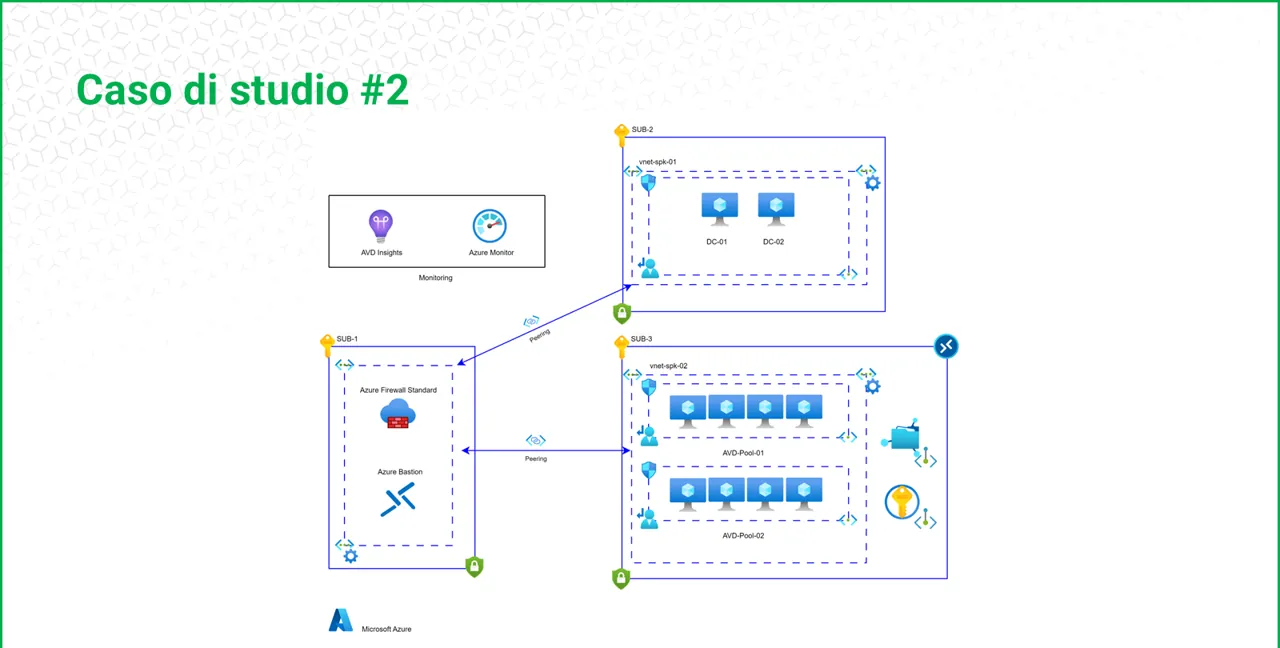
The second case study is more compact: a hub with Azure Firewall Standard and Azure Bastion, one spoke with the domain controllers and one spoke with two Azure Virtual Desktop host pools, monitored with AVD Insights and Azure Monitor.
Lessons from the field and takeaways
- After identity, infrastructure is the second thing to secure in a Zero Trust approach.
- Cloud security must at least match your on-premises datacenter, never drop for convenience.
- Naming convention, IP plan and number of subscriptions are decided upfront: fixing them later is expensive.
- Hub & spoke remains the easiest model to govern and to get IT teams to adopt.
- Infrastructure access should always be just-in-time and least privilege, with no standing permissions, IT staff included.
- Use Infrastructure as Code wherever possible: you get a full history of changes and fewer mistakes.
- Zero Trust is a continuous improvement process: define your security changes and give them deadlines.
- Keep an eye on platform retirements (default outbound access, Basic IPs, TLS 1.0/1.1): they’re also a chance to raise the bar.
Resources
Microsoft Learn documentation
- Network topology and connectivity (Cloud Adoption Framework)
- Apply Zero Trust principles to a hub virtual network in Azure
- What is Azure Virtual Network Manager?
- Choose the right Azure Firewall SKU
- Multilayered protection for Azure virtual machine access
Related blog posts
Other sessions
Agents at work – l'intelligenza che agisce
Three digital colleagues in half an hour: GitHub Copilot for developers, Microsoft Scout for people working across mail, files and portals, Microsoft Foundry for enterprise agents. Real cases, demos and one rule: delegate the work, not the responsibility.
- Agents at Work: Meet Your New Colleagues — WeAreProject · 13 October 2026
- GitHub Copilot
- Microsoft Scout
- Microsoft Foundry
- Work IQ
- Microsoft Entra ID
- Microsoft Intune
Azure Firewall or FortiGate (NVA)? A practical guide to choosing
A practical comparison of Azure Firewall and FortiGate as an NVA: why you need a firewall in Azure, how routing changes everything, and how policies, web filter, TLS inspection, IDPS, WAF and logs compare.
- #POWERCON2026 — Governare la complessità digitale · 24 September 2026
- Global Azure Veneto 2026 · April 2026
- Azure Firewall
- FortiGate
- Azure Virtual Network
- Azure Private Link
- Azure Application Gateway
- Azure Monitor
- +1