Azure Firewall or FortiGate (NVA)? A practical guide to choosing
A practical comparison of Azure Firewall and FortiGate as an NVA: why you need a firewall in Azure, how routing changes everything, and how policies, web filter, TLS inspection, IDPS, WAF and logs compare.
- Events
-
- #POWERCON2026 — Governare la complessità digitale · · Online · Conference
- Global Azure Veneto 2026 · · Vicenza · Conference
- Level
- Intermediate
The problem and the context
“Do I really need a firewall in Azure?” I hear this question a lot, and my answer is always the same: would you ever run your on-premises datacenter without one? The retirement of default outbound access makes the topic even more pressing. At the time of the session, new virtual networks created with APIs released after March 31, 2026 get private subnets by default, so you need an explicit outbound method to reach the internet. You have to design the egress point. You can’t take it for granted anymore.
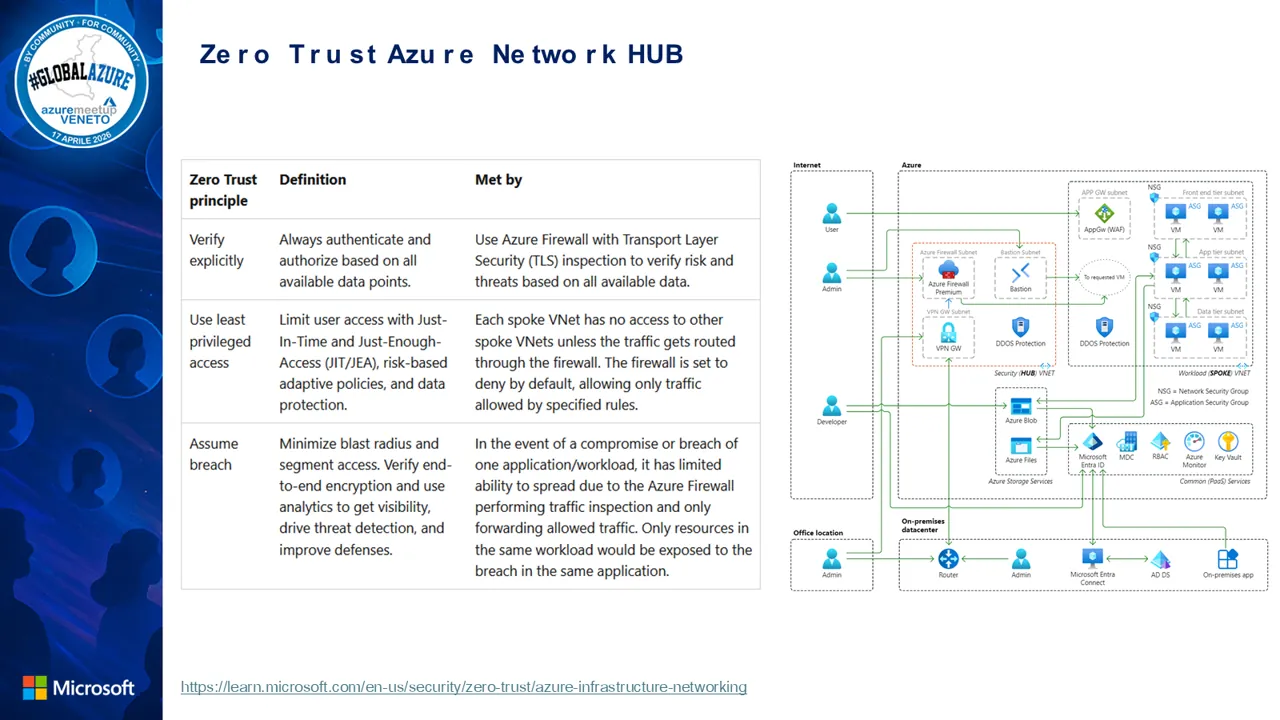
The reference model is Microsoft’s Zero Trust hub: verify explicitly, use least privilege and assume breach, with a central firewall in the hub controlling traffic. So the real question isn’t whether you need a firewall, but which one. You can choose Azure Firewall, the native PaaS service, or a third-party Network Virtual Appliance such as FortiGate. This session is for sysadmins, network engineers and architects who have to make that choice and then live with it.
Key content
The two solutions
Azure Firewall is a PaaS service that protects north-south and east-west traffic. You can deploy it across multiple Availability Zones for a 99.99% SLA. It comes in Basic, Standard and Premium SKUs, and Azure Firewall Manager lets you govern several instances across subscriptions from a single management plane.
FortiGate-VM is a next-generation firewall running as IaaS: an NVA that lives in a VNet or in an Azure Virtual WAN hub. It brings Fortinet’s NGFW engine, with L3-L7 inspection, IPS, web filtering, antivirus and IPsec VPN. You deploy it from Azure Marketplace, pay-as-you-go or BYOL, as a single instance or in high availability. It plugs into FortiManager as an extension of your on-premises fleet. For any NVA, Microsoft recommends a few steps:
- start from the vendor’s documentation and Marketplace image;
- consider VMs with Azure Boost, or network-optimized VMs (in preview at the time of the session);
- measure performance with tools such as NCPS.
Virtual networks don’t exist
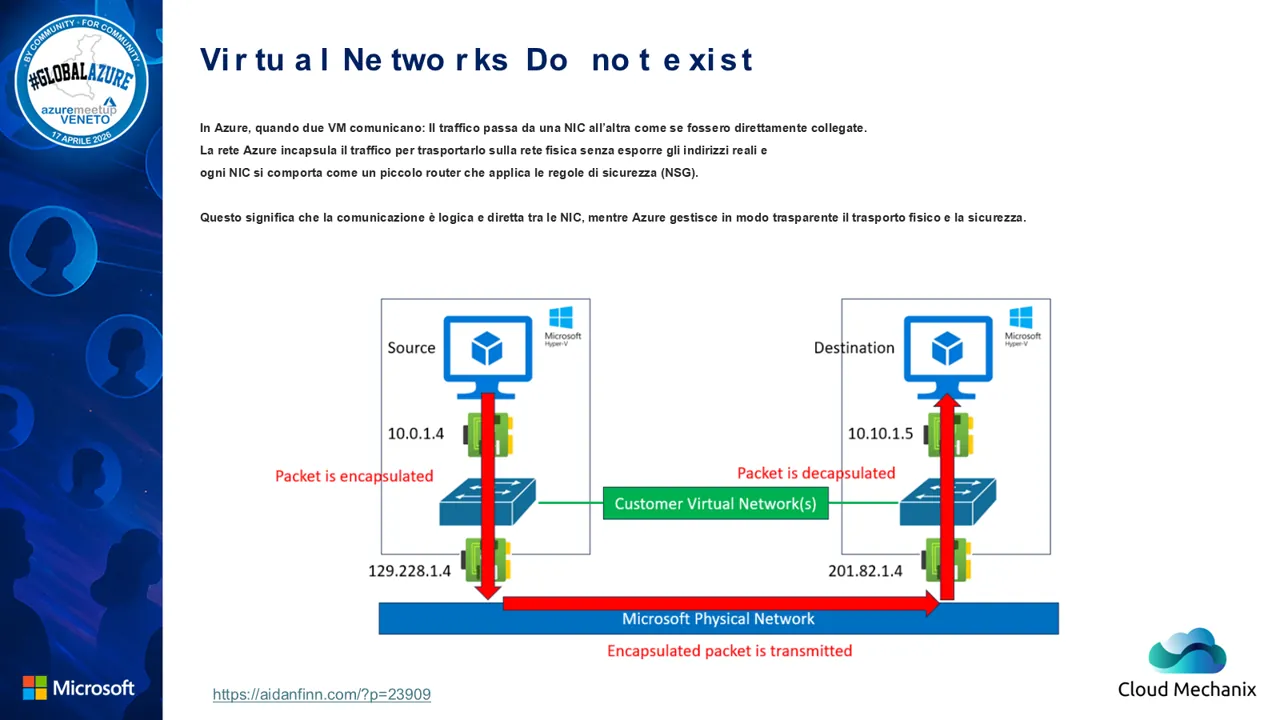
Before comparing features, you need to step back and look at networking. In Azure, when two VMs talk, traffic goes from one NIC to the other as if they were directly connected. The network encapsulates packets over the physical transport, and each NIC acts like a small router that enforces NSG rules. So the firewall isn’t naturally “in the middle”. It only sits in the path if routing sends traffic there.
It’s all about UDRs
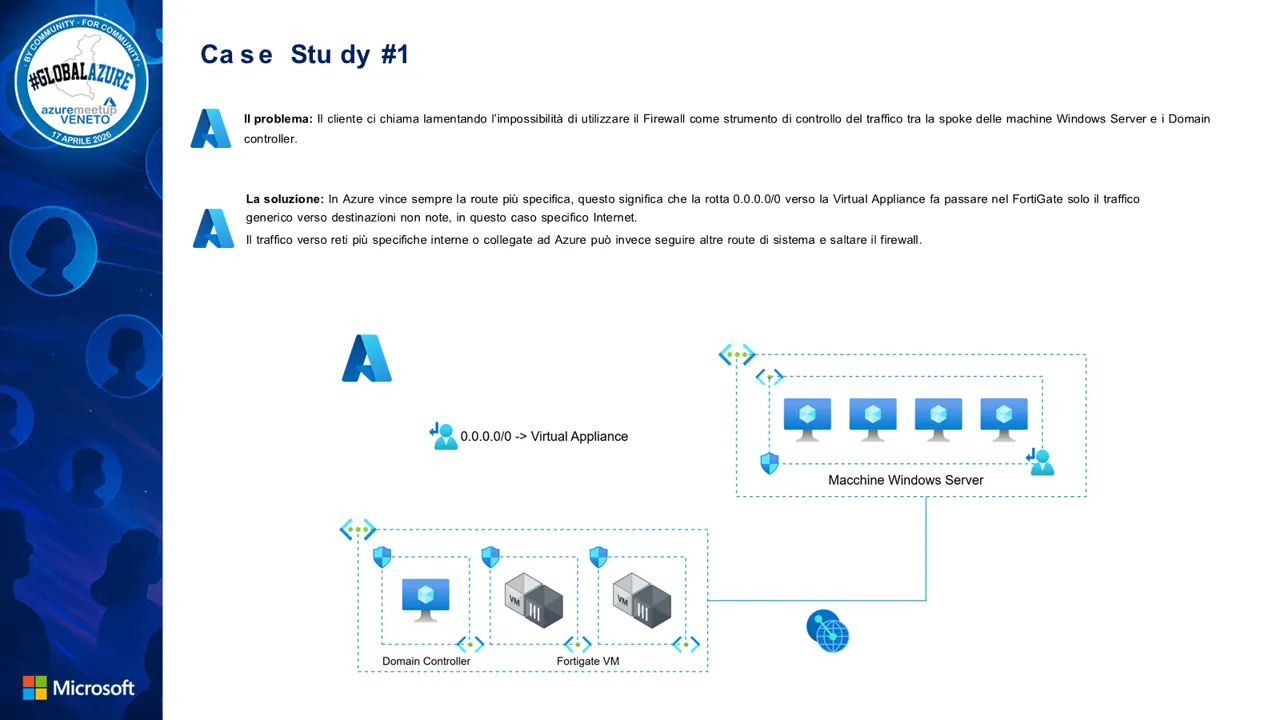
In Azure, the most specific route always wins. User Defined Routes override system routes, and they’re how you steer traffic to the firewall. But a 0.0.0.0/0 route to the appliance only catches traffic to unknown destinations, which in practice means the internet. Internal and connected networks follow more specific system routes and bypass the firewall.
Private Endpoints work the same way: Azure publishes them as NICs with a /32 route. To inspect that traffic, enable network policies on the Private Endpoint subnet, write UDRs that are specific enough, and make sure return traffic stays symmetric. I cover this in more detail in FortiGate in Azure: routing, UDRs and AVD traffic under control and FortiGate in Azure: protecting PaaS with Private Endpoints.
The most powerful firewall is useless if routing doesn’t send traffic through it: always check the effective routes.
Deployment
You deploy Azure Firewall as an Azure resource, typically in the hub VNet, and you can use DevOps tooling to do it. FortiGate comes from the Marketplace as a VM with at least two NICs. The external NIC handles egress and service publishing. The internal NIC becomes the next hop for every UDR. The step-by-step deployment is in FortiGate in Azure: deploying an NVA from the Marketplace.
Security filters and governance compared
| Area | Azure Firewall | FortiGate (NVA) |
|---|---|---|
| Policies | Network rules (mostly east-west, no security filtering), application rules (mostly outbound, ports 80/443/1433), DNAT rules | A single firewall policy per flow, with security profiles in flow-based or proxy-based mode |
| Web filter | Web categories in application rules, from the Standard SKU | FortiGuard web filter by category, updated by Fortinet, with custom lists |
| Deep inspection | TLS inspection from the Premium SKU, application rules only | SSL/SSH inspection (full inspection), outbound and for published web apps |
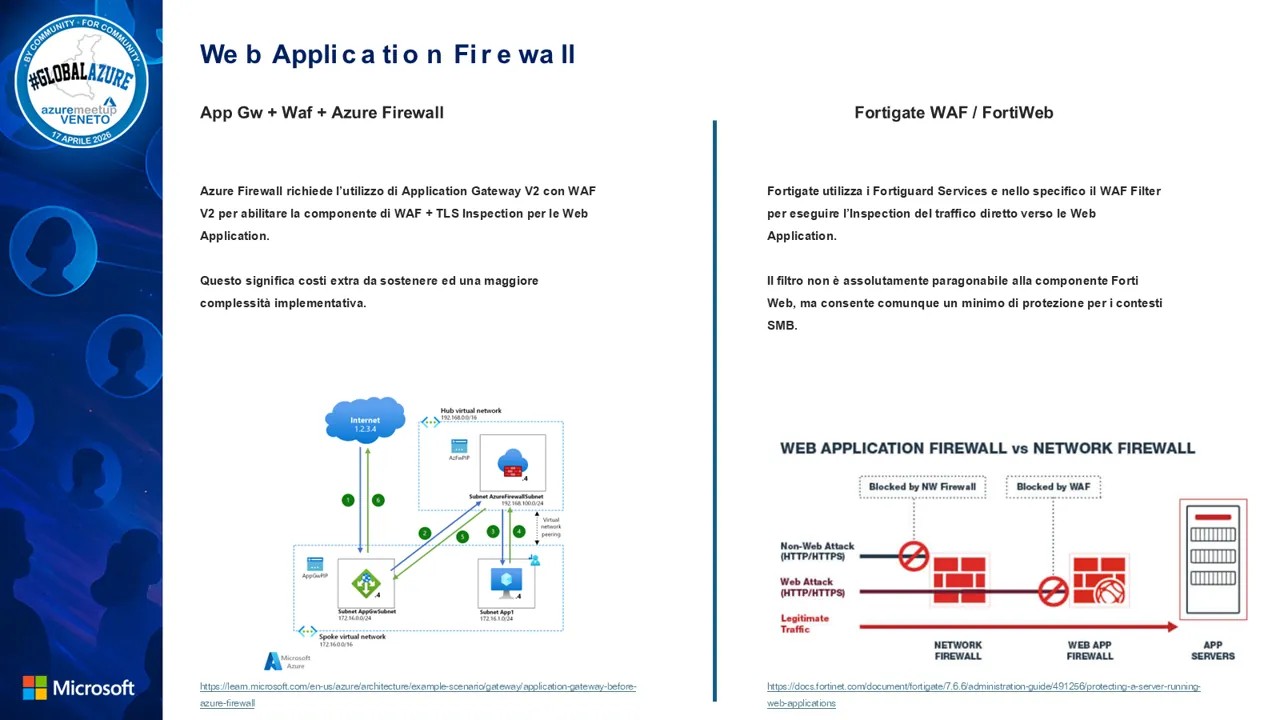
| WAF | Needs Application Gateway v2 with WAF v2: extra cost and complexity | Built-in WAF filter: not comparable to FortiWeb, but baseline protection for SMB scenarios |
| IDPS / IPS | IDPS from the Premium SKU, a global setting applied to all traffic (except exclusions), which may affect performance | IPS through sensors attached to an individual policy and resource, using FortiGuard signatures |
| Publishing services | DNAT is possible, but the service isn’t designed for exposing workloads | External NIC used as the ingress point for services |
| Logs | Log Analytics workspace, KQL, alerts and Microsoft Sentinel; delay of up to about 10 minutes | Real-time logs on local disk, which can be sent to FortiCloud or FortiAnalyzer |
Architectures and demos
The session opens with Microsoft’s Zero Trust hub architecture, which is the reference for everything that follows. Then I walk through two real cases.
In the first, a customer couldn’t use the firewall to control traffic between the Windows Server spoke and the domain controllers. The cause was route specificity: the 0.0.0.0/0 route to the FortiGate only caught internet-bound traffic.
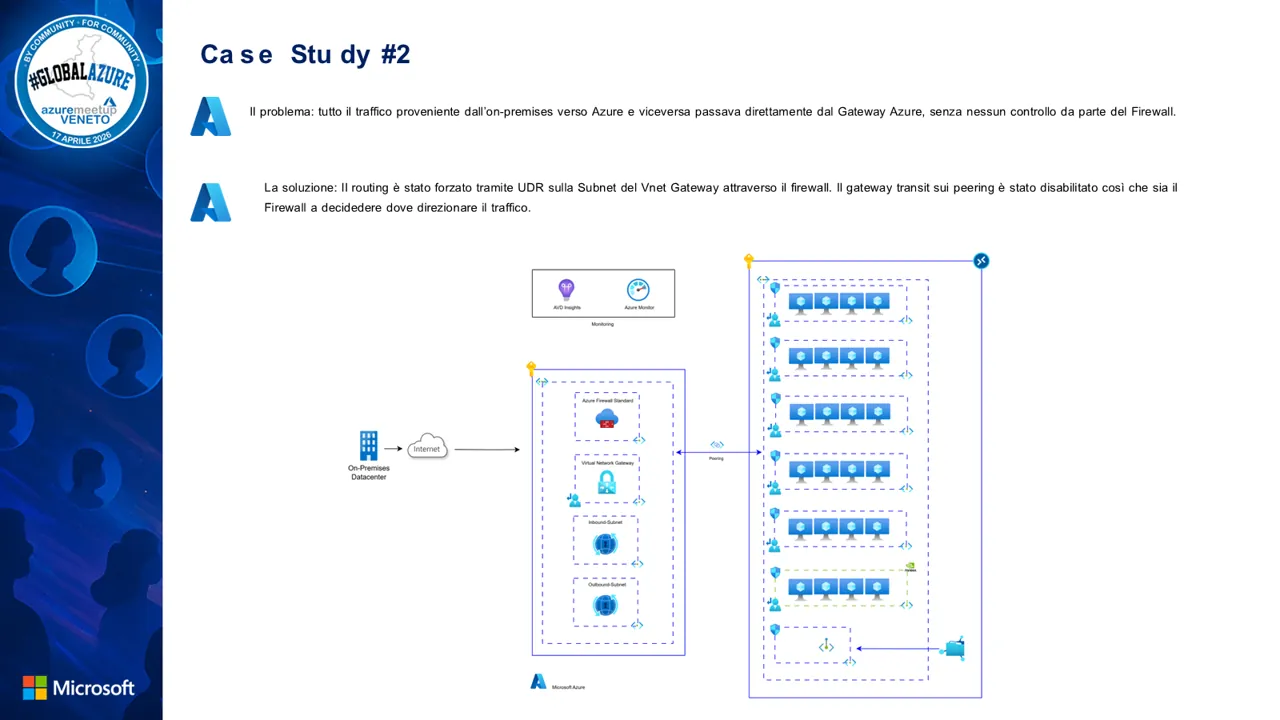
In the second, all traffic between on-premises and Azure went through the Virtual Network Gateway with no firewall control at all. The fix was a UDR on the gateway subnet that forced traffic through the firewall. We also disabled gateway transit on the peerings, so the firewall decides where traffic goes.
Next come the deployment demos for both firewalls and the filter comparison. For the WAF, I show the difference between the Application Gateway + WAF + Azure Firewall chain and FortiGate’s WAF filter.
The final demo covers monitoring. To work around Azure Firewall’s log delay, I show Azure Firewall Mon, an open-source project for real-time log viewing. It’s useful, but it isn’t an official Microsoft solution, so adopt it with care. As a closing reminder, here’s the diagram that explains why virtual networks “don’t exist”.
Lessons from the field and takeaways
- You always need perimeter defense in Azure, just as you do on-premises. With default outbound access retired, egress becomes a design decision.
- There’s no single best solution. After the requirements analysis, you pick the one that fits best, all else being equal.
- Every firewall choice imposes a routing model. Always check the effective routes and work closely with the network team.
- Watch out for more specific routes: internal traffic, gateways and Private Endpoints can easily bypass the firewall.
- Azure Firewall and NVAs are implemented differently, and sometimes the approach changes from vendor to vendor too.
- WAF and IDPS affect cost, complexity and performance in different ways, so evaluate them before you deploy, not after.
- Power is nothing without control: you need to know what’s happening in your infrastructure, ideally in real time.
Resources
Microsoft Learn documentation
- What is Azure Firewall?
- Choose the right Azure Firewall SKU
- Virtual network traffic routing
- Use Azure Firewall to inspect traffic destined to a private endpoint
- Default outbound access in Azure
- Monitor Azure Firewall
Recordings
Related blog posts
Other sessions
Zero Trust Approach on Azure Networking: Tips and Tricks
After identity, the network is the second Zero Trust front. Network design principles, hub & spoke, Virtual Network Manager, the end of default outbound access, Azure Firewall and JIT VM access, with demos and two case studies.
- Infrastructure as a Saturday 2025 · 12 April 2025
- #POWERCON2025 · 7 February 2025
- WPC 2024 · 27 November 2024
- Azure Virtual Network Manager
- Azure Firewall
- Azure Application Gateway
- Azure Bastion
- Microsoft Defender for Cloud
- Microsoft Entra ID
- +1
Agents at work – l'intelligenza che agisce
Three digital colleagues in half an hour: GitHub Copilot for developers, Microsoft Scout for people working across mail, files and portals, Microsoft Foundry for enterprise agents. Real cases, demos and one rule: delegate the work, not the responsibility.
- Agents at Work: Meet Your New Colleagues — WeAreProject · 13 October 2026
- GitHub Copilot
- Microsoft Scout
- Microsoft Foundry
- Work IQ
- Microsoft Entra ID
- Microsoft Intune