Zero Trust Approach on Azure Networking: Tips and Tricks
After identity, the network is the second Zero Trust front. Network design principles, hub & spoke, Virtual Network Manager, the end of default outbound access, Azure Firewall and JIT VM access, with demos and two case studies.
- Events
-
- Infrastructure as a Saturday 2025 · · Pordenone · Conference
- #POWERCON2025 · · Microsoft House, Rome · Conference
- WPC 2024 · · Assago (Milan) · Conference presented as “Implement a Zero Trust network infrastructure in Azure: Tips and Tricks”
- Level
- Intermediate
The problem and the context
After identity security, infrastructure security is the second thing to focus on in a Zero Trust strategy. Anyone coming from an on-premises datacenter has a clear expectation: the security level they had at home must be matched, and ideally improved, in the cloud. The catch is that in Azure many things “just work” (outbound connectivity, peering, public PaaS endpoints), and that is exactly why they need to be governed explicitly.
The session was born at WPC 2024 as “Implement a Zero Trust network infrastructure in Azure: Tips and Tricks” and evolved over the following editions: I took it to Infrastructure as a Saturday 2025 and to #POWERCON2025, where it got its current title. The backbone stayed the same: design principles, Zero Trust tooling, demos and case studies. It is aimed at sysadmins, network and cloud engineers and architects who design, or inherit, a network in Azure.
Key content
Network design principles
Before talking about products I start from the basics, taken from the “network topology and connectivity” design area of the Cloud Adoption Framework. Six points that look obvious but that you pay for later if you skip them:
| Principle | What to decide |
|---|---|
| Naming convention | A written convention, unique across the whole environment |
| Region | Networking adapted to the distance from production datacenters |
| Subscription | How many subscriptions you need to deploy the environment |
| IP addresses | An addressing plan compliant with company standards and without overlaps |
| Segmentation | Segment as much as possible to govern traffic |
| Filtering | Filter traffic and allow only legitimate flows |
On top of that I build a hub & spoke topology: it is the model conceptually closest to on-premises and lets you govern North-South and East-West flows without excessive administrative effort.
Zero Trust applied to the network
I recap Microsoft’s Zero Trust principles (verify explicitly, least privilege, assume breach) and bring them to the network using Microsoft’s guidance for applying Zero Trust to the hub VNet and to IaaS and PaaS spokes. In practice the tools are:
- Network security groups, applied to a subnet or a single NIC for granular control of inbound and outbound flows;
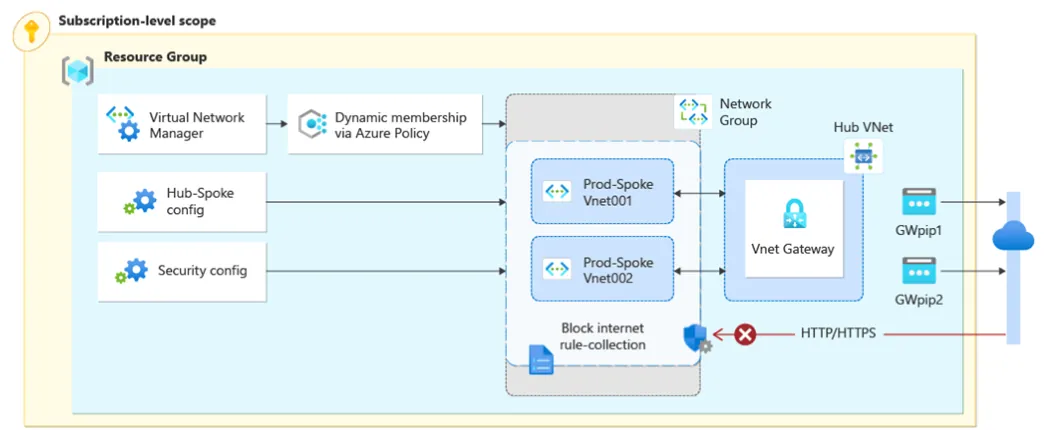
- Azure Virtual Network Manager, to govern VNets from a single place even in cross-tenant and multi-subscription scenarios, with managed connectivity, Security Admin Rules and, at the time of the session, IPAM in preview. I also covered it in the post on hub & spoke with Virtual Network Manager;
- Private Endpoint, not a security tool in itself, but a way to keep traffic to a PaaS service private and avoid public exposure;
- Network Security Perimeter, in preview at the time of the session, to draw a boundary around a group of PaaS resources and reduce the risk of data exfiltration.
Zero Trust on the network means designing a continuous improvement process, with clear deadlines for applying the changes.
The end of default outbound access
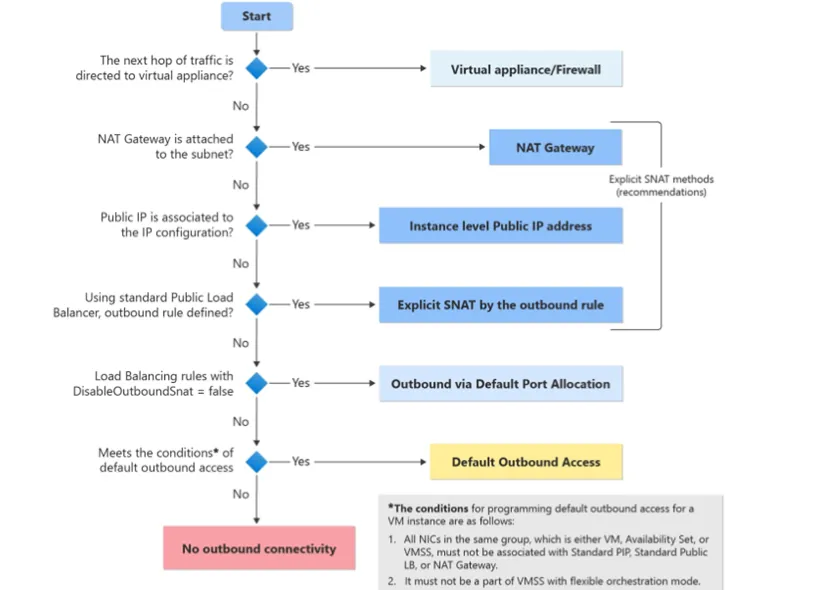
One topic I wanted to include is the retirement of default outbound access for VMs, announced for 30 September 2025: new VMs that need internet access will have to use an explicit method such as NAT Gateway, Load Balancer outbound rules or a public IP. One way to get ahead of the change is the Private Subnet, in preview at the time of the session, which disables outbound internet access by default for every VM in the subnet.
Perimeter: Azure Firewall, Application Gateway and WAF
Azure Firewall is the PaaS service that governs North-South and East-West traffic, can be deployed across multiple Availability Zones and managed centrally with Azure Firewall Manager across subscriptions. I compare the Basic, Standard and Premium SKUs and show how Application Gateway v2 with WAF v2 completes the picture: an L7 load balancer for inbound traffic to web applications, protecting against attacks such as SQL injection and cross-site scripting.
Architectures and demos
The demos cover creating the hub & spoke components, Virtual Network Manager, the Private Subnet, Azure Firewall and multi-layer VM protection.
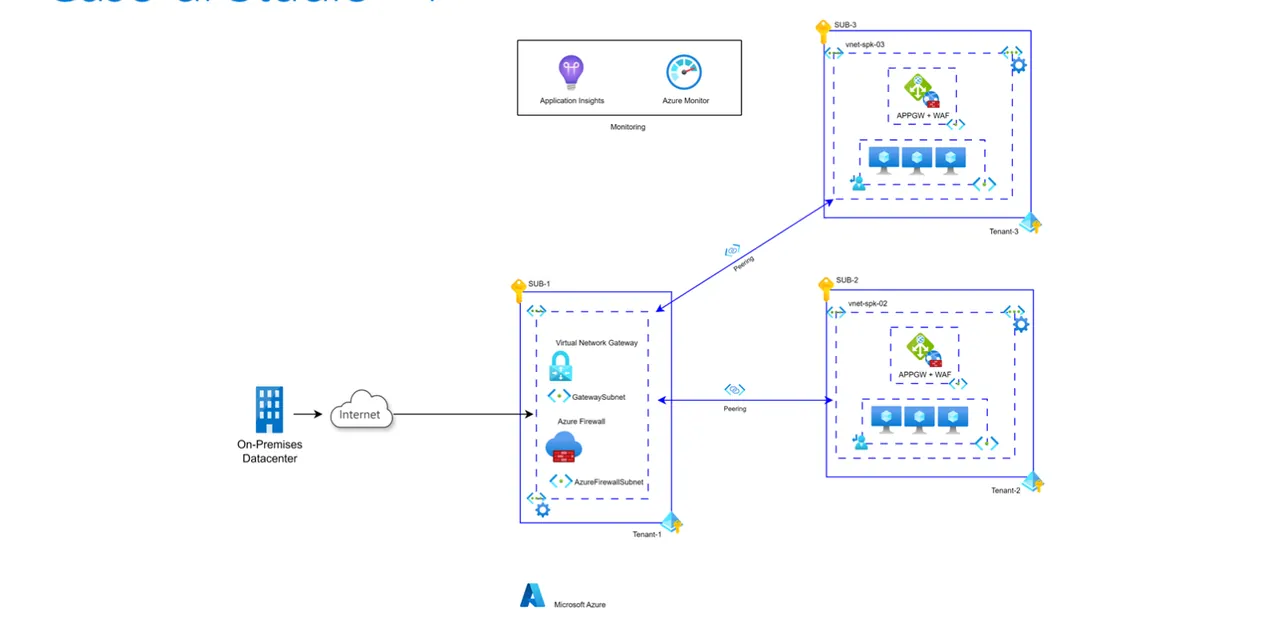
The first case study, in the opening image, is a hub & spoke network spread across multiple tenants and subscriptions: the hub hosts the Virtual Network Gateway to the on-premises datacenter and Azure Firewall, the spokes host applications published through Application Gateway with WAF, with centralized monitoring via Application Insights and Azure Monitor.
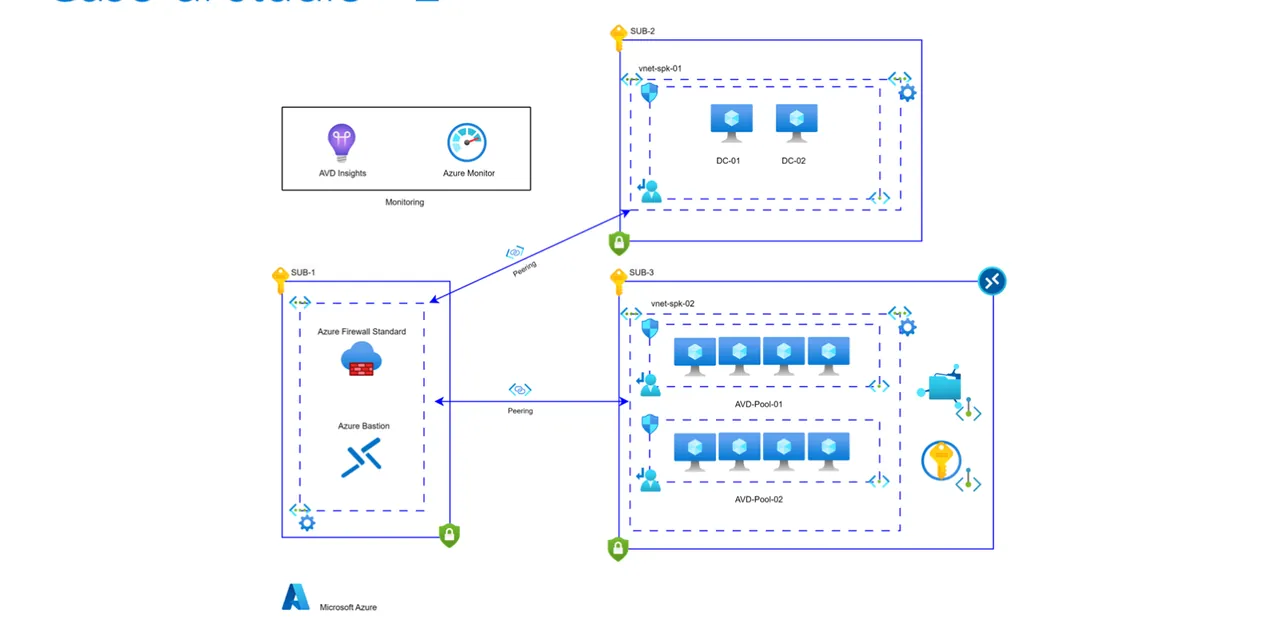
The second case study is an Azure Virtual Desktop environment: a hub with Azure Firewall Standard and Azure Bastion, one spoke with the domain controllers and one with the session host pools, monitored with AVD Insights and Azure Monitor.
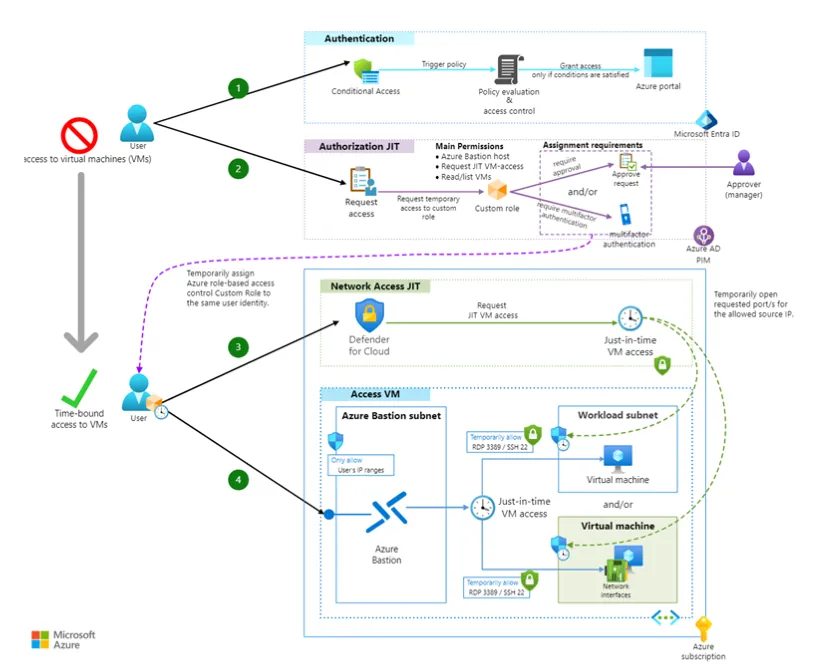
For administrative access to VMs I show the Defender for Cloud JIT + Azure Bastion + Entra ID PIM combination: authentication with Conditional Access, temporary role activation through PIM, ports opened only on request and access through Bastion. I also wrote about it in the post on multi-layer VM protection.
Lessons from the field and takeaways
- After identity, the network is the second Zero Trust front: on-premises security must be matched and improved in the cloud.
- Naming convention, a non-overlapping IP plan and the number of subscriptions are decided up front, not afterwards.
- Hub & spoke is still the simplest model to govern North-South and East-West flows.
- Don’t rely on implicit outbound connectivity: make it explicit before the platform forces you to.
- Use Infrastructure as Code where possible: you get a full history of changes and fewer mistakes.
- Infrastructure access is always Just in Time and Least Privilege, with no standing permissions, IT staff included.
- Security people are not there to make life easier, but safer.
Resources
Microsoft Learn documentation
- Network topology and connectivity for Azure landing zones
- What is Azure Virtual Network Manager?
- Default outbound access in Azure
- What is a network security perimeter?
- Multilayered protection for Azure virtual machine access
- Apply Zero Trust principles to a hub virtual network in Azure
Recordings
Related blog posts
Other sessions
Azure Firewall or FortiGate (NVA)? A practical guide to choosing
A practical comparison of Azure Firewall and FortiGate as an NVA: why you need a firewall in Azure, how routing changes everything, and how policies, web filter, TLS inspection, IDPS, WAF and logs compare.
- #POWERCON2026 — Governare la complessità digitale · 24 September 2026
- Global Azure Veneto 2026 · April 2026
- Azure Firewall
- FortiGate
- Azure Virtual Network
- Azure Private Link
- Azure Application Gateway
- Azure Monitor
- +1
Agents at work – l'intelligenza che agisce
Three digital colleagues in half an hour: GitHub Copilot for developers, Microsoft Scout for people working across mail, files and portals, Microsoft Foundry for enterprise agents. Real cases, demos and one rule: delegate the work, not the responsibility.
- Agents at Work: Meet Your New Colleagues — WeAreProject · 13 October 2026
- GitHub Copilot
- Microsoft Scout
- Microsoft Foundry
- Work IQ
- Microsoft Entra ID
- Microsoft Intune