FortiGate in Azure: routing, UDR and keeping AVD traffic in check
FortiGate in Azure: base config, routing and UDRs to send Azure Virtual Desktop traffic through the firewall instead of letting it bypass it.
Last updated on
Table of Contents
In the first episode we deployed the VM. Today we continue the FortiGate in Azure journey with the piece that, in my view, separates an installation that “works” from one that actually protects you: routing. The worst thing that can happen in the cloud is deploying a security tool and then not governing traffic, ending up with machines talking to each other without ever crossing the firewall. And a heads-up: everything here applies just as well to Azure Firewall, which will get its own series.
Virtual networks do not exist
I start from a slide inspired by Aidan Finn’s article “Virtual Networks Do Not Exist”, which in my opinion explains Azure routing even better than the official documentation. The idea: in Azure a virtual network is mainly a security boundary. Inside it, the real protagonists are the NICs, which talk to each other regardless of the subnet they sit on. Microsoft takes care of encapsulating and transporting the packet over its physical network, but the actual routing is done by the NICs, which effectively become small routers (think about the Network Security Groups you can apply right there).
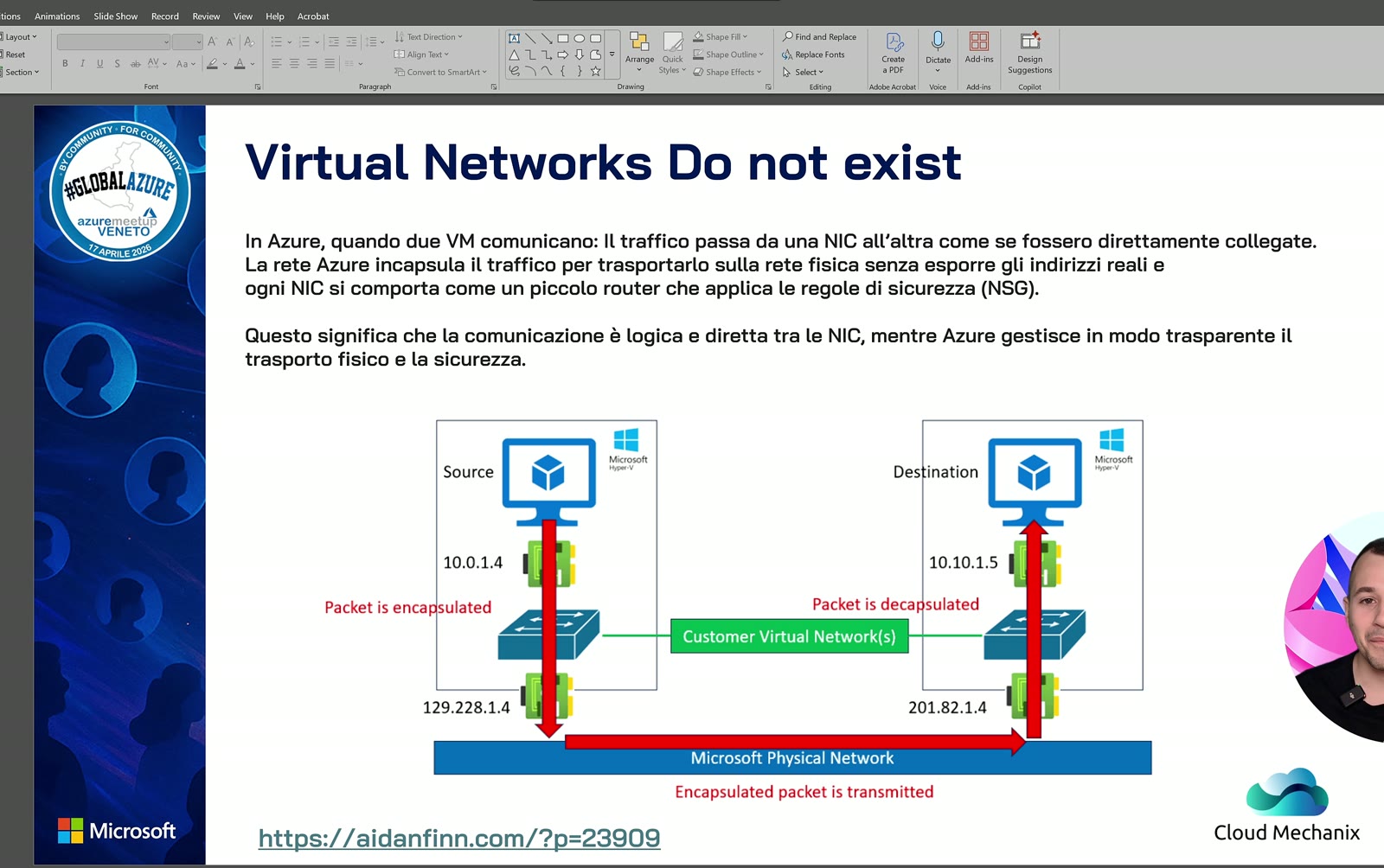
And it is on the NICs that user defined routes (UDRs) take effect: the Azure objects that change default routing, the equivalent of on-premises static routes. UDRs are applied to subnets, and every NIC on that subnet inherits their settings.
A practical tip: open the NIC of one of your VMs, go to effective routes and look at every route it inherits. You’ll discover that most of Azure networking works precisely because of those routes: peering between two VNets, for instance, works because routes are injected reciprocally into both networks.
Case study: the bypassed firewall
One of the scenarios I see most often, which I also brought to Global Azure: a central hub with the FortiGate and a spoke VNet with some Windows Servers. The spoke has a 0.0.0.0/0 UDR with the virtual appliance as next hop. Yet the servers talk to the domain controller completely bypassing the firewall.
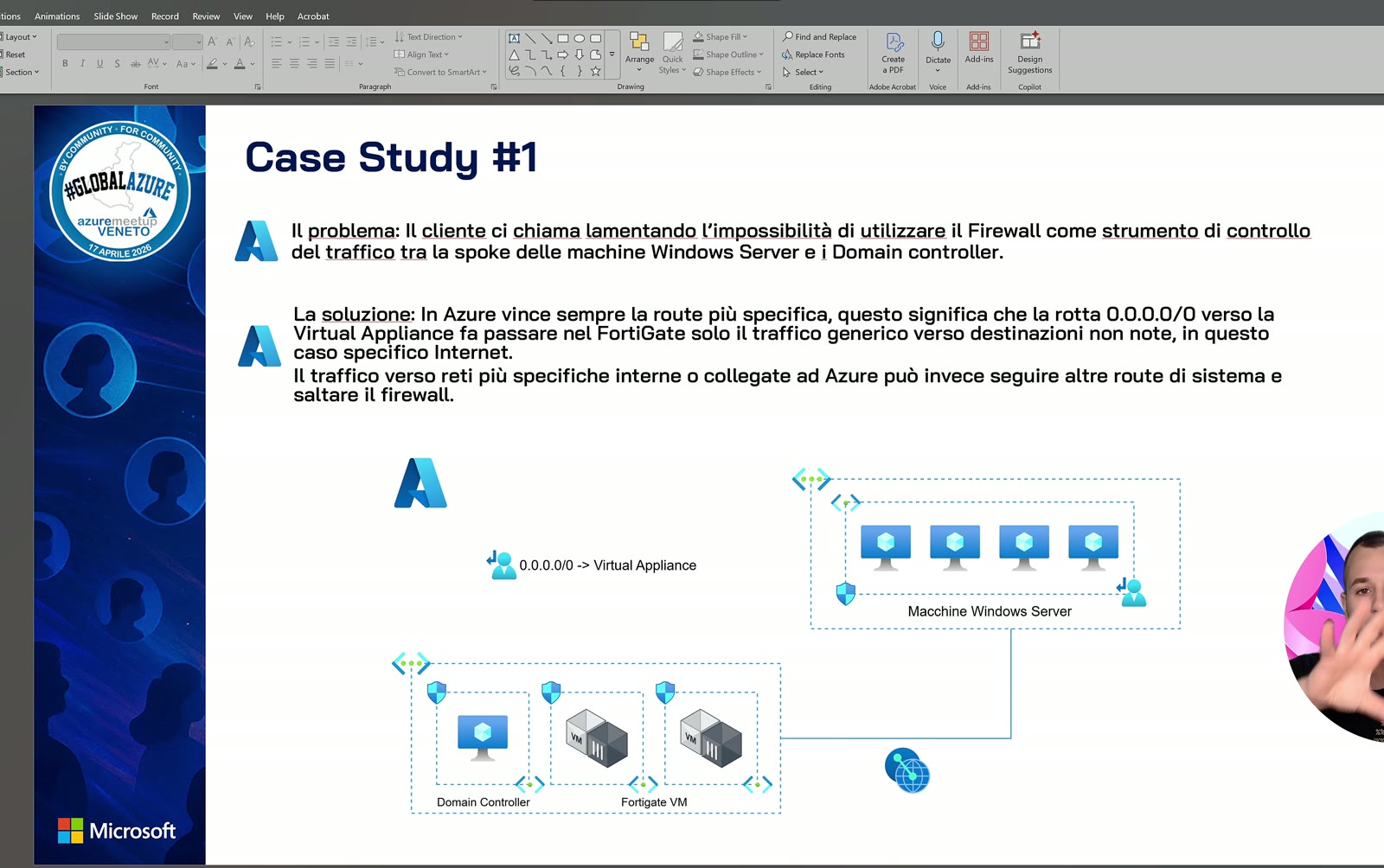
How is that possible? Because in Azure the most specific route wins, and 0.0.0.0/0 is the least specific of all. In that case the servers used the firewall for internet browsing only. That might not be acceptable; actually, I’d say it absolutely isn’t.
Deploying the NVA and pointing 0.0.0.0/0 at the firewall is not enough: watch route specificity.
It’s all about UDR
The next slide compares the effective routes of the NIC of a VM in a VNet peered with the hub, before and after the UDR.
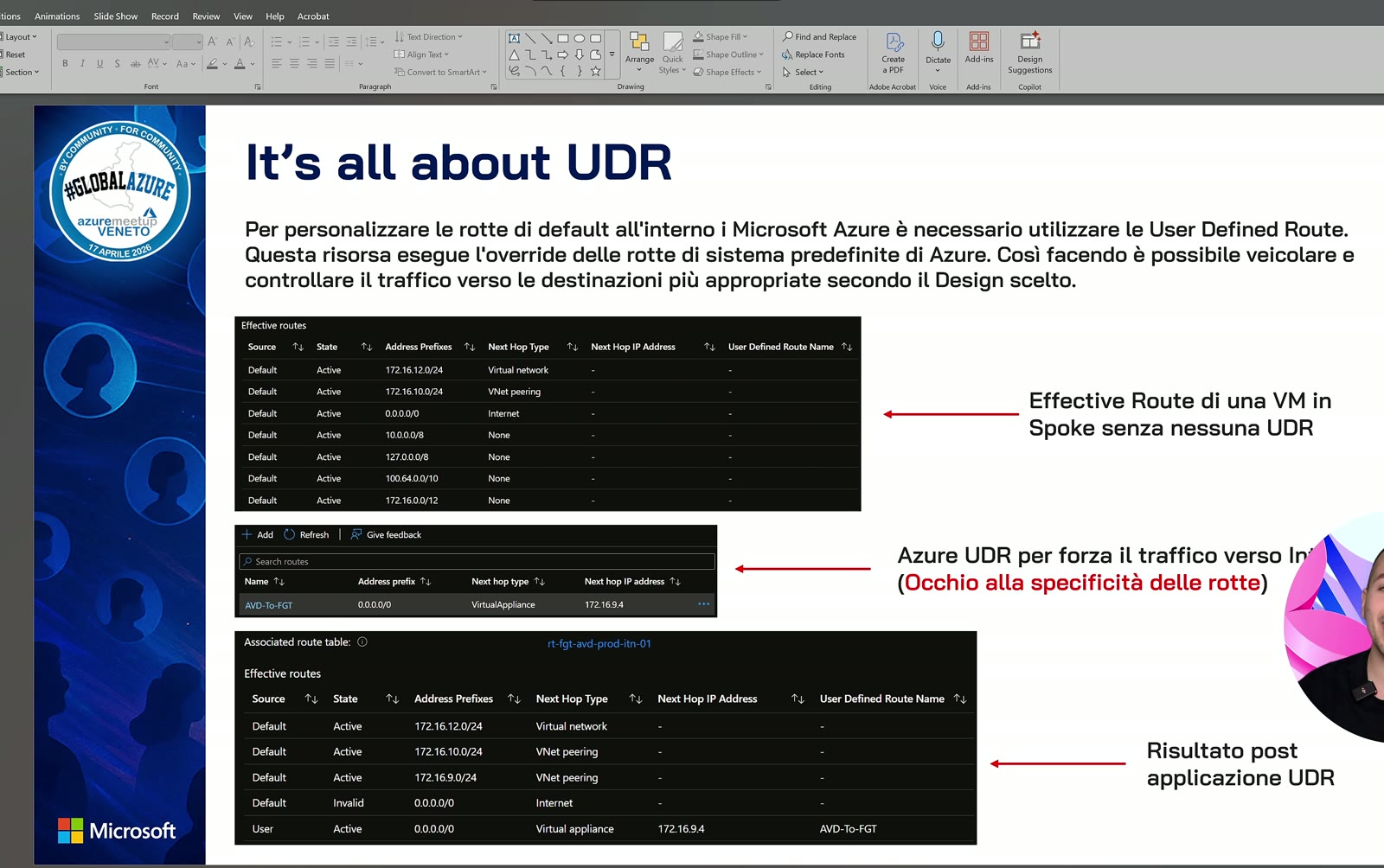
| Route | Next hop | What happens with the 0.0.0.0/0 UDR |
|---|---|---|
| VNet address space | Virtual network | Stays active |
| 172.16.10.0/24 (peered network) | VNet peering | Stays active: it’s more specific |
| Default 0.0.0.0/0 | Internet | Invalidated |
| UDR 0.0.0.0/0 | Virtual appliance | Active |
The outcome: only internet traffic goes to the firewall, everything else keeps flowing directly. This holds for virtual machines and equally for private endpoints, which I cover in the third episode.
Base configuration of FortiGate in Azure
In the lab I replicated the slide design: a hub with the FortiGate and a jump machine (on different subnets), and a spoke with a cloud-only Azure Virtual Desktop VM in Italy North.
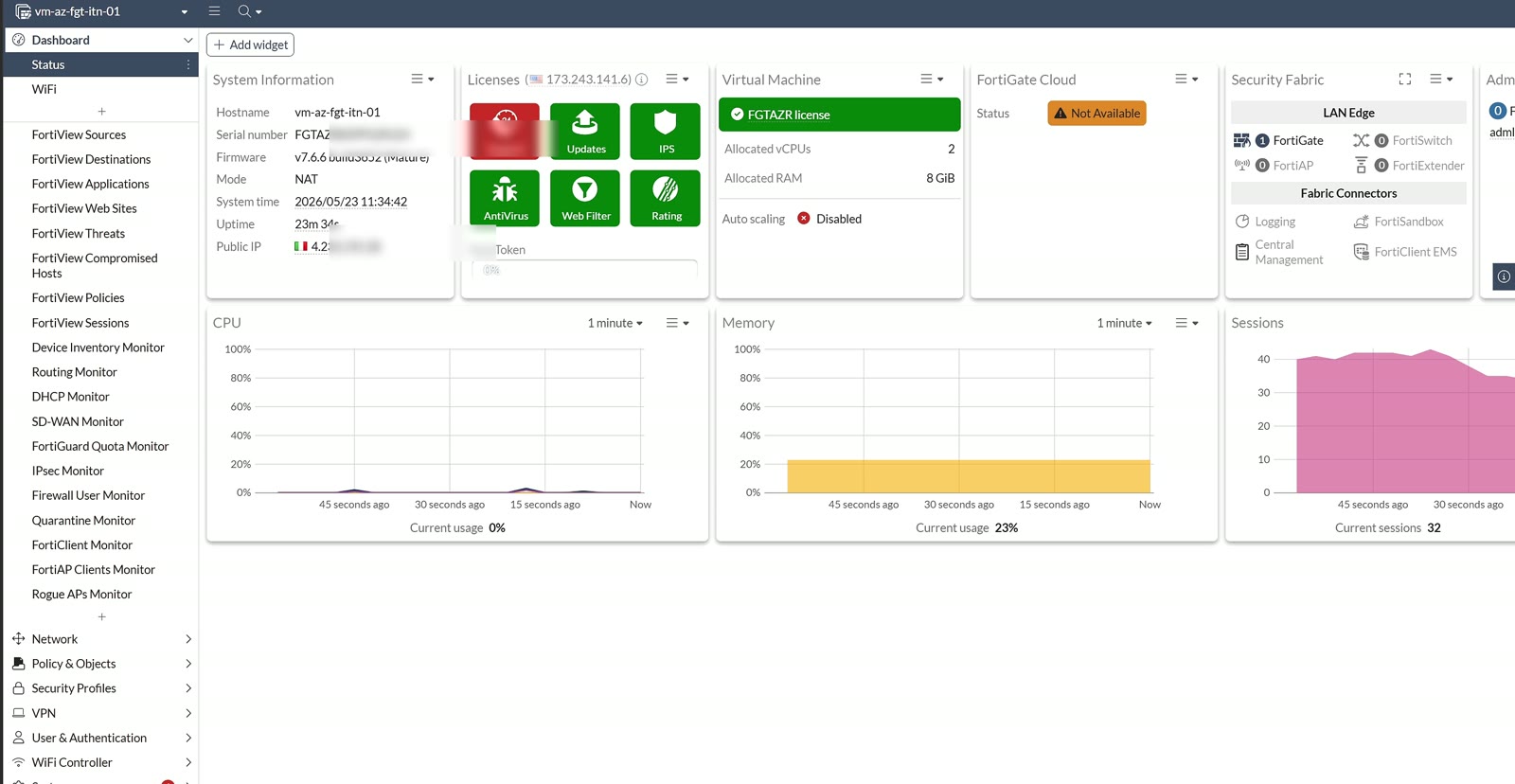
What I changed:
- Renamed interfaces: the external NIC is the one holding the public IP (you can add more, depending on the subnet size); the internal NIC has address 172.16.9.4, where my routes will point.
- DNS: I use Azure’s default DNS, unless customers have specific requirements.
- DNS server on the internal NIC: requests are forwarded to the system DNS. This is essential to handle private DNS zones with private endpoints, and therefore to reach PaaS resources.
- Static routes: in a hub and spoke you must add routes to the spokes on the FortiGate too, to close the loop and avoid asymmetric routing. Asymmetric routing equals trouble: every new network you add must be added here as well, or networks won’t talk.
- Address objects: one for the AVD subnet and one for the PaaS component.
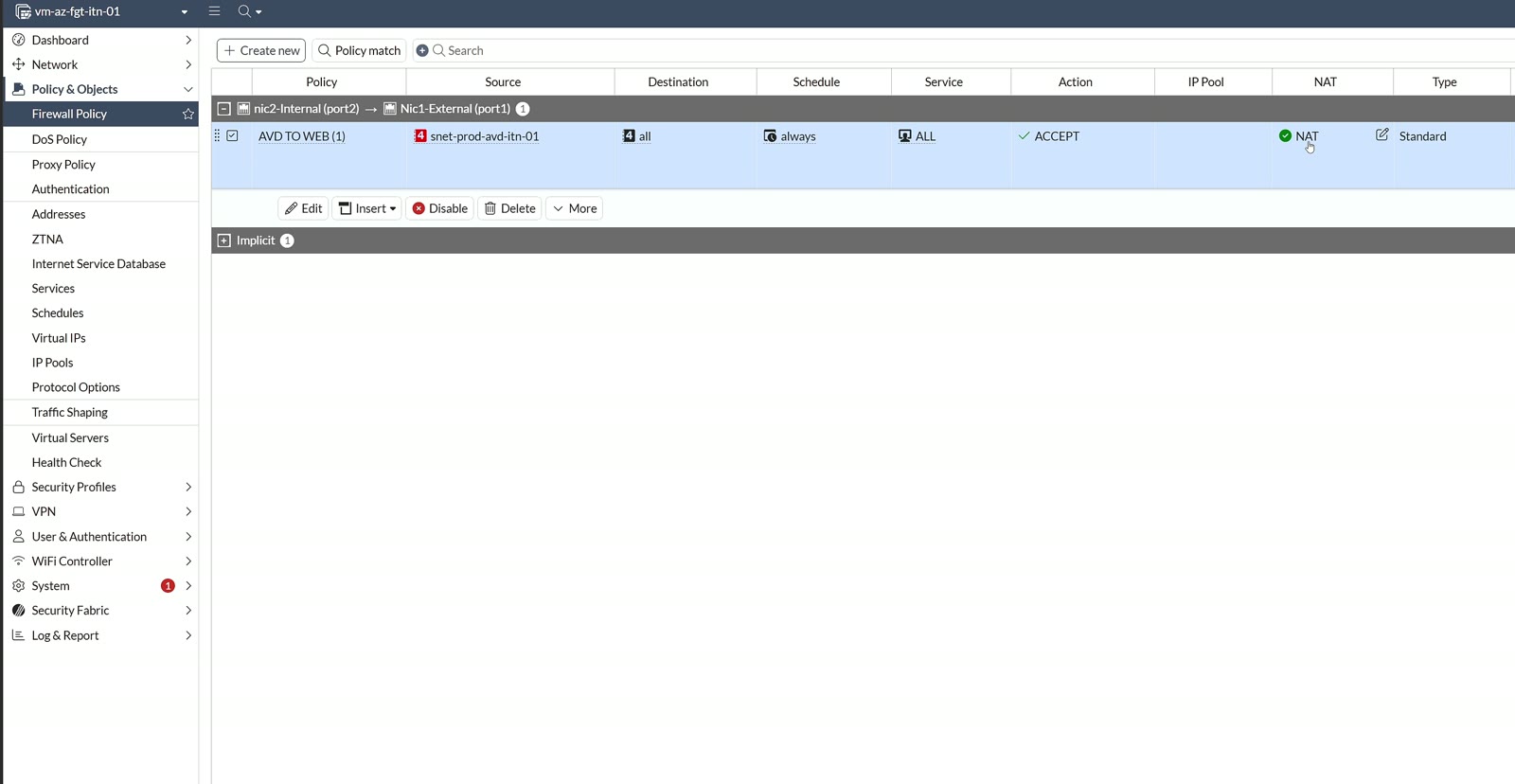
Then the firewall policy, internal to external: source the AVD subnet, destination and services all, NAT enabled and an AVD web filter as security profile. It’s a trivial demo rule, not a production one. Remember that in this mode the FortiGate does SNAT, an important detail for keeping routing symmetric with private endpoints.
Steering traffic with a route table
All this works only if traffic reaches the firewall. On the AVD subnet, besides the NSG, I associated a route table (search for UDR in the portal) with a 0.0.0.0/0 route, next hop virtual appliance 172.16.9.4. I deliberately reproduced the case study mistake.
The NIC’s effective routes show the internet route invalidated, the new route active and the peering routes still on. Test from the AVD VM: browsing a tech blog works, while a site in a blocked category is stopped by the FortiGate web filter. Everything looks under control. It isn’t: the firewall has only that policy plus the implicit deny, yet from the AVD VM I open an RDP session to the machine in the hub and get to the credentials prompt. East-west traffic, firewall fully bypassed.
The fix is to invalidate the routes allowing this behavior, in this case the peering one: every route you want handled by the firewall must be overridden with UDRs at least as specific, pointing to the NVA.
Key takeaways
- In Azure routing is done by NICs: always check effective routes.
- The most specific route wins: a 0.0.0.0/0 UDR does not cover traffic to peered networks.
- Add static routes to the spokes on the FortiGate to avoid asymmetric routing.
- DNS forwarding on the internal NIC prepares the ground for private endpoints.
- Always validate with a real test, like the east-west RDP in the demo.
Watch the video and let’s talk
The full demo is in the YouTube video (in Italian) and all my content is on my channel. If you’re designing a hub and spoke, also read the post on Azure Virtual Network Manager and, for Fortinet, the one on SSL VPN with Active Directory and MFA. Reach out on LinkedIn, find my talks on Sessionize and more about me on the about page.

Written by
Cloud Solution Architect and Microsoft Azure MVP: landing zones, networking, security and hybrid cloud from the field.
Related articles
FortiGate in Azure: protecting PaaS with Private Endpoint
FortiGate in Azure and Private Endpoint: inspect traffic to PaaS services with UDR, NSG, private DNS and SNAT. Demo with storage account and AVD.
FortiGate in Azure: how to deploy an NVA from the Marketplace
FortiGate in Azure as an NVA: rules for SKU and licensing, NICs and bandwidth, plus a step-by-step single VM deployment from the Azure Marketplace.
Fortinet: configuring an integrated LDAPS server in Active Directory
A guide to configuring an LDAPS server on FortiGate integrated with Active Directory and Enterprise CA certificates.