FortiGate in Azure: protecting PaaS with Private Endpoint
FortiGate in Azure and Private Endpoint: inspect traffic to PaaS services with UDR, NSG, private DNS and SNAT. Demo with storage account and AVD.
Last updated on
Table of Contents
This is the third episode of my series on FortiGate in Azure. In the first one we covered what an NVA is and how to deploy FortiGate from the Marketplace; in the second one we configured routing and UDRs to send Azure Virtual Desktop traffic through the firewall. Now let’s tackle a very common case: how the firewall behaves when there are no virtual machines involved, but Platform as a Service resources.
PaaS: convenient, but exposed by default
With a PaaS service, such as a storage account or Azure SQL, Microsoft provides the service and manages everything underneath: hardware, cluster, updates.
The issue is the default behavior. Click “next, next” in the portal and you get a service directly exposed to the Internet, reachable by anyone. Sure, the service has its own firewall, but segregating access by public IP alone isn’t a smart idea in my opinion: there could be N devices behind a public IP, and I can’t be sure all those connections are legitimate.
That’s why PaaS products should always be bound to a perimeter. There are newer technologies like Network Security Perimeter (maybe a future video), but today’s tool is the Private Endpoint.
How a Private Endpoint works
A Private Endpoint makes a PaaS service private by giving it a network interface that lives in a subnet of your VNet. The service becomes reachable on a private IP. That NIC, however, behaves in a rather particular way, and this applies to FortiGate as well as any network virtual appliance.
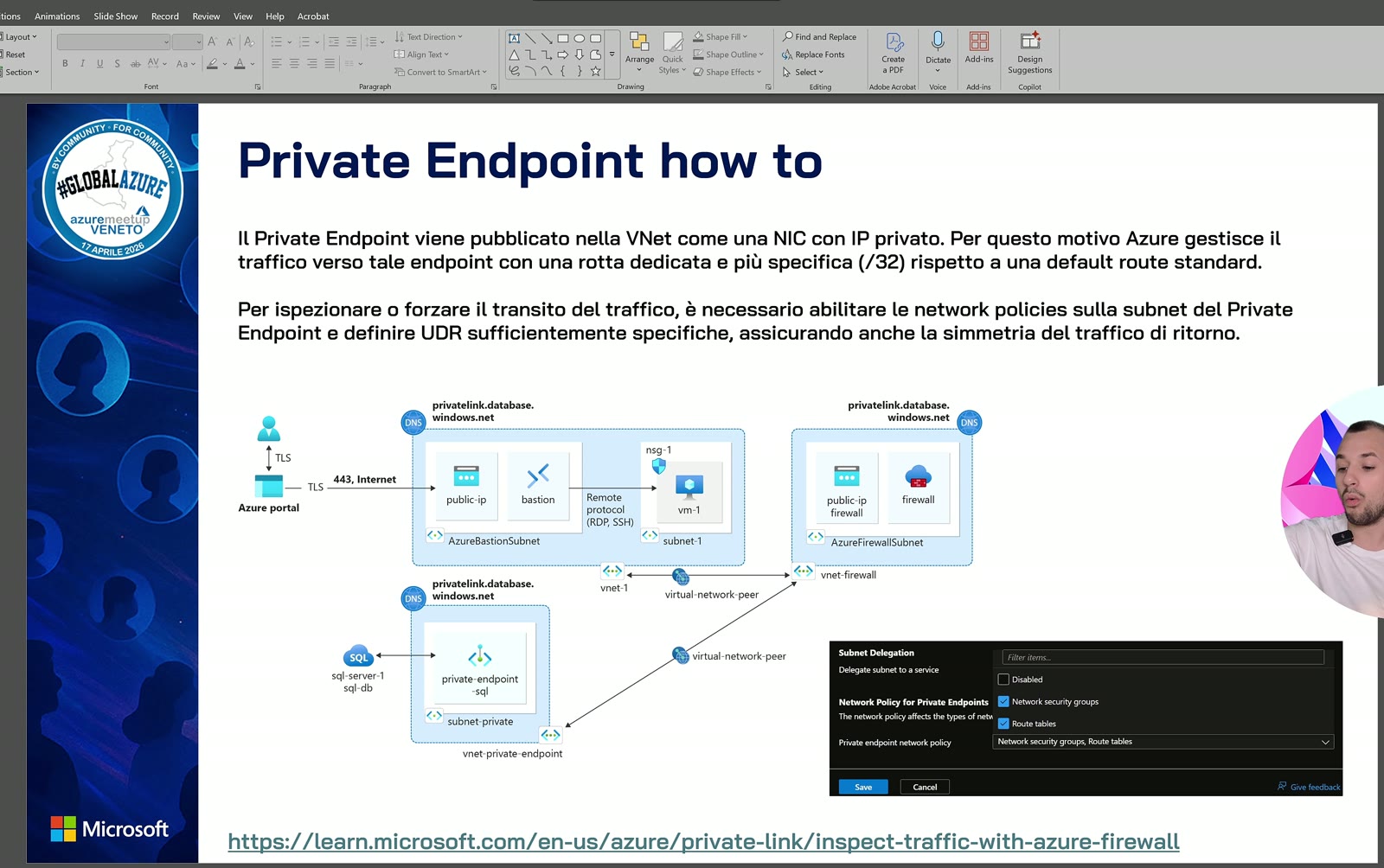
The scenario is classic hub and spoke: the firewall in the hub (Azure Firewall or an NVA, it doesn’t matter), and in a spoke a SQL server with its Private Endpoint. It works exactly the same for a storage account.
Three things you need to know
1. Dedicated subnet and network policies. Put Private Endpoints in a dedicated subnet. It looks minor, but it’s essential: by default that NIC ignores both UDRs and NSGs. To use them, enable the private endpoint network policy in the subnet settings, for both Network Security Groups and route tables. To me the NSG is a must regardless, because you can’t allow access to everyone; route tables are what steer traffic to the Private Endpoint through the firewall.
2. The propagated /32 route. The Private Endpoint writes a hyper-specific /32 route, not only in its own VNet but in every peered VNet, hub included. This makes the Private Endpoint reachable from the spokes without going through the firewall, which is absolutely not what we want. So you need a UDR telling the spokes to send that traffic to the firewall.
3. SNAT for symmetry. To inspect traffic to Private Endpoints, Microsoft recommends SNAT to keep traffic symmetric and avoid asymmetric routing. On FortiGate we’re used to it: IPv4 policies have SNAT enabled by default.
The firewall is king: traffic to the Private Endpoint must go through it, otherwise the /32 route lets you skip inspection.
Then there’s DNS. With a firewall in the hub, the privatelink private DNS zone should be linked to the hub network: if everything goes through the hub, that’s your DNS. More complex scenarios may need Private DNS Resolver, but that’s an advanced case.
| Item | What to do | Why |
|---|---|---|
| PEP subnet | Dedicated, network policies enabled for NSG and route table | By default the NIC ignores UDRs and NSGs |
| UDR | Route traffic for the Private Endpoint to FortiGate | The /32 route would bypass the firewall |
| SNAT | Keep it enabled in the FortiGate policy | Traffic symmetry, as Microsoft recommends |
| DNS | Private DNS zone linked to the hub VNet | Spokes resolve through the hub |
The demo: a storage account behind FortiGate
In the portal I have the same design as the slide: a hub in Italy North with FortiGate and the usual jump box, a production spoke with the Private Endpoint of a storage account (blob), and another spoke with the Azure Virtual Desktop machines, which only have 0.0.0.0/0 pointing to FortiGate for browsing.
The VNet’s connected devices already prove my point: what matters is the NIC, not the VM. Opening the effective routes of the jump box in the hub, which inherits every route reaching the hub, I find an interface endpoint route with the Private Endpoint IP as /32. That route also reaches FortiGate, which blocks traffic it doesn’t know.
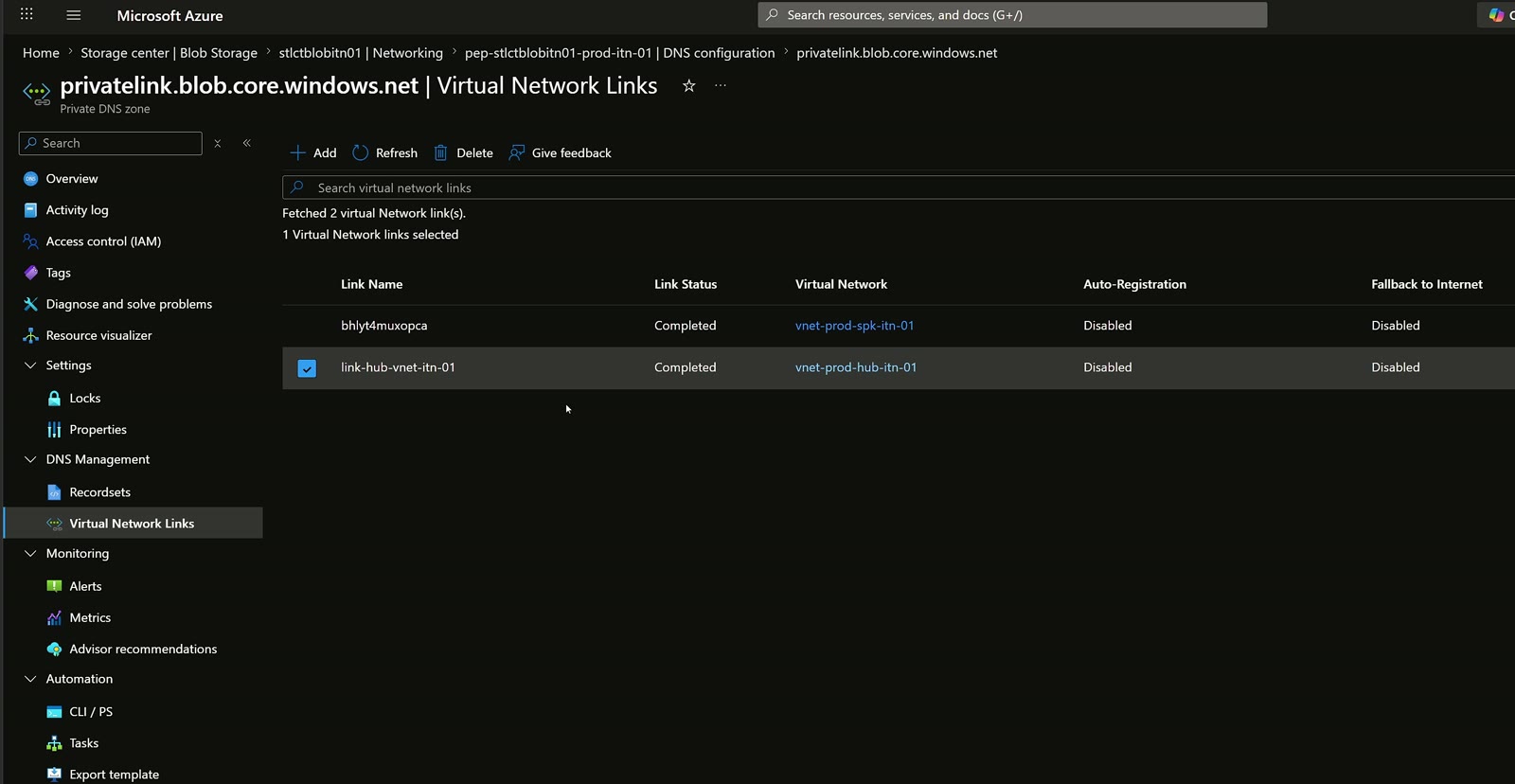
The storage account has public network access disabled and an associated Private Endpoint. The private DNS zone has its virtual network link only to the hub: with 18 spokes you don’t need to link them all. AVD machines reach the firewall, the firewall forwards to the hub DNS, i.e. Azure DNS, and that’s how they resolve the Private Endpoint.
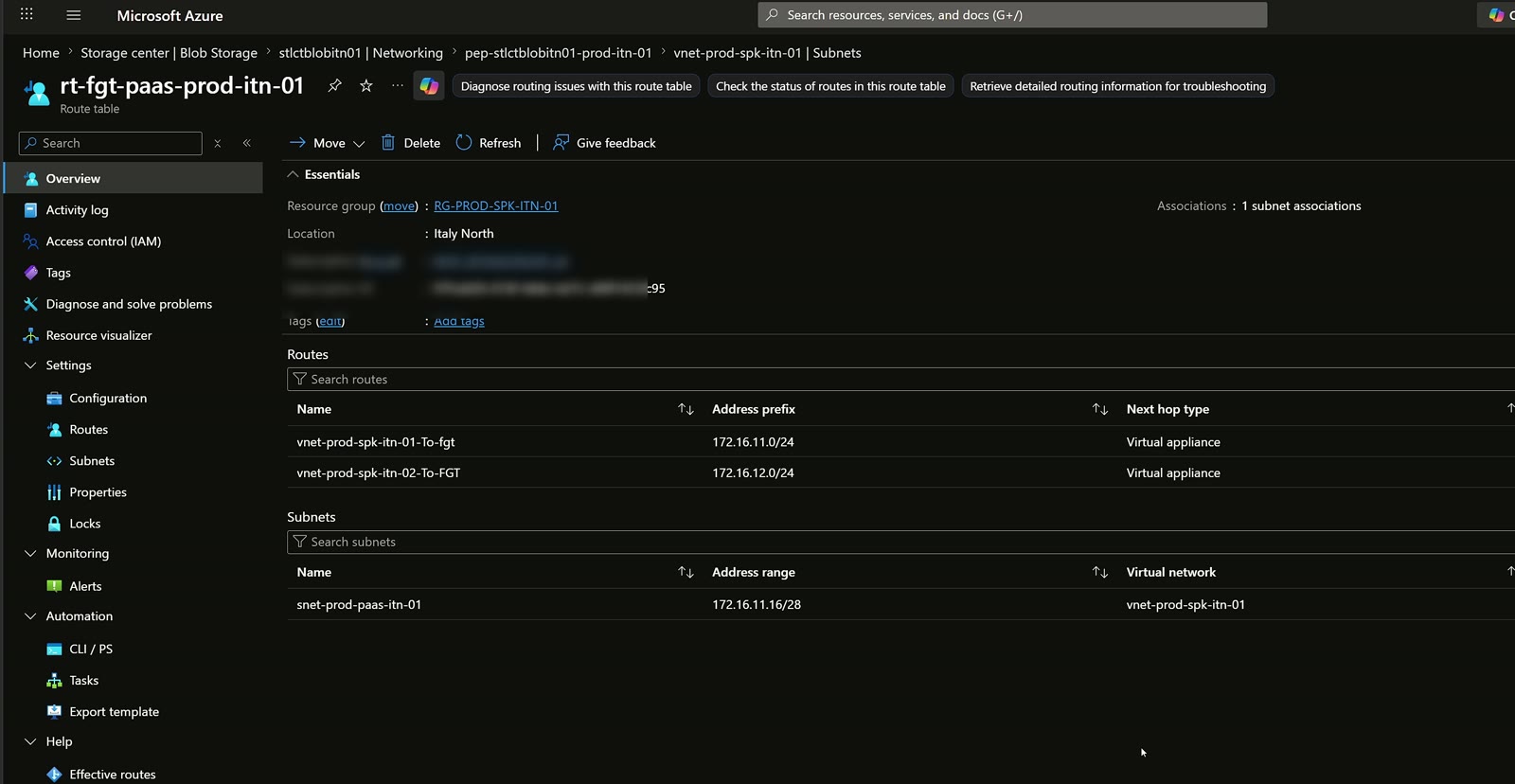
The Private Endpoint subnet has an NSG and a route table attached, thanks to the enabled network policies. The NSG is very basic; the routes, including return routes, are critical to guarantee symmetry and stop anyone from talking to the Private Endpoint without crossing the firewall.
Before the policy: deny
FortiGate only has the web browsing rule from the AVD network to the Internet. From the AVD machine I ping the Private Endpoint: DNS resolution is correct, but I get request timeout.
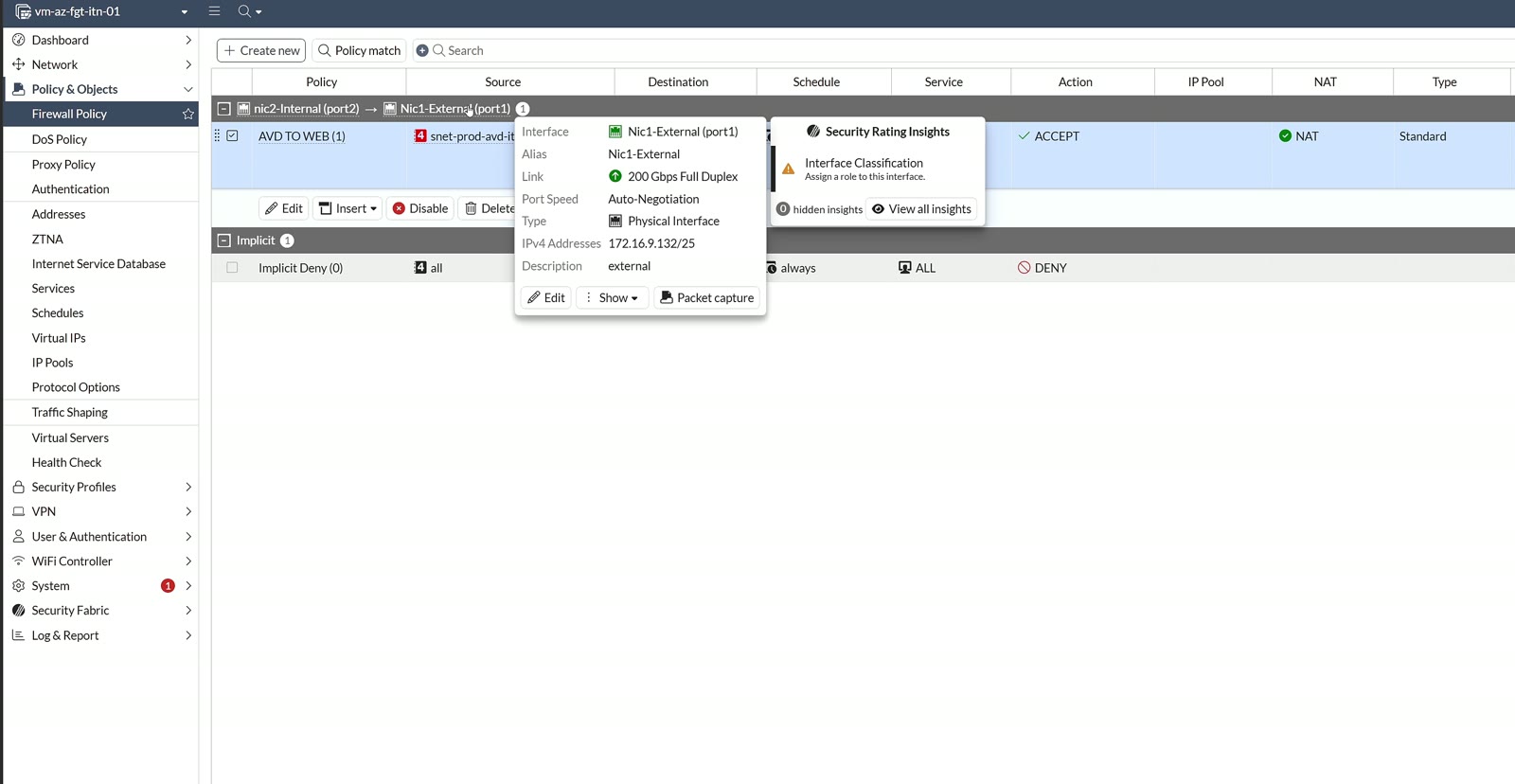
In the FortiGate logs (show matching logs) I immediately see the denied traffic: no rule, so it hits the implicit deny. A ping means everything and nothing, though, so I try Azure Storage Explorer with a key: the connection seems to be established, but the container returns an “unable to retrieve” error and HTTPS denies show up on the firewall. Perfectly expected.
The AVD to Private Endpoint policy
I create a new policy. First quirk: on-premises you’ll rarely see a “VLAN 1 to VLAN 1” rule; in Azure it happens all the time. Since it’s internal traffic, both incoming and outgoing interfaces are internal and the rule is built on objects: source the AVD network, destination the Private Endpoint subnet. I used macro subnets only to speed up the demo; don’t do it in production. Services are HTTP and HTTPS, no all-to-all. I keep SNAT enabled, as Microsoft documents, and log all sessions.
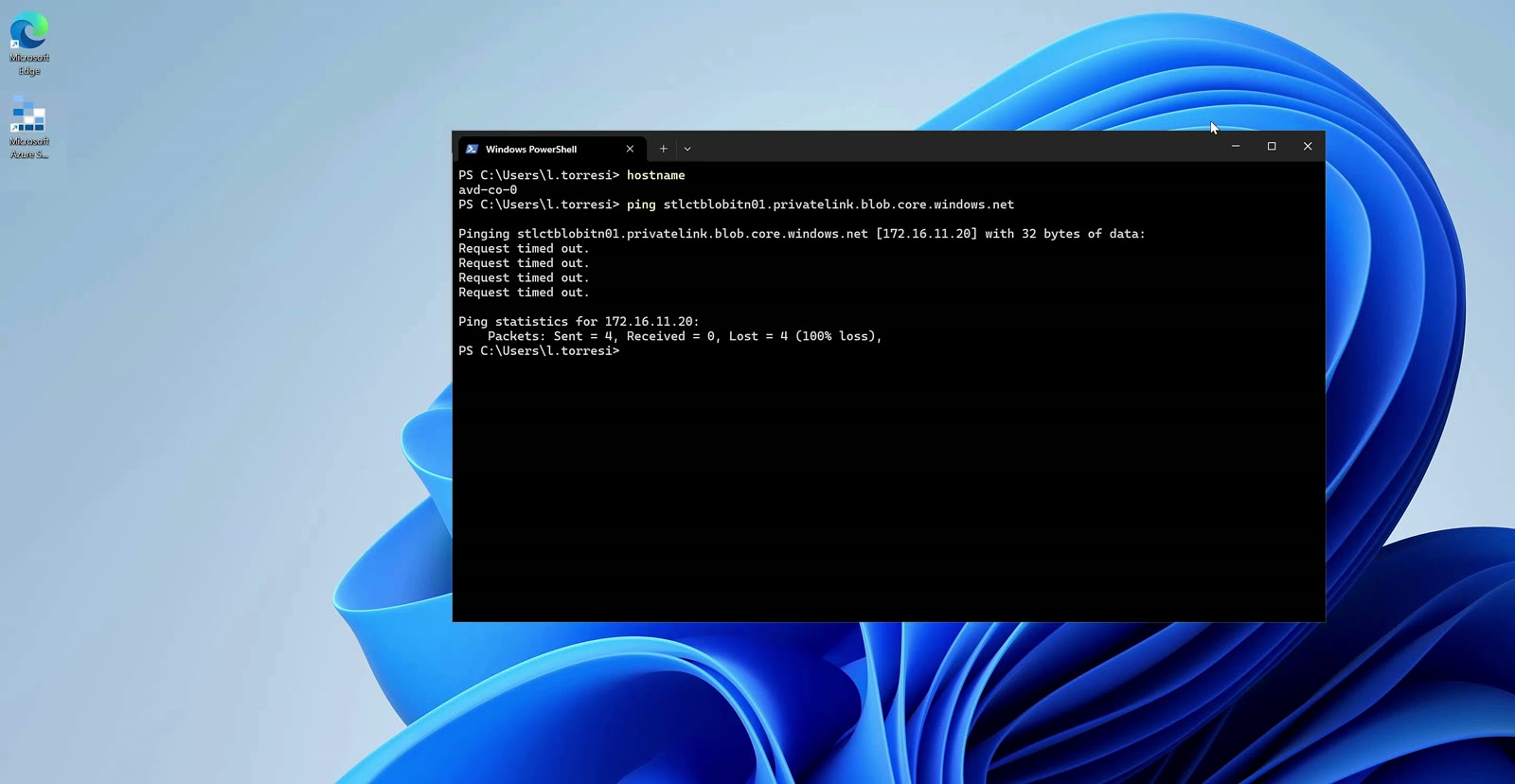
I retry Storage Explorer: the container can be browsed and a file upload succeeds. The logs show accepted traffic from the AVD machine to the Private Endpoint’s private IP, and the details show SNAT applied, in line with Microsoft guidance for inspecting traffic to a Private Endpoint.
Key takeaways
- PaaS services are Internet-exposed by default: bind them to a perimeter with a Private Endpoint.
- The Private Endpoint NIC ignores UDRs and NSGs until you enable network policies on the dedicated subnet.
- The /32 route propagates across peerings: use UDRs to force traffic through FortiGate.
- Keep SNAT enabled in the policy to maintain traffic symmetry.
- Link the private DNS zone to the hub: spokes resolve through the firewall.
Private Endpoints were the hardest thing for me to grasp when I started with firewalls in Azure: they reason differently from a VM. For the network design side, see my posts on hub and spoke with Azure Virtual Network Manager and FortiGate SSL VPN with Active Directory and MFA.
Watch the video and let’s talk
The full demo is in the YouTube video and more content is on my channel. Too hard, too easy? Tell me in the comments or on LinkedIn: it helps me tune the storytelling. To bring these topics to an event, my sessions are on Sessionize, and here’s about me.

Written by
Cloud Solution Architect and Microsoft Azure MVP: landing zones, networking, security and hybrid cloud from the field.
Related articles
FortiGate in Azure: routing, UDR and keeping AVD traffic in check
FortiGate in Azure: base config, routing and UDRs to send Azure Virtual Desktop traffic through the firewall instead of letting it bypass it.
FortiGate in Azure: how to deploy an NVA from the Marketplace
FortiGate in Azure as an NVA: rules for SKU and licensing, NICs and bandwidth, plus a step-by-step single VM deployment from the Azure Marketplace.
Fortinet: configuring an integrated LDAPS server in Active Directory
A guide to configuring an LDAPS server on FortiGate integrated with Active Directory and Enterprise CA certificates.