Azure Migrate: I think, therefore I migrate
Before migrating, stop and think. Organizational prerequisites, Cloud Adoption Framework and Landing Zone, then Azure Migrate in practice: discovery, assessment, dependencies, test migration and a VMware re-host case study.
- Events
-
- Azure Meetup Veneto — AMV 02 · · User group
- Global Azure Torino 2024 · · Turin · Conference presented as “Workloads are ready for Take-Off: Secure your migration journey with Azure Migrate”
- DevMarche — Cloudy with a chance of devs · · User group
- Level
- Intermediate
The problem and the context
Azure Migrate makes moving virtual machines to Azure technically easy. That’s exactly why it’s tempting to start replicating right away, without answering the questions that really matter. The Italian title plays on Descartes: I think, therefore I migrate. First you reason, then you move.
I presented this talk at DevMarche, at Azure Meetup Veneto and, in an English version co-presented with Zeno Testoni, at Global Azure Torino 2024 as “Workloads are ready for Take-Off: Secure your migration journey with Azure Migrate”. It is aimed at sysadmins, architects and IT managers who run an on-premises datacenter (VMware or Hyper-V) and are evaluating a move to Azure.
Key content
Before migrating, stop and think
I open with a checklist of uncomfortable questions: do I know and have I documented my datacenter processes and application islands? Is the IT staff trained? Is the whole business, not just IT, on board? Are we ready to accept new paradigms? Is there a budget for a POC? Once the migration is done, who will govern Azure? And can the business move entirely to the cloud, or do we need a hybrid model?
From there I share a few convictions built in the field:
- You need an architect: someone who translates business needs into technology choices and doesn’t think in silos, but builds bridges between teams.
- No one-man show: a migration has too many dimensions (network, security, applications, databases, governance) for a single person.
- Always build the business case: your counterparts often don’t know the technologies you propose, and nothing is more objective than numbers.
- Alignment with the customer or IT department: “my answers are limited, you have to ask me the right questions”. And the most important question is still: why?
A successful migration is decided before the first replication: motivations, business case, team and Landing Zone come before the tool.
CAF, Landing Zone and infrastructure as code
The reference framework is the Cloud Adoption Framework (Define Strategy, Plan, Ready, Adopt), with the Landing Zone as a prerequisite: migrated workloads must land in an environment that is already governed. I quote Italian pastry chef Iginio Massari, “if a result isn’t reproducible, it isn’t a result”, to introduce the Dev(Sec)Ops part: Azure DevOps or GitHub Enterprise for the process, ARM templates, Bicep or Terraform to make the Landing Zone repeatable.
Azure Migrate, the service
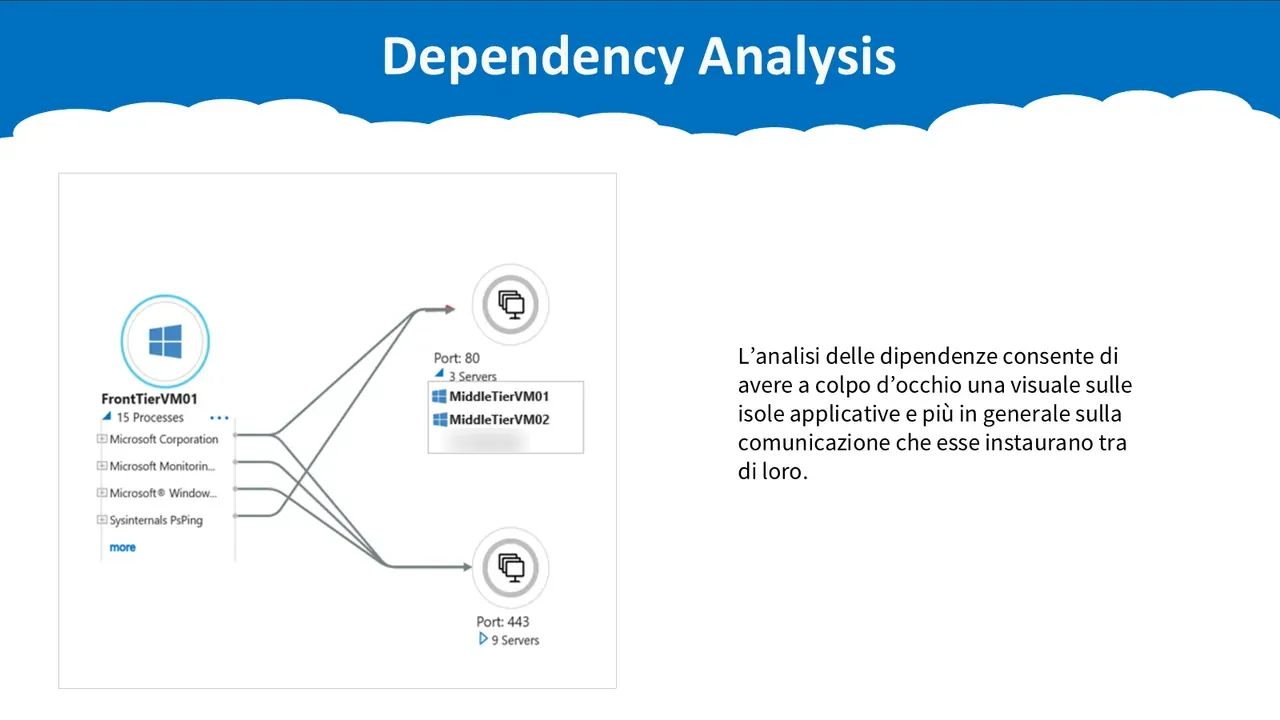
Then I get into Azure Migrate as the hub for datacenter migration. The first choice is connectivity: public endpoints or Private Link. Then the flow: the on-premises appliance collects metadata from vCenter or Hyper-V hosts and sends it to the discovery service, which feeds assessments and the business case. Server discovery finds VMs, applications and running workloads; dependency analysis gives an at-a-glance view of application islands and how they talk to each other, which is key to planning migration waves.
For the migration itself I compare the two approaches:
| Approach | How it works | When I use it |
|---|---|---|
| Agentless | The appliance orchestrates snapshots and replication via vCenter to a cache storage account, then to managed disks | Supported VMware or Hyper-V VMs, when I don’t want to touch the guests |
| Agent-based | A replication agent on each machine, plus a replication appliance | Physical servers, other hypervisors or scenarios agentless doesn’t cover |
I also show Windows OS upgrade during migration, handy to avoid carrying end-of-support versions into the cloud.
Architectures and demos
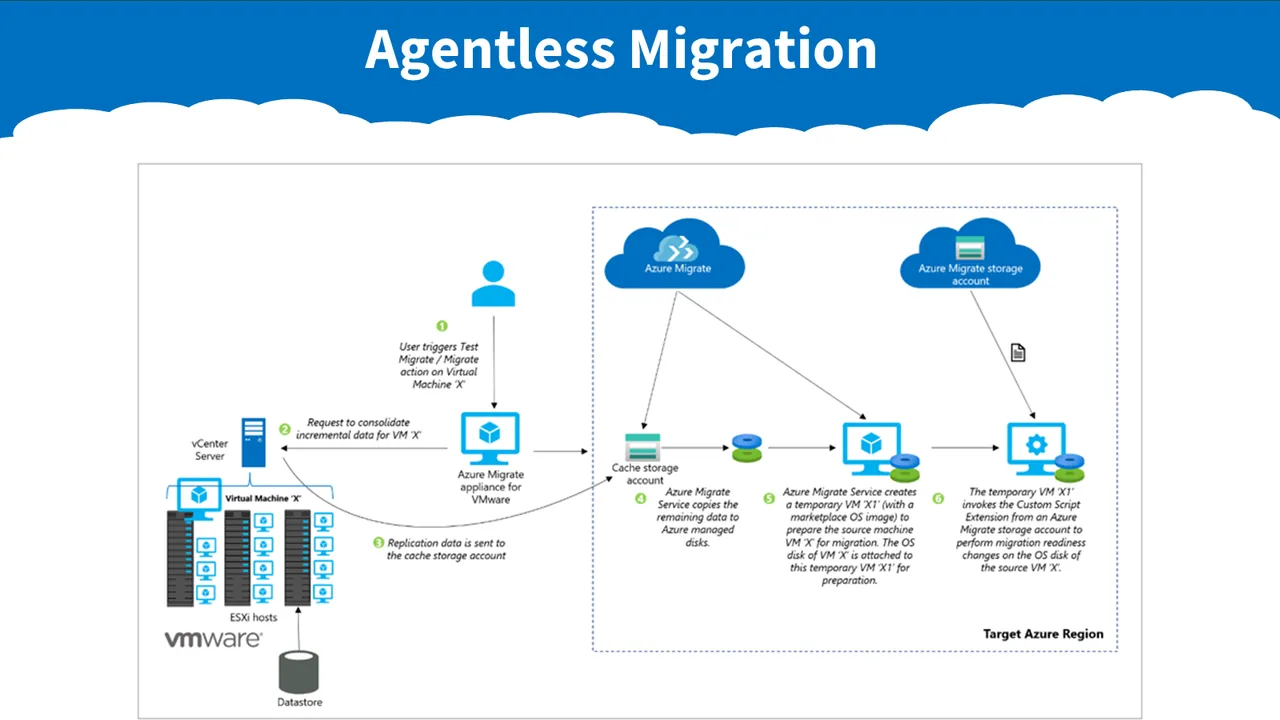
The opening image describes agentless migration from VMware: the user triggers Test Migrate or Migrate, the appliance asks vCenter for incremental data, replication lands in the cache storage account, Azure Migrate creates managed disks and a temporary VM prepares the OS disk to boot in Azure.
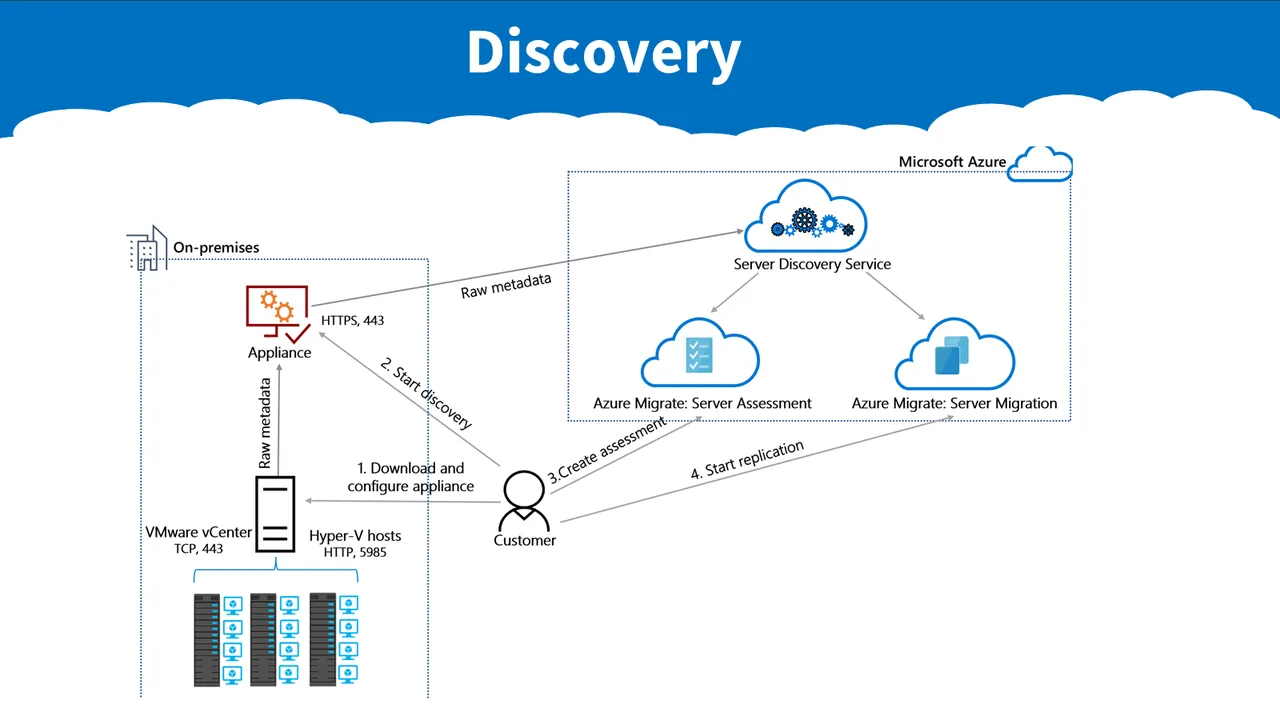
The demos cover discovery, assessment and migration from the portal. If you work with Hyper-V, I described a typical discovery issue in my post on Validation failed with WSMan.
The case study
The last part is a lift & shift case study using a re-host approach: VMs moved from VMware to Azure without any replatforming. The challenge: assess and test every workload before migrating, minimize downtime, and guarantee in the cloud the same security and performance level as on-premises.
The work followed CAF: a business case built starting from Movere (a discovery solution acquired by Microsoft and now available through Microsoft Solution Assessment), a naming convention, project documents, the Landing Zone and a test migration to validate the design before going live.
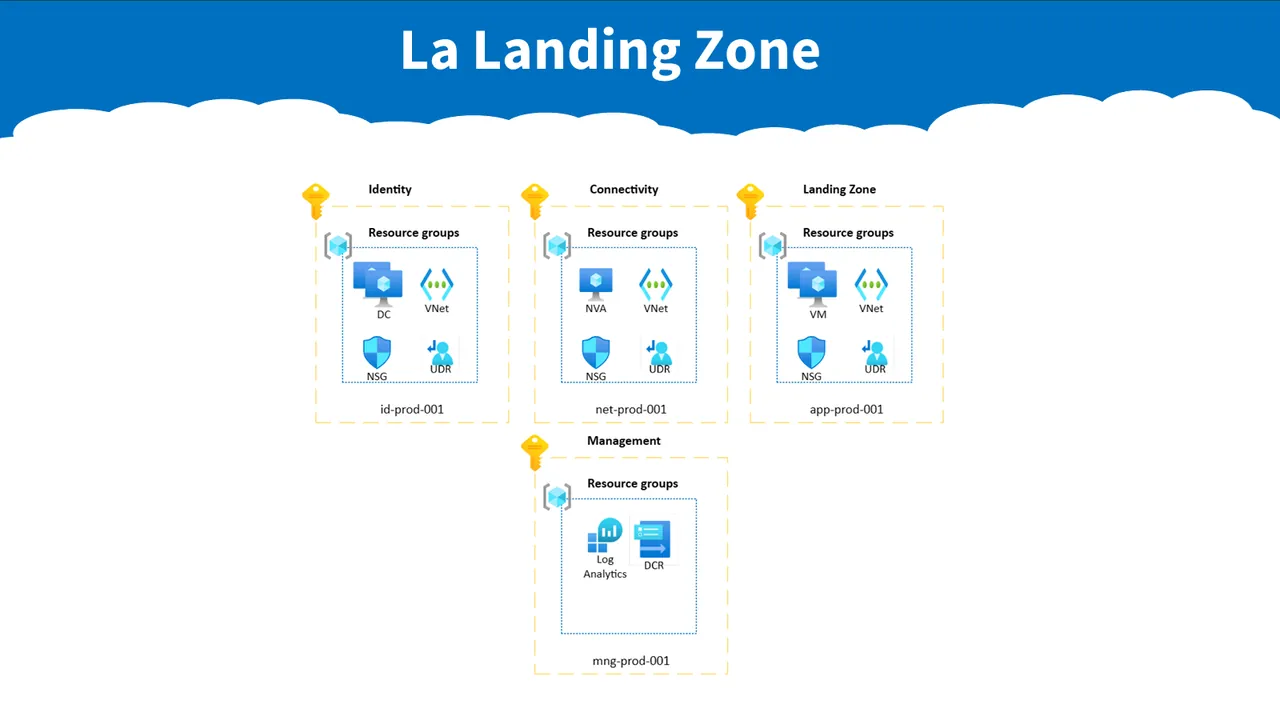
The Microsoft SQL cluster was re-hosted on Azure VMs following Microsoft’s guide for availability groups. On the governance side we introduced Azure Bastion (more here), Azure Backup for IaaS VMs and the SQL cluster, third-party NVAs for VPN and firewall (see FortiGate in Azure) and a Storage Account for logging and monitoring.
Lessons from the field and takeaways
- Questions come before the tool: processes, application islands, skills, budget and who will govern Azure afterwards.
- The design document is essential to align customer expectations with the design you worked out.
- Don’t deploy the Azure Migrate appliance in networks with security filtering or NAT between the appliance and the hypervisor or workloads.
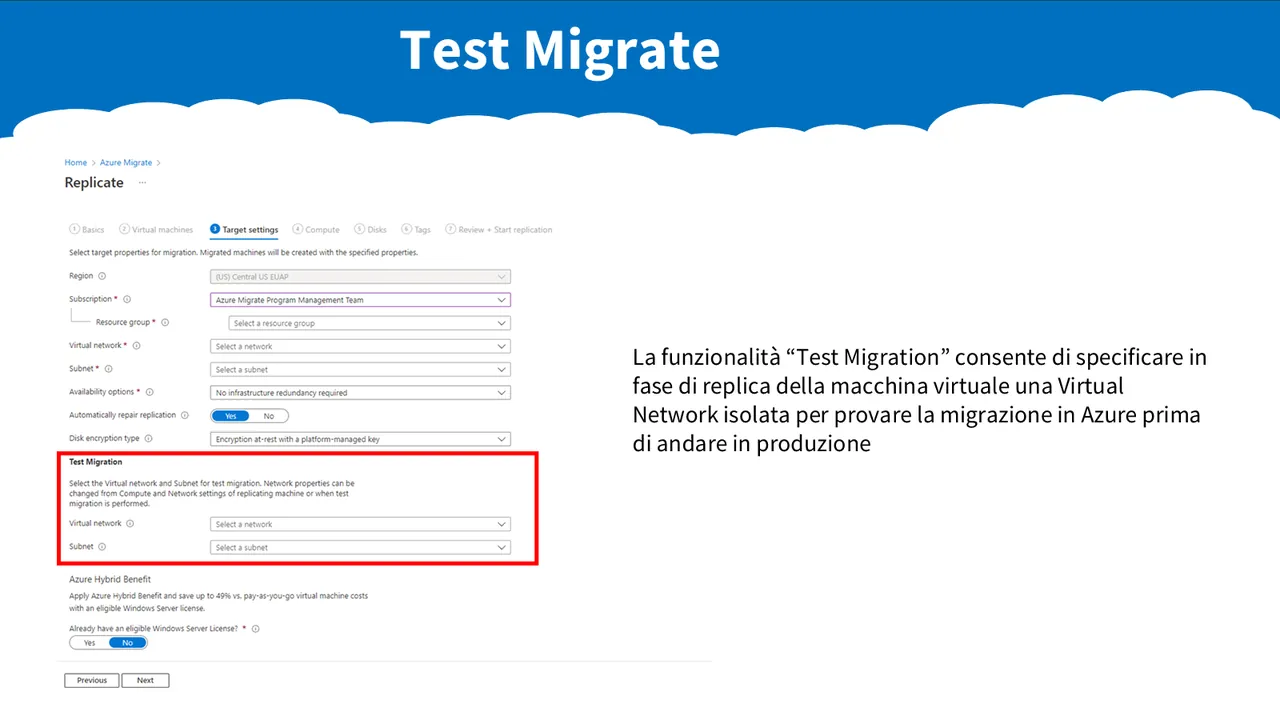
- Test migration on an isolated network lets you run UAT directly on replicated production machines and gives the customer an environment to validate the work.
- Dependency analysis is the fastest way to discover application islands and plan waves.
- Most workloads can be migrated by following Microsoft or vendor documentation: special cases such as SQL clusters have dedicated guides.
- Make the Landing Zone reproducible with infrastructure as code: if it isn’t reproducible, it isn’t a result.
Resources
Microsoft Learn documentation
- About Azure Migrate
- Azure Migrate appliance
- Dependency analysis
- Migrate VMware VMs to Azure (agentless)
- Microsoft Cloud Adoption Framework for Azure
Recordings
- Watch / listen to the recording — Azure Meetup Veneto — AMV 02
- Session page on Sessionize
Related blog posts
Other sessions
Cloud Governance & Security: Azure at its best
From Landing Zone to Zero Trust: how to set up governance, networking, identity and workload protection in Azure with Azure Policy, Microsoft Defender for Cloud, Azure Bastion and Entra ID PIM.
- Webinar WeAreProject — Cloud Governance & Security · 2026
- Azure Policy
- Azure Monitor
- Microsoft Defender for Cloud
- Microsoft Entra ID
- Azure Bastion
- Azure Firewall
- +1
Secure your Azure Landing Zone
A well-designed Landing Zone is not enough: it has to be protected. Identity as the new perimeter, just-in-time access, Zero Trust networking and compliance, with PIM and Bastion demos and a serverless case study.
- 1nn0va Saturday 2024 · September 2024
- #POWERCON2024 — Rivoluzione digitale in azione · 14 June 2024
- Microsoft Entra ID
- Azure Bastion
- Azure Firewall
- Azure Application Gateway
- Microsoft Defender for Cloud
- Azure Policy
- +1