Choosing the right Copilot: a System Engineer's view
Many Copilots, one point of view: the person running the infrastructure. How I use GitHub Copilot with Bicep, PowerShell and Azure DevOps, which model to pick, and what three real cases taught me.
- Events
-
- Azure Italia Podcast — Puntata 57 · · Podcast presented as “Il Copilot per i Cloud Engineers e SysAdmins del futuro”
- Global Azure Torino 2025 · · Turin · Conference
- Global Azure Veneto 2025 · · Vicenza · Conference
- DevMarche × Università di Macerata · · Macerata · User group
- Level
- Introductory
The problem and the context
“So many Copilots!” is how almost everyone reacts when looking at Microsoft’s family of products with that name: GitHub Copilot, Microsoft 365 Copilot, Microsoft Security Copilot, Copilot in Azure and more. For people working in IT, and especially for those of us who started as sysadmins, the question is not “what can AI do” but “which of these tools actually makes my work better tomorrow morning, on my customers’ environments”.
That is where this session comes from. I start from the impact of AI on our job, and from the panic that comes with every technology leap, and turn it around: progress is an opportunity for those who choose to learn. I use the story of Dorothy Vaughan, who at NASA, when IBM computers started replacing manual calculations, taught herself Fortran and then trained her colleagues. That is exactly the attitude we need with AI.
Then I move to my favourite Copilot, GitHub Copilot, told not by a developer but by a System Engineer: Infrastructure as Code, PowerShell scripts, pipelines. The session is for sysadmins, cloud engineers and IT managers who want to know where to start. The first version, delivered at DevMarche with the University of Macerata, also included a part on Microsoft Security Copilot and on AI as a defence against cyberattacks; the Global Azure editions focus on GitHub Copilot and the case studies. I also talked about it in episode 57 of the Azure Italia Podcast.
Key content
GitHub Copilot for non-developers
GitHub Copilot is an assistant that helps you write code faster and with less effort, keeping your focus on the task. It lives inside VS Code (with the GitHub Copilot and GitHub Copilot Chat extensions) and in other supported IDEs such as JetBrains and Neovim. The features I use most day to day are three:
- Code completion: as I type, Copilot suggests the rest of the line or block. It works well when I know what I want: if my head is confused, the suggestions will be just as confused.
- Explaining and commenting code: faced with a script of hundreds of lines, uncommented and not very well written, I can get an explanation without leaving the IDE and ask Copilot to comment it.
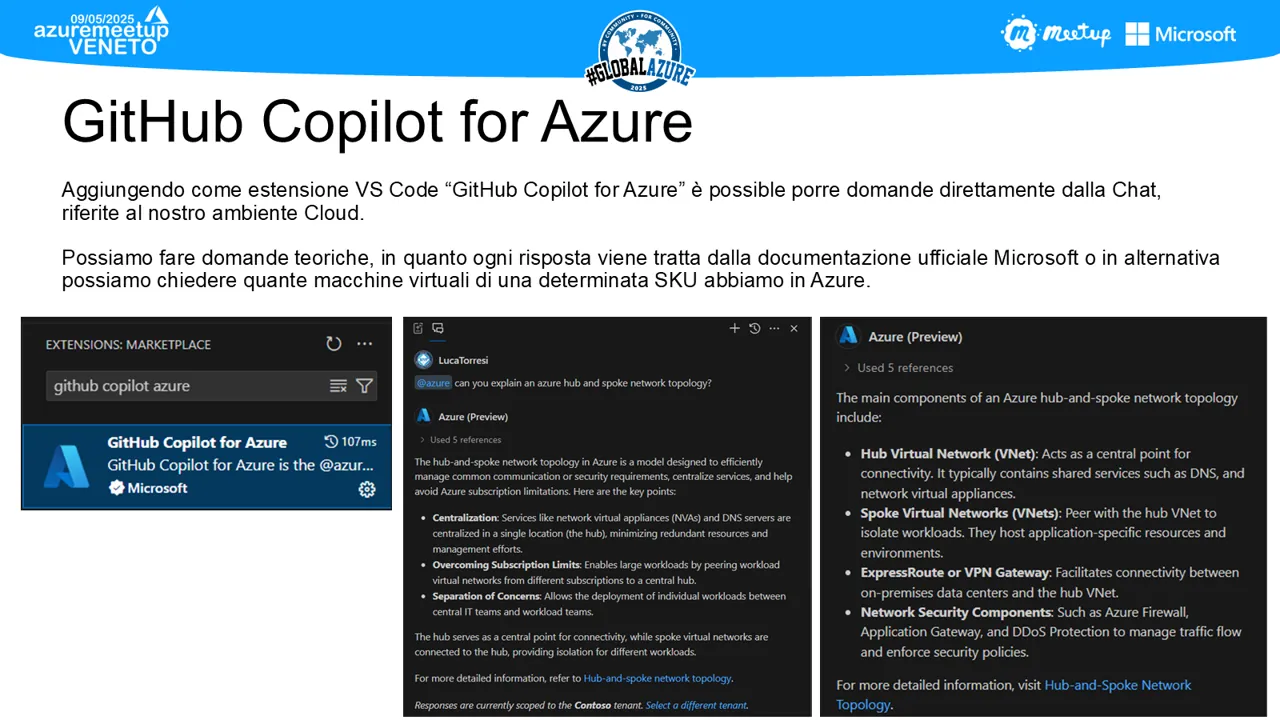
- GitHub Copilot for Azure: an extension that brings Azure into the chat. I can ask theory questions, answered from the official Microsoft documentation, or questions about my environment, such as how many VMs of a given SKU I have.
Yes, but which model?
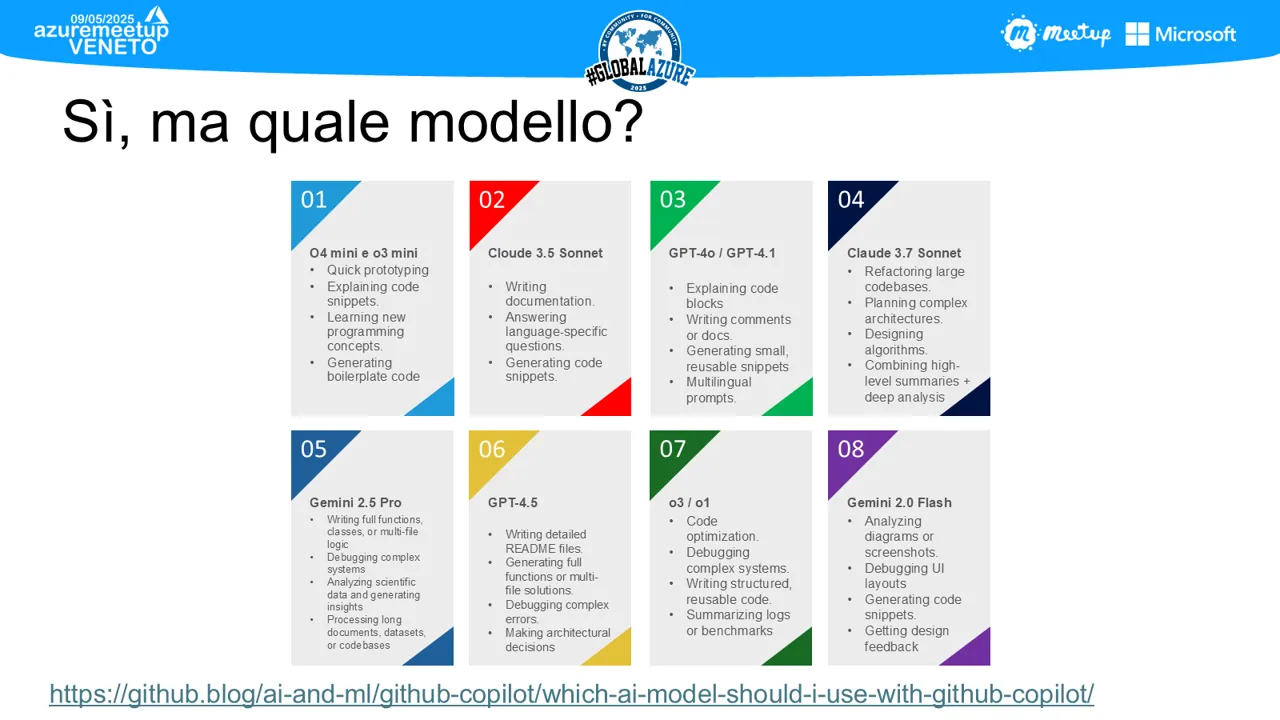
At the time of the session GitHub Copilot already let you pick different LLMs in the chat: the GPT family (4o, 4.1, 4.5), the o1, o3, o3-mini and o4-mini reasoning models, Gemini 2.0 Flash and 2.5 Pro, Claude 3.5 and 3.7 Sonnet. Many in preview. Picking at random often means using a heavy model for a trivial task, or the other way around. Based on GitHub’s own guidance, I summarised the choice like this:
| Model | Where I would use it |
|---|---|
| o4-mini / o3-mini | Quick prototypes, explaining snippets, boilerplate |
| Claude 3.5 Sonnet | Documentation, language-specific questions |
| GPT-4o / GPT-4.1 | Comments, small reusable snippets, multilingual prompts |
| Claude 3.7 Sonnet | Refactoring large codebases, planning architectures |
| Gemini 2.5 Pro | Multi-file logic, long documents and codebases |
| GPT-4.5 | Detailed READMEs, complex debugging, architectural decisions |
| o3 / o1 | Code optimisation, summarising logs and benchmarks |
| Gemini 2.0 Flash | Analysing screenshots and diagrams, UI layouts |
Ask, Edit and Agent
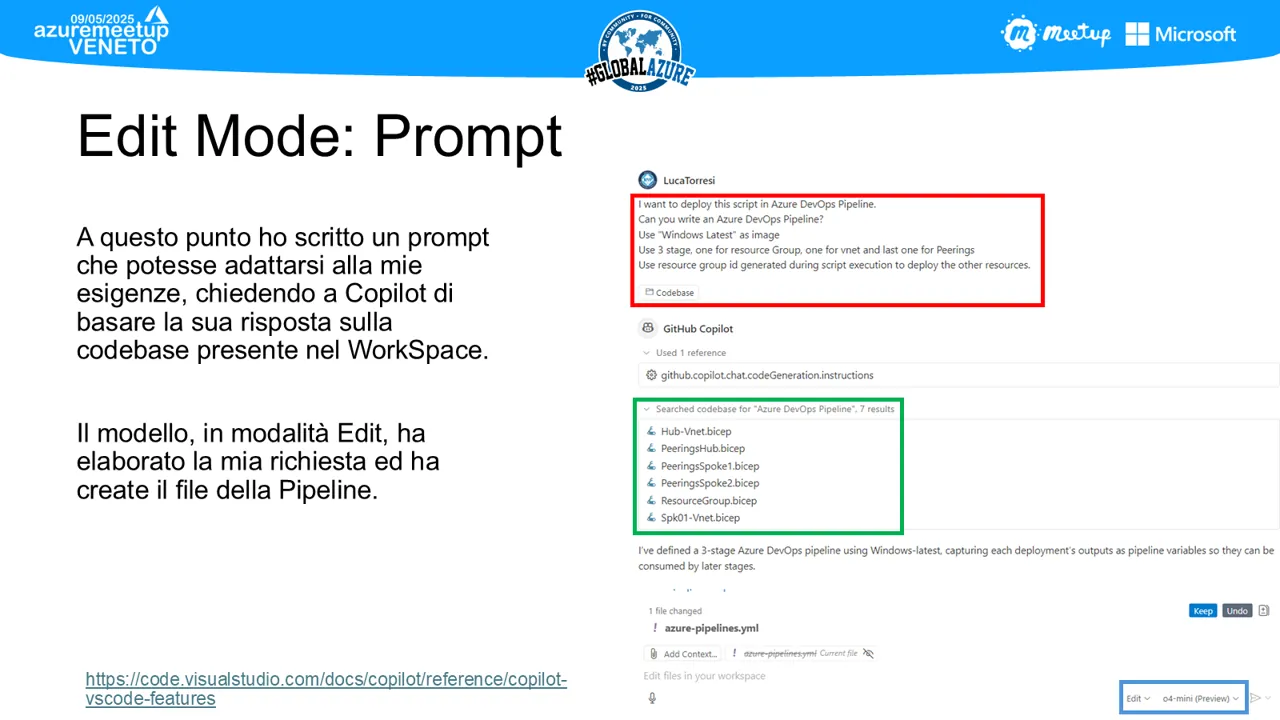
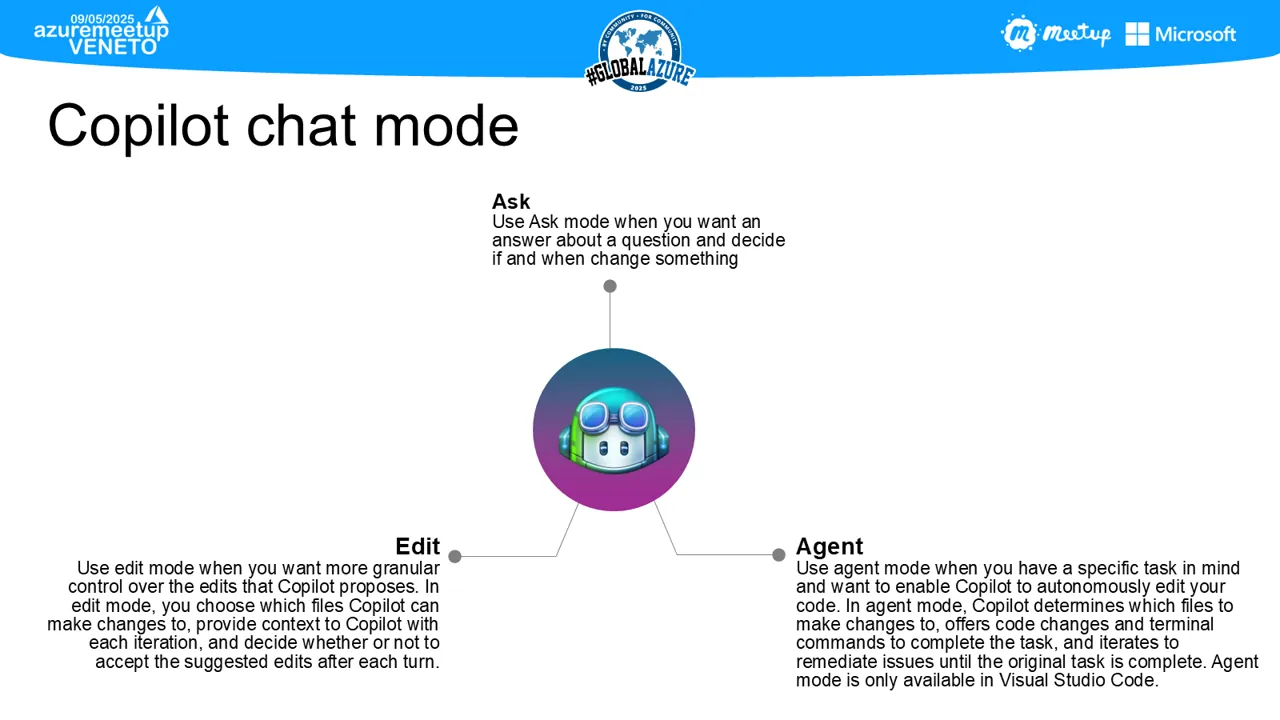
The other key choice is the chat mode. Ask is for when I want an answer and decide myself if and when to change anything. Edit gives me granular control: I choose which files Copilot can touch, provide context at every iteration and accept or reject edits turn by turn. Agent is for when I have a specific goal and let Copilot decide which files to change, propose terminal commands and iterate until the task is done.
Prompt like a PRO
Prompt engineering is the craft of writing clear, targeted instructions. The trick I always show is simple: Copilot runs on an LLM, so why not ask it what kind of prompt it expects? Better still, let it write the prompt, then refine it.
A well-written prompt is not enough for a good result: you need to know what you are asking for and check what comes back.
Architectures and demos
The core of the session is three case studies, each with a recorded demo, set in a fictional company called “LCT Consulting”.
Case #1: an Azure network in Bicep, in half a day. The task was a new network infrastructure in Azure, deployed with Bicep, with no ready-made scripts to start from and no DevOps tooling allowed for the deployment. I show how I built the prompt (with Copilot helping me write it) and got the Bicep files. Before that, the intro demo shows GitHub Copilot for Azure at work.
Case #2: understanding and improving inherited scripts. After two colleagues left the project, I was “parachuted” onto an enterprise customer. The job was to extract logs from several Windows servers to check whether some protocols considered obsolete were still in use, with firm deadlines and no documentation at all, just the scripts to run. With Copilot I first understood what the scripts did, then optimised and commented them. It took several prompts, but the final version was commented, reusable and, above all, ready to share with colleagues and the customer.
Case #3: an Azure DevOps pipeline written by Copilot in Edit mode. A customer already used Azure DevOps for application development but had never used it for infrastructure, and needed some resources in a short time window. I decided to deploy a hub and spoke network with its peerings, reusing Bicep code I had already written, through a pipeline generated by Copilot. I added my codebase as a VS Code workspace so requests start from existing code.
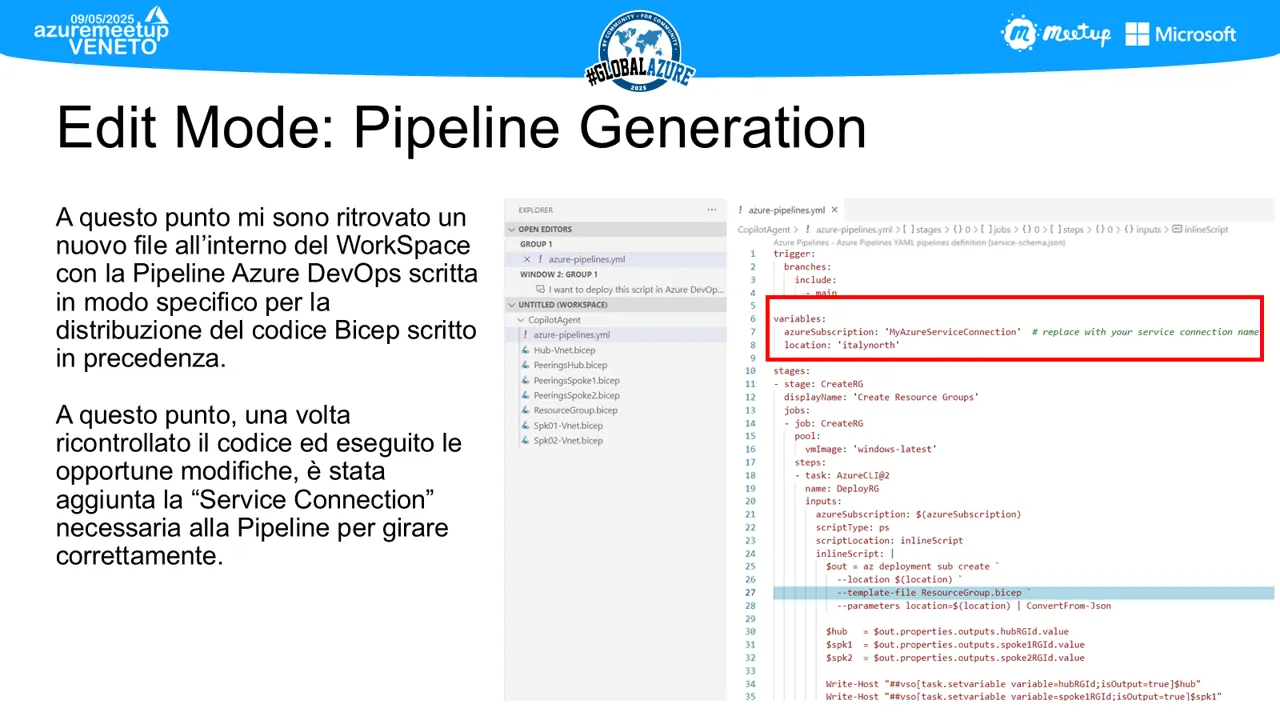
After reviewing the code and making the necessary changes, I added the service connection, pushed the files to an Azure DevOps repository with Git and ran the pipeline, checking that the resources were created in Azure.
I close with some adoption figures published by GitHub and an overview of the available plans.
Lessons from the field and takeaways
- Many Copilots doesn’t have to mean confusion: for infrastructure people, GitHub Copilot in VS Code is the most concrete starting point.
- Model choice matters: a light model for prototypes and snippets, a reasoning model for refactoring, architecture and complex debugging.
- Edit mode is the right trade-off on production code: I decide which files are touched and what gets accepted.
- Starting from an existing codebase in the workspace gives far more precise results than a prompt “in the void”.
- Generated code must always be reviewed and adapted: the service connection, parameters and network choices remain my responsibility.
- Letting Copilot write the prompt is a great way to start, but you need the skills to judge whether the answer is right.
- When a company hires a professional who knows how to use AI, it is really hiring two people. Continuous learning doesn’t stop because we use AI.
- The field follow-up of this session, two years later, is A Cloud Engineer and GitHub Copilot. To see Copilot outside the IDE, read also GitHub Copilot CLI with managed identity.
Resources
Microsoft Learn documentation
- Introduction to GitHub Copilot for Azure
- GitHub Copilot learning path
- What is Bicep?
- Integrate Bicep with Azure Pipelines
- Hub-spoke network topology in Azure
Recordings
- Watch / listen to the recording — Azure Italia Podcast — Puntata 57
- Watch / listen to the recording — DevMarche × Università di Macerata
- Session page on Sessionize
Related blog posts
Other sessions
Azure Copilot Agents: build, deploy, observe… survive
Six specialized Azure Copilot agents and GitHub Copilot for Azure put to work across a workload's lifecycle: where they help, where they don't, and how to keep them under control in production.
- Azure Copilot
- GitHub Copilot for Azure
- Azure Migrate
- Azure Monitor
- Azure MCP Server
- Azure Advisor
Agents at work – l'intelligenza che agisce
Three digital colleagues in half an hour: GitHub Copilot for developers, Microsoft Scout for people working across mail, files and portals, Microsoft Foundry for enterprise agents. Real cases, demos and one rule: delegate the work, not the responsibility.
- Agents at Work: Meet Your New Colleagues — WeAreProject · 13 October 2026
- GitHub Copilot
- Microsoft Scout
- Microsoft Foundry
- Work IQ
- Microsoft Entra ID
- Microsoft Intune