Azure Copilot Agents: build, deploy, observe… survive
Six specialized Azure Copilot agents and GitHub Copilot for Azure put to work across a workload's lifecycle: where they help, where they don't, and how to keep them under control in production.
- Events
-
Upcoming session: not yet presented at a public event.
- Level
- Intermediate
The problem and the context
Asking an agent to do something on Azure is easy. Trusting what it does in production is much harder. Anyone running Azure environments knows the starting point: portal, CLI, monitoring and tickets scattered across too many tools, incidents that take time and experienced people to understand, and cost and resilience that become remediation work instead of design choices.
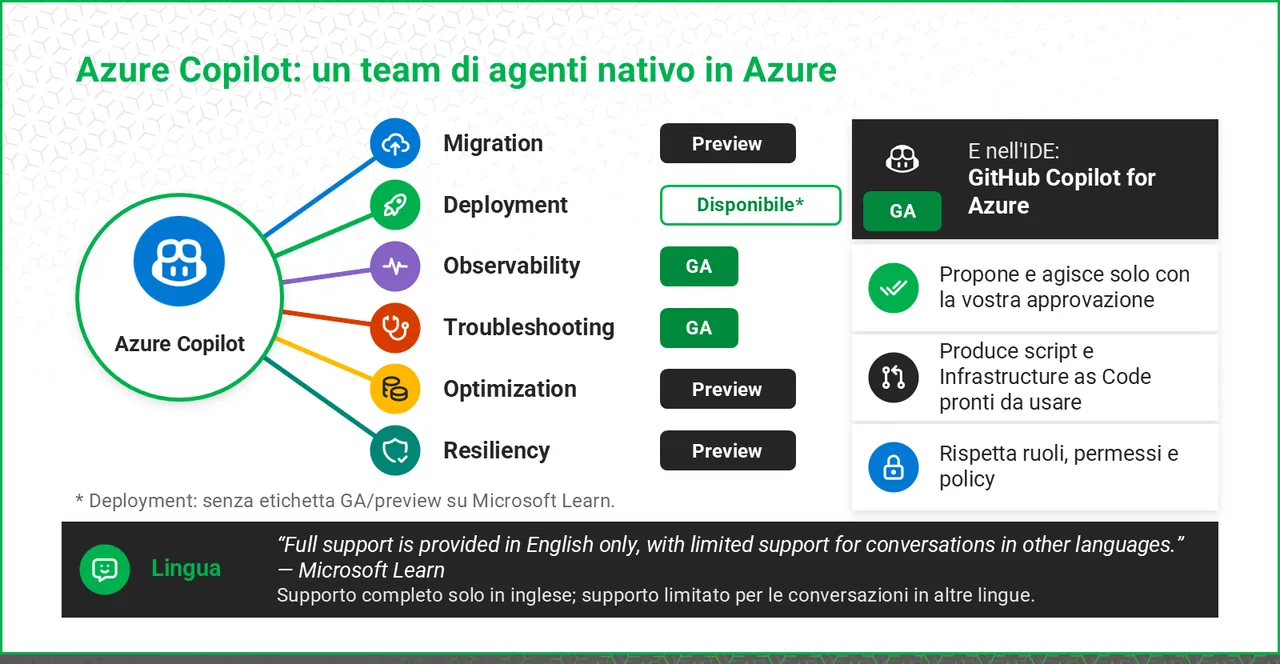
Microsoft’s answer is Azure Copilot: not yet another tool, but a team of six specialized agents native to the platform (Migration, Deployment, Observability, Troubleshooting, Optimization and Resiliency), alongside GitHub Copilot for Azure in the IDE. In this session I’ll put them to work the way a real team would, starting from an Azure environment and following a workload’s lifecycle. It’s for architects, sysadmins and cloud teams who are thinking about handing part of their Azure operations to agents and want to know where they really help, where they don’t, and how to avoid surprises.
Key content
Six agents, different maturity
The first message I’ll bring is that “Azure Copilot Agents” isn’t a single block: each agent has its own maturity. At the time of the session, according to each agent’s Microsoft Learn page, the picture is:
| Agent | Where you invoke it | Status at the time of the session |
|---|---|---|
| Migration | Azure Migrate / Azure Copilot chat | Preview |
| Deployment | Azure Copilot chat | Available, no GA/preview label |
| Observability | Azure Monitor | GA (autonomous operations in preview) |
| Troubleshooting | Azure Copilot chat, Support + Troubleshooting | GA (Azure Local and Entra in preview) |
| Optimization | Azure Copilot chat, Azure Advisor | Preview |
| Resiliency | Azure Copilot chat, Resiliency page | Preview |
| GitHub Copilot for Azure | VS Code, Visual Studio, JetBrains | GA on VS Code and Visual Studio 2026 |
Two practical caveats: the documentation isn’t always consistent across pages (the access management page reported a different classification), and full support is English only. That’s why the demos use English prompts.
From idea to cloud: migrate and deploy
The Migration Agent works on the data of an Azure Migrate project: you explore the inventory in natural language, surface end-of-support systems, compare business cases (rehost, PaaS or a mix), plan migration waves and generate a landing zone. The limit to clarify upfront: it plans and guides, but server replication and execution stay in Azure Migrate.
The Deployment Agent acts as a virtual cloud solution architect: you describe the workload, it proposes a Well-Architected plan with pros, cons and trade-offs, and once you approve it generates Terraform or Bicep, all the way to a GitHub pull request. It’s designed for greenfield scenarios: it doesn’t import or modify existing infrastructure.
GitHub Copilot for Azure brings the same journey into the IDE, built on Azure MCP Server, so you can learn, design, deploy and troubleshoot without leaving the editor. The pattern I recommend in Agent mode is simple: “don’t take any action until I authorize it”, ask for a plan, review it, then authorize. I covered a related scenario in the post on GitHub Copilot CLI with managed identity.
When something breaks
The Observability Agent in Azure Monitor lets you query logs and metrics in natural language, without writing KQL, and launch a deep investigation that correlates application, infrastructure and platform, optimized for AKS, Application Insights and VMs. It explains its reasoning: which signals it considered and why.
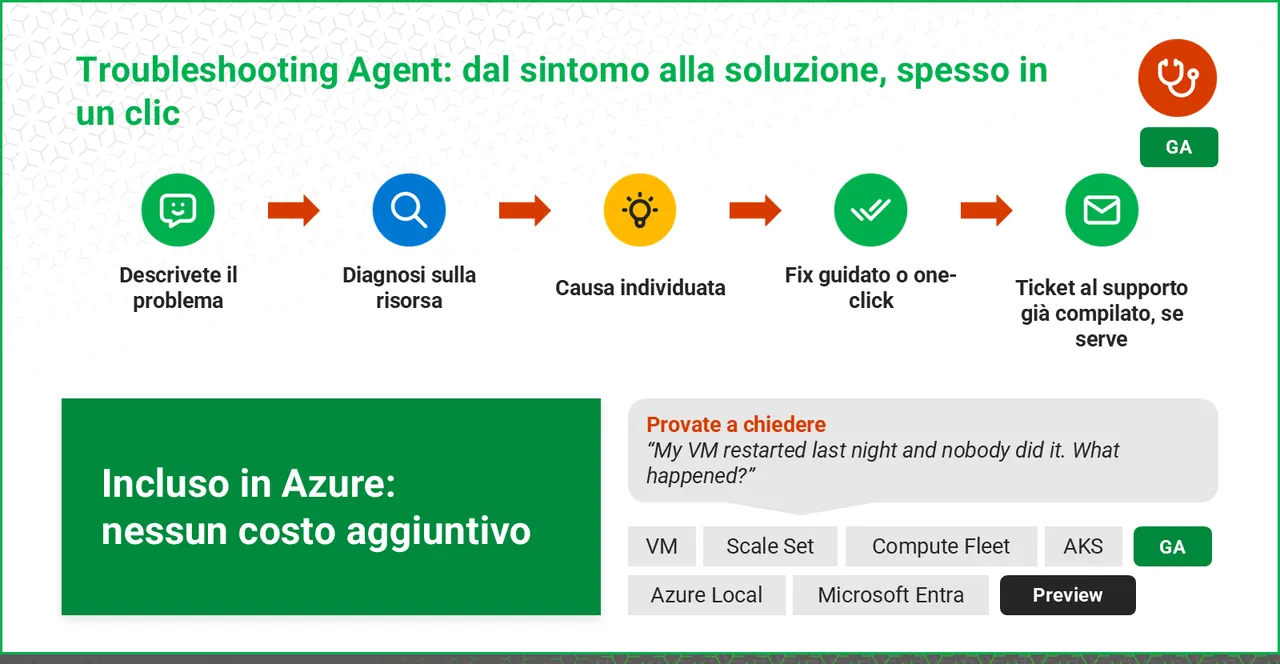
The Troubleshooting Agent follows the flow symptom, diagnosis, root cause, guided or one-click fix and, if needed, a pre-filled support ticket. It’s included in Azure with no extra cost per query, with deep troubleshooting for VMs, scale sets and AKS.
Spend better, withstand more
The Optimization Agent explains every cost recommendation, estimates cost and carbon reduction, and generates Azure CLI or PowerShell scripts; at the time of the session it covers Virtual Machines and scale sets. The Resiliency Agent has two modes: Start Resilient for new applications (a report and Bicep templates with resilience built in) and Get Resilient for existing workloads (zone resilience checks, blockers and fix scripts).
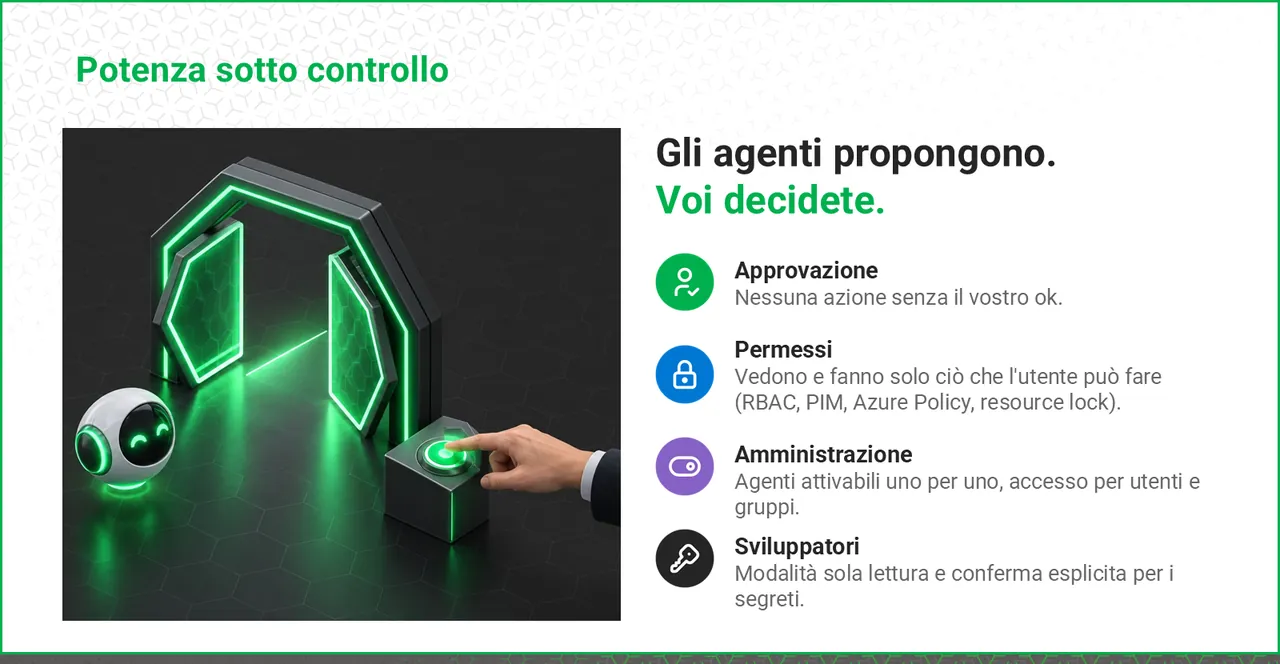
Agents propose, you decide: no action without approval, and never more permissions than the user has.
Governance: keeping them under control
This is the “survive” part of the title. Agents see and do only what the user can do, honouring Azure RBAC, PIM, Azure Policy and resource locks (which is where Entra ID PIM comes back into play). Administrators enable them one by one from the Azure Copilot admin center, for users and groups; on the developer side, Azure MCP Server offers read-only mode and explicit confirmation for secrets.
Architectures and demos
The thread of the session is a workload’s lifecycle in three stages: from idea to cloud, when something breaks, spend better and withstand more. Two stages will include a live demo.
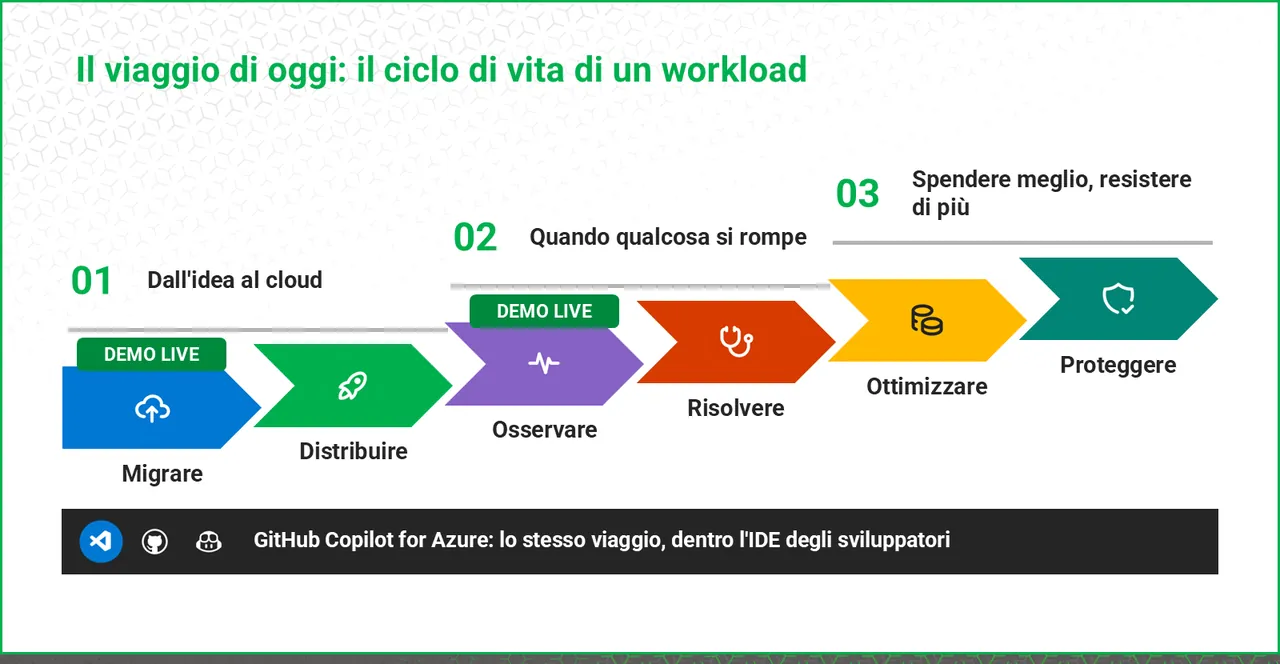
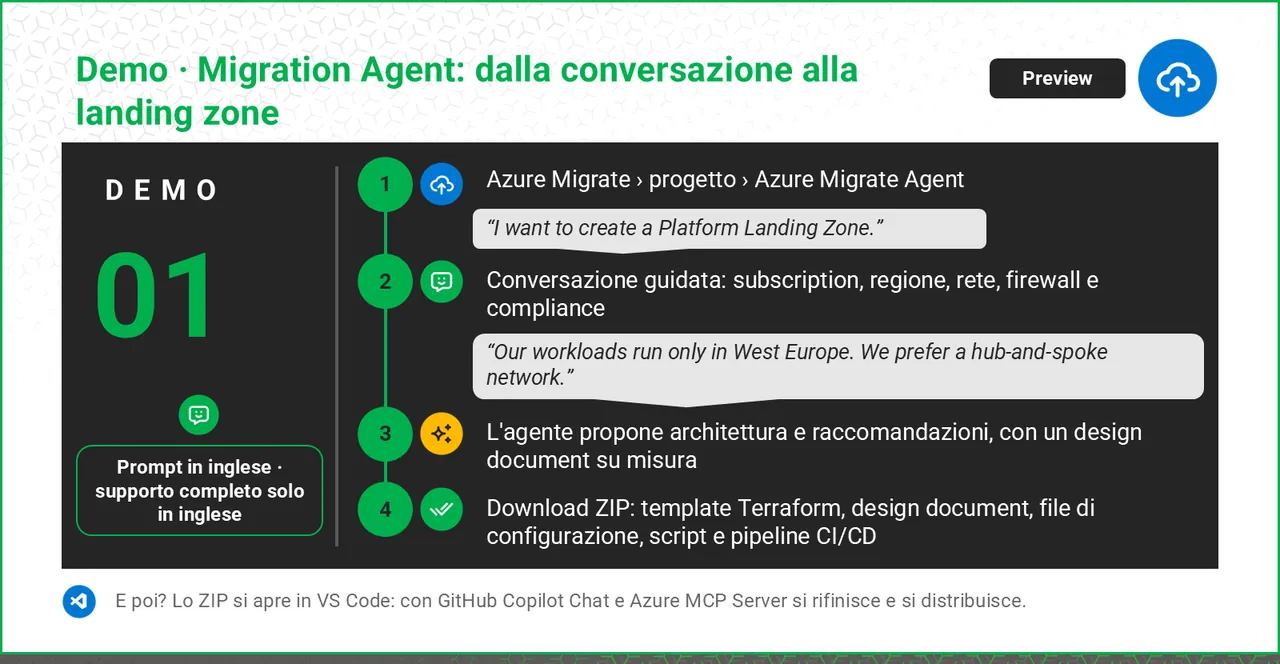
In the first demo I’ll show the Migration Agent going from conversation to landing zone: from an Azure Migrate project I start the agent asking it to create a Platform Landing Zone, answer its questions on subscriptions, region, network, firewall and compliance, and finally download a ZIP with Terraform templates, a design document, configuration files, scripts and CI/CD pipelines. From there the ZIP opens in VS Code, where GitHub Copilot Chat and Azure MCP Server help refine and deploy it.
In the second demo I’ll use the Observability Agent on a web app’s logs: from the Application Insights Logs page you start with a suggestion like “Show error summary”, follow up in natural language, read the agent’s reasoning and, if needed, move to a deep investigation or create an issue to share with the team.
I’ll cover the Troubleshooting Agent, the other agents and GitHub Copilot for Azure in terms of how they work and their limits, without demos.
Lessons from the field and takeaways
- Check each agent’s status on its own Microsoft Learn page: GA and preview coexist and the docs aren’t always aligned.
- Write prompts in English: it’s the only language with full support.
- The Migration Agent plans, it doesn’t migrate: replication and cutover stay in Azure Migrate.
- The Deployment Agent is for new workloads; existing infrastructure needs other tools.
- In the IDE, always ask for a plan before authorizing actions, and use read-only mode while exploring.
- Agents inherit the user’s permissions: least privilege and PIM matter even more.
- Enable agents by group and gradually, starting with the GA ones and piloting the preview ones on real use cases.
Resources
Microsoft Learn documentation
- Agents in Azure Copilot
- Manage access to Azure Copilot
- Azure Copilot Migration Agent
- Azure Monitor Observability Agent overview
- Troubleshooting Agent in Azure Copilot
- What is GitHub Copilot for Azure?
Recordings
Related blog posts
Other sessions
Agents at work – l'intelligenza che agisce
Three digital colleagues in half an hour: GitHub Copilot for developers, Microsoft Scout for people working across mail, files and portals, Microsoft Foundry for enterprise agents. Real cases, demos and one rule: delegate the work, not the responsibility.
- Agents at Work: Meet Your New Colleagues — WeAreProject · 13 October 2026
- GitHub Copilot
- Microsoft Scout
- Microsoft Foundry
- Work IQ
- Microsoft Entra ID
- Microsoft Intune
Becoming a Frontier Firm - The AI Journey
From chatting with Copilot to agents that do the work: I walk through Microsoft's AI stack layer by layer, from Microsoft 365 Copilot to Work IQ, Microsoft Foundry and GitHub Copilot, with two demos and a three-step adoption path.
- GenAI Envisioning @ One Microsoft · 19 June 2026
- Microsoft 365 Copilot
- Copilot Cowork
- Work IQ
- Microsoft Foundry
- Microsoft Agent Framework
- GitHub Copilot
- +1