Becoming a Frontier Firm - The AI Journey
From chatting with Copilot to agents that do the work: I walk through Microsoft's AI stack layer by layer, from Microsoft 365 Copilot to Work IQ, Microsoft Foundry and GitHub Copilot, with two demos and a three-step adoption path.
- Events
-
- GenAI Envisioning @ One Microsoft · · Microsoft, Dublin · Corporate event
- Level
- Introductory
The problem and the context
This session was part of the GenAI Envisioning @ One Microsoft day, hosted at Microsoft’s Dublin campus. The audience was CIOs, IT managers and business leaders: people who have heard plenty about AI already, but struggle to see how all the product names fit together and where it actually makes sense to start.
The starting point is simple: companies don’t need more experimentation, they need AI that delivers outcomes. And in most cases the limit isn’t technology, it’s the operating model. Frontier Firms are organizations that don’t just “adopt” AI: they redesign work so that people and agents share the same flow. In my part of the morning I tried to give a concrete map of that journey: which pieces of the Microsoft stack you need, what each one is for, and in what order to put them.
Key content
From assistant to autonomous coworker
In this session I describe the evolution in three phases. First came Copilot as an assistant inside Microsoft 365 apps: it helps you write, summarize, search. Then came declarative agents built with Microsoft Copilot Studio, connected to company data through connectors and plugins. The phase we’re in now is agents that use the same tools people use and carry a task from start to finish. That’s the whole shift: we no longer ask for an answer, we delegate a piece of work.
One platform, several surfaces
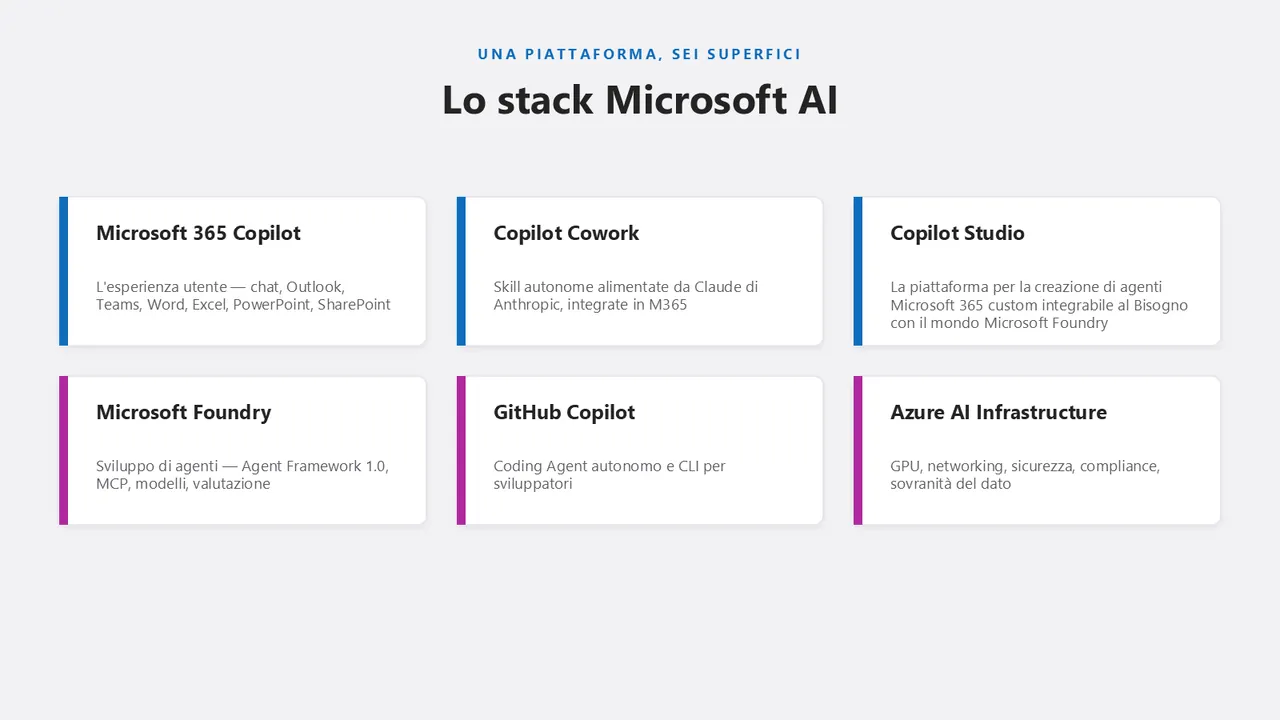
The way I presented it, the Microsoft AI stack has six surfaces: Microsoft 365 Copilot as the user experience in Teams, Outlook, Word, Excel and PowerPoint; Copilot Cowork, which brings agentic skills powered by Anthropic’s Claude models into Microsoft 365; Copilot Studio to build custom agents; Microsoft Foundry to develop enterprise agents; GitHub Copilot for people who write code; and underneath it all the Azure infrastructure, with security, compliance and data sovereignty.
Microsoft 365 Copilot and Copilot Cowork
On Microsoft 365 Copilot I focused on what was available or announced at the time of the session: models that are stronger at multi-step reasoning, the Researcher agent with a self-critique loop on its answers, persistent per-user memory, Copilot inside Power Apps and access to Dataverse data. The message: AI shows up where people already work, no tool switching required.
Copilot Cowork is the most “agentic” piece on the user side: you state an intent in natural language, Cowork picks the right skill (built-in or custom), orchestrates calendar, mail, files and Teams, and returns a result with a trace of what it did. Custom skills are what I find most interesting for companies: a reusable behavior made of instructions, tools, context data and examples, governed centrally. As a practical example I showed the prompt I used to have Cowork help me set up this very presentation, starting from an email, a company template and a reference deck.
Work IQ: context for agents
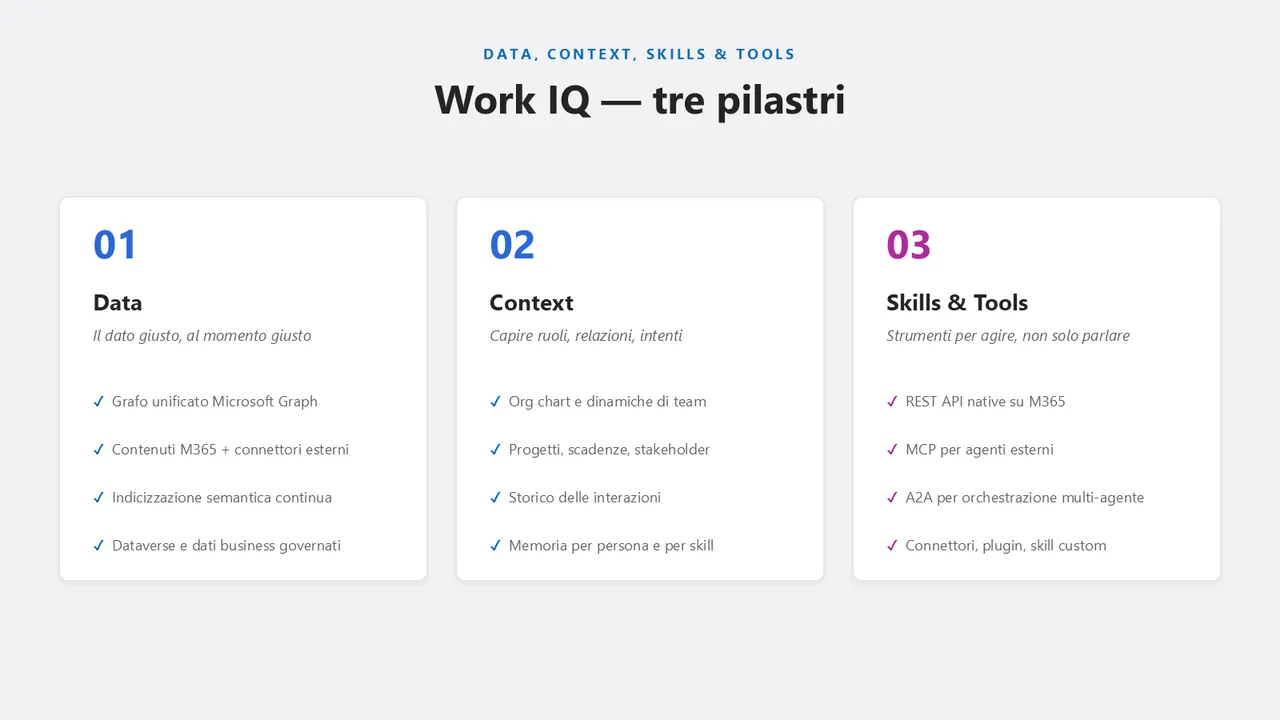
An agent without context is an intern on day one. Work IQ is the layer that gives agents an understanding of who works with whom, on what, and under which rules. I described it through three pillars: Data (Microsoft Graph, Microsoft 365 content, external connectors, Dataverse), Context (roles, relationships, projects, memory) and Skills & Tools (REST APIs, MCP for external agents, A2A for multi-agent orchestration). Context honors the user’s identity, ACLs, sensitivity labels and DLP.
Microsoft Foundry and GitHub Copilot
For people building enterprise agents the reference point is Microsoft Foundry: a multi-provider model catalog, Agent Framework for Python and .NET, native MCP support, continuous evaluation and safety controls such as prompt injection protection. On GitHub Copilot I showed the coding agent, which you assign an issue to and which works all the way to a pull request, and the Copilot CLI, which can pull in enterprise context such as documentation and runbooks via MCP.
| Layer | What you need | Microsoft tool |
|---|---|---|
| User experience | AI in everyday apps | Microsoft 365 Copilot |
| Agentic skills | Delegated multi-step tasks | Copilot Cowork |
| Agentic platform | Data, context, tools | Work IQ |
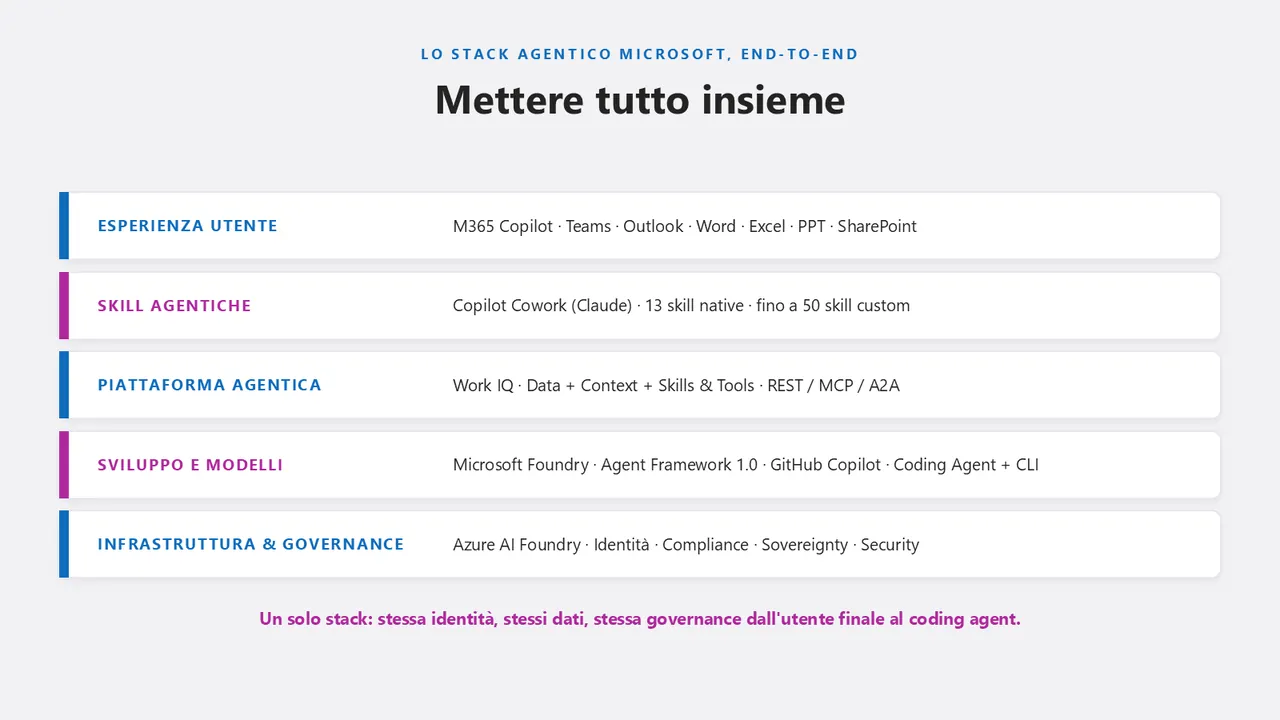
| Development and models | Enterprise agents and code | Microsoft Foundry, GitHub Copilot |
| Infrastructure and governance | Identity, compliance, security | Azure |
One stack: same identity, same data, same governance, from the end user all the way to the coding agent.
Architectures and demos
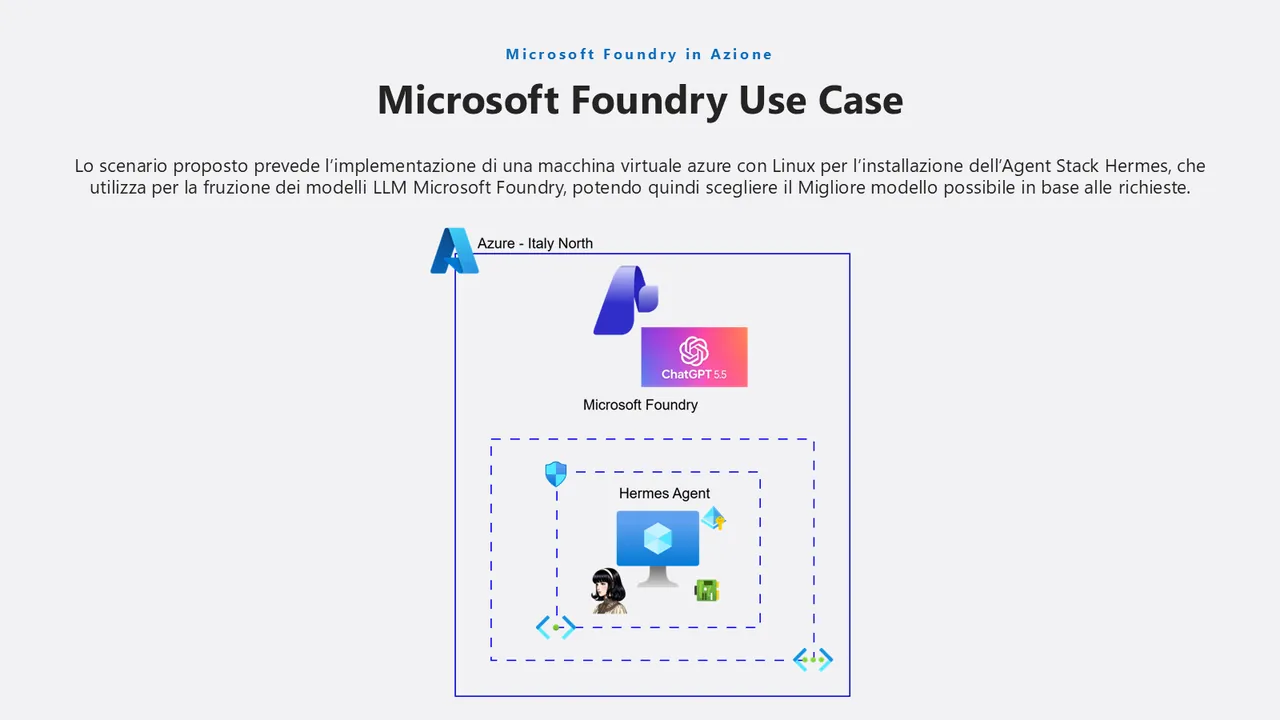
The part I always enjoy most is the hands-on one. The Microsoft Foundry demo is based on a scenario I built myself: a Linux virtual machine in Azure (Italy North region) running Hermes, an open source agent stack, which uses the models exposed by Microsoft Foundry. That way I can pick the best-fitting model for each request. In the videos I showed the agent at work, queried in natural language. A related topic is covered in the post on an always-on AI agent on Azure Virtual Desktop.
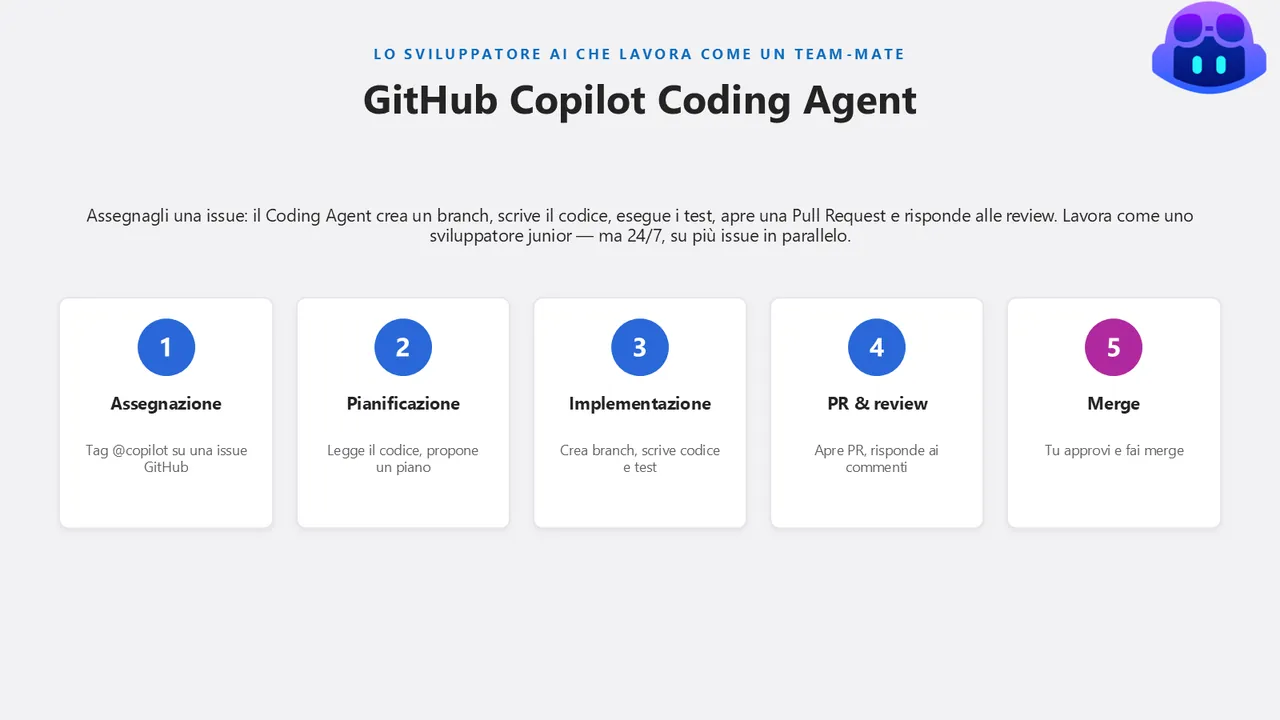
The second demo was about GitHub Copilot, with the agent working on code in the editor. The flow I described is the coding agent’s: issue assignment, plan, implementation with tests, pull request and review, with the merge always remaining a human decision. If you’re curious about the infrastructure side, in the post on GitHub Copilot CLI with managed identity I explain how I run it on Azure.
To close, I put all the pieces back together in the end-to-end stack diagram (the image at the top) and proposed a three-step path: Discover & Design, with workshops to identify priority use cases and the data they need; Pilot & Validate, a 60-90 day pilot measured against agreed KPIs; Scale & Govern, with rollout by user groups, a company-wide skill catalog and adoption monitoring.
Lessons from the field and takeaways
- AI’s bottleneck is rarely technical: it’s organizational. Without rethinking processes, the tools stay expensive toys.
- Think in layers (experience, skills, context, development, governance) rather than product by product.
- Context beats the model: Work IQ and MCP are what make an agent useful instead of generic.
- Custom skills are the fastest way to turn a team’s know-how into repeatable behavior.
- In Microsoft Foundry, choosing the right model per request is a real lever on quality and cost.
- Delegate execution, not decisions: merging, sending an email or approving stay human.
- Start small and measurable: one pilot with clear KPIs is worth more than ten prototypes.
Resources
Microsoft Learn documentation
- Microsoft 365 Copilot overview
- What is Microsoft Foundry?
- Microsoft Agent Framework overview
- What is Microsoft Copilot Studio?
Related blog posts
Other sessions
Azure Copilot Agents: build, deploy, observe… survive
Six specialized Azure Copilot agents and GitHub Copilot for Azure put to work across a workload's lifecycle: where they help, where they don't, and how to keep them under control in production.
- Azure Copilot
- GitHub Copilot for Azure
- Azure Migrate
- Azure Monitor
- Azure MCP Server
- Azure Advisor
Agents at work – l'intelligenza che agisce
Three digital colleagues in half an hour: GitHub Copilot for developers, Microsoft Scout for people working across mail, files and portals, Microsoft Foundry for enterprise agents. Real cases, demos and one rule: delegate the work, not the responsibility.
- Agents at Work: Meet Your New Colleagues — WeAreProject · 13 October 2026
- GitHub Copilot
- Microsoft Scout
- Microsoft Foundry
- Work IQ
- Microsoft Entra ID
- Microsoft Intune