Hybrid is the New Normal: bring the power of the Microsoft Azure cloud into your datacenter
A webinar on Microsoft hybrid scenarios: Azure Arc to govern on-premises and multi-cloud servers, Azure Local to virtualize the cloud way, and Azure Site Recovery for disaster recovery.
- Events
-
- Webinar WeAreProject — Hybrid is the New Normal · · Online · Webinar
- Level
- Intermediate
The problem and the context
In most of the companies I work with, the on-premises datacenter isn’t going away: it lives alongside Azure, sometimes another cloud provider, and often remote sites acting as the “edge”. The usual outcome is a different tool for every world: one console for patching, one for antivirus, one for monitoring, and a DR site designed years ago and never really tested.
This webinar exists to show that hybrid is not a transition phase on the way to the cloud, it is the normal operating model. It’s aimed at IT managers, sysadmins and architects who run Windows and Linux servers on-premises and want to bring Azure management, security and resilience services to them, without necessarily migrating everything. The journey covers three pillars, Azure Arc, Azure Local and Azure Site Recovery, each with a demo.
Key content
Azure Arc: one control plane
The starting point is Azure Arc. It projects resources that don’t live in Azure (physical servers, VMs on VMware or Hyper-V, machines on other clouds, Kubernetes clusters) into Azure Resource Manager. From then on, a server in a rack becomes an Azure resource like any other: it has a resource group, tags, RBAC permissions and policies.
In the session I walk through the benefits I see most often in projects:
- Single pane of glass for Windows and Linux servers, on-premises or multi-cloud.
- Security: native integration with Microsoft Defender for Cloud and Microsoft Sentinel, towards a Zero Trust model. With the Intune and Defender for Endpoint integration you can manage security settings even on devices that can’t enroll in Intune, such as Windows servers.
- Monitoring: Azure Monitor collects data from Arc servers into a Log Analytics workspace; agents are deployed automatically via Azure Policy and VM insights gives you the performance view.
- Updates: Azure Update Manager orchestrates patching across the whole Windows and Linux estate, on demand or in maintenance windows, with a single compliance view. ESUs also cover out-of-support systems like Windows Server 2012.
- Compliance: Azure Policy assesses organizational standards at scale, with bulk remediation for existing resources and automatic remediation for new ones.
A feature sysadmins really like is SSH access through Azure Arc: you connect to Windows and Linux servers with no public IP, no exposed ports and no VPN, using Microsoft Entra ID authentication and centrally managed permissions. If you want a hands-on start, I wrote a guide on onboarding your first machine to Azure Arc.
Hybrid isn’t “a bit of cloud and a bit of on-premises”: it’s one management, security and governance model, wherever the workload runs.
Azure Local: the cloud’s virtualization platform in your datacenter
The second block is Azure Local: one machine or a cluster of machines running the Azure Stack HCI operating system, connected to Azure and manageable from the portal as well as with Windows Admin Center and PowerShell. The key concept is hyperconverged infrastructure: instead of separate switches, hypervisors, storage fabric and SAN, standard x86 servers with local drives and software that unifies compute, storage and networking.
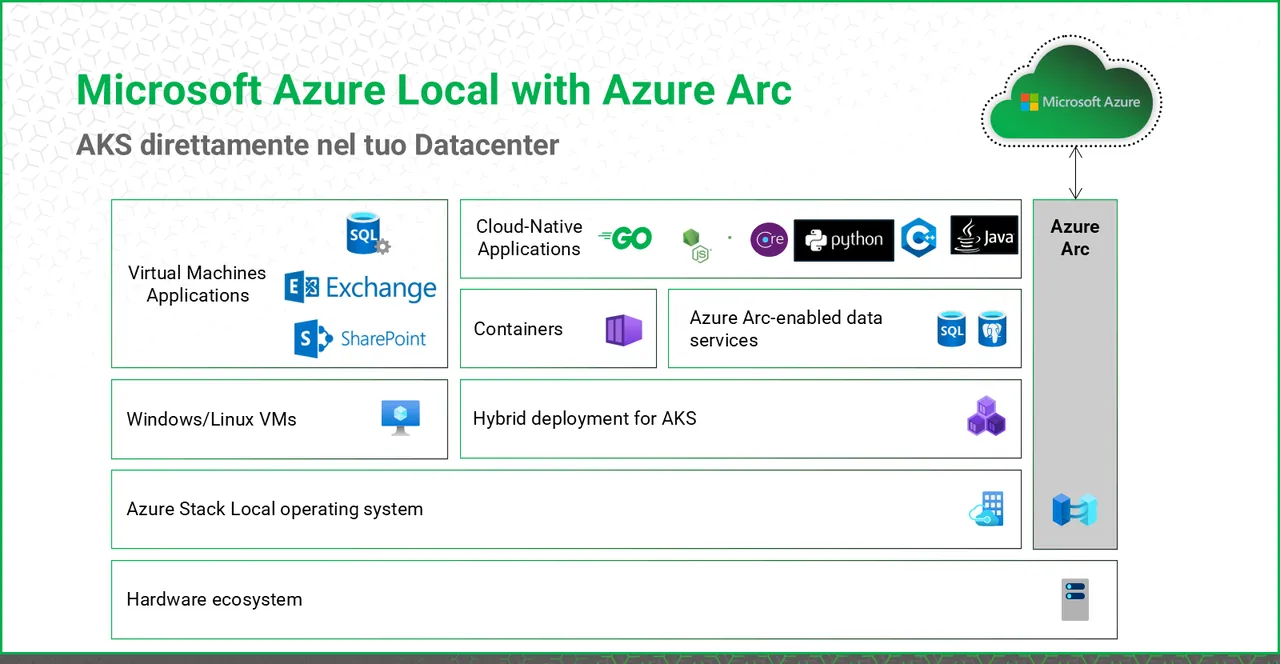
On top of Azure Local, thanks to Azure Arc, you run Windows and Linux VMs, AKS for containers, Arc-enabled data services and an on-premises flavour of Azure Virtual Desktop. To get there from VMware or Hyper-V the official tool is Azure Migrate: the VM is replicated and converted, shut down at the source, the remaining delta is replicated, and it’s powered on in the new cluster.
Azure Site Recovery: a real DR orchestrator
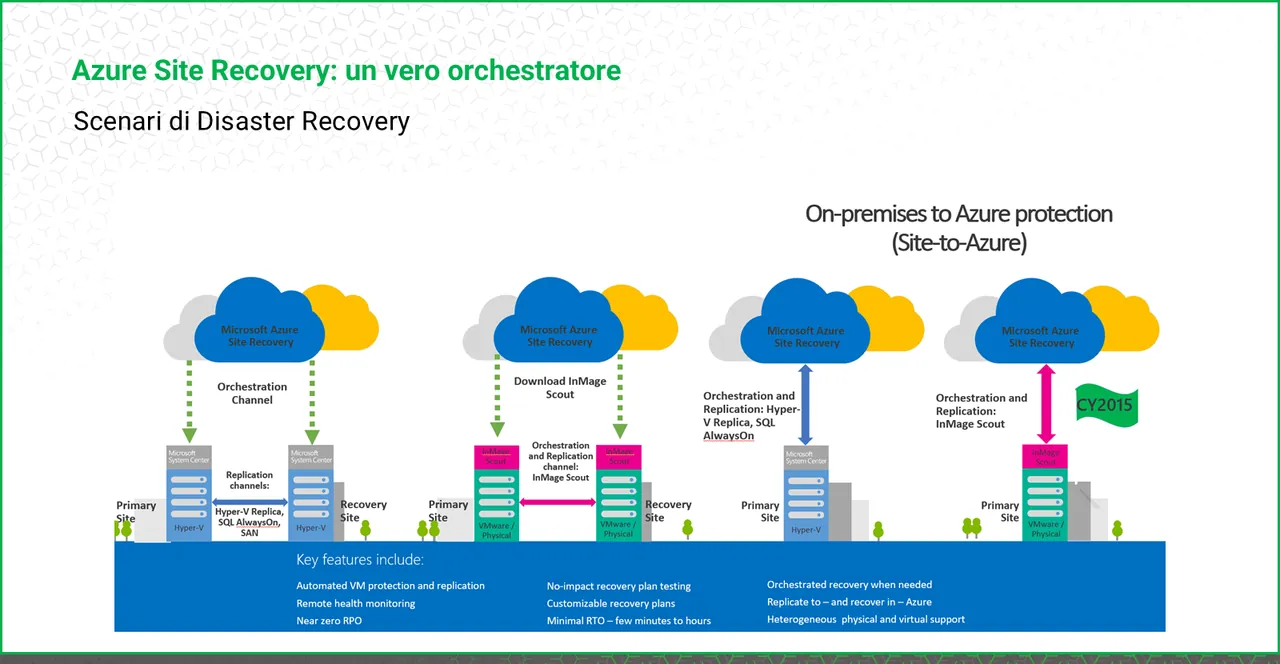
The last pillar is Azure Site Recovery, Microsoft’s Disaster Recovery as a Service: continuous replication, recovery plans, failover tests with no impact on production, and control over RPO and RTO. In the session I stress an often overlooked point: ASR isn’t only for DR to Azure. It can orchestrate failover between different on-premises sites and protect workloads on VMware, Hyper-V, physical servers and other clouds.
| Need | Service | What it brings |
|---|---|---|
| Govern existing servers, wherever they are | Azure Arc | Management, policy, patching, security and monitoring from Azure |
| Refresh the on-premises virtualization platform | Azure Local | Hyperconverged infrastructure managed as an Azure resource, with local VMs, AKS and AVD |
| Ensure business continuity | Azure Site Recovery | Orchestrated replication, recovery plans and failover, even between on-premises sites |
Architectures and demos
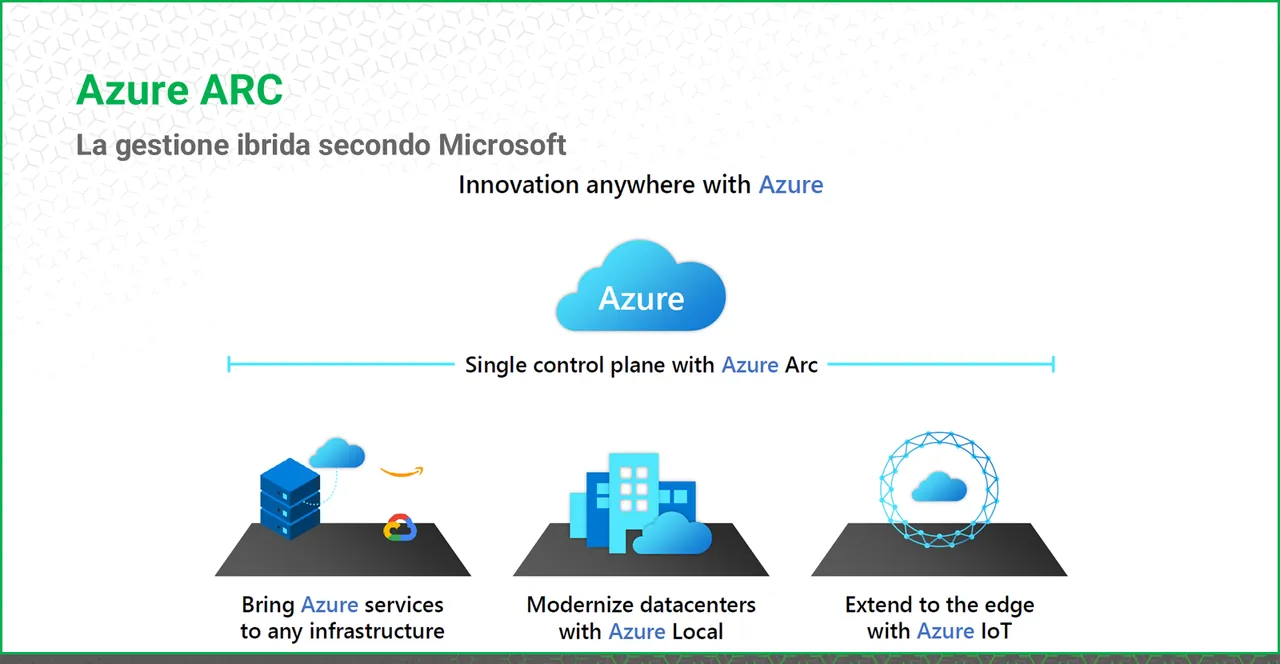
The first diagram (the hero image) sums up the vision: Azure as a single control plane that, through Arc, spans on-premises, multi-cloud and edge infrastructure.
For Azure Local I showed the full stack: the operating system at the bottom, Windows and Linux VMs, hybrid AKS deployment, containers and Arc-enabled data services, all connected to Azure through Arc.
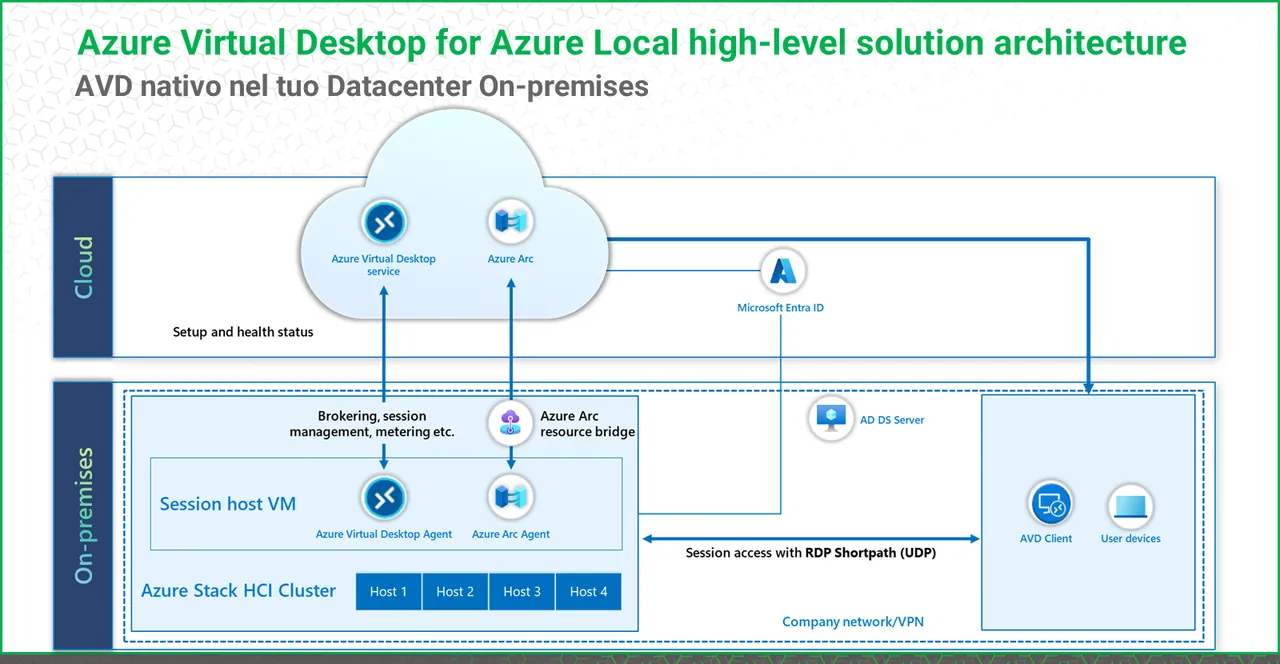
An architecture that always sparks questions is Azure Virtual Desktop on Azure Local: the AVD control plane stays in the cloud (brokering, session management, metering), while session hosts run on-premises with the AVD agent and the Arc agent, and users connect with RDP Shortpath.
For Azure Site Recovery I presented the different replication and orchestration scenarios, from on-premises to Azure and between primary and recovery sites.
Finally, a comparison of Windows Server management capabilities with and without Azure Arc, useful to understand what you get from onboarding alone and what requires additional services.
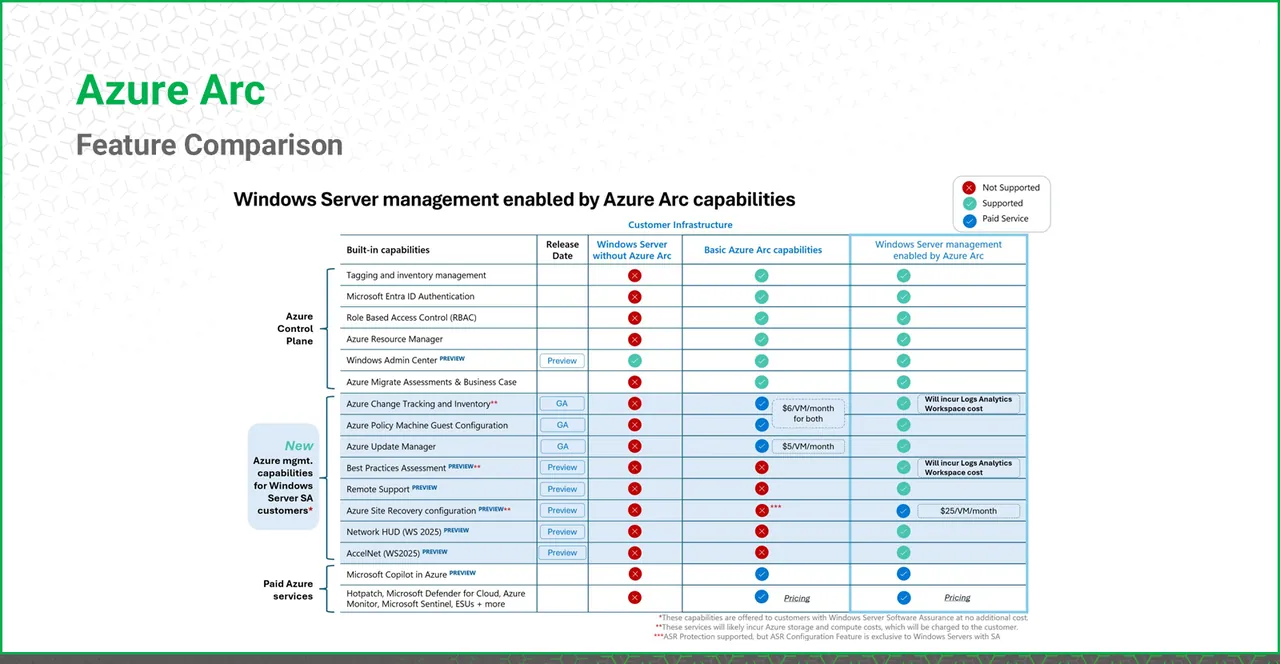
The demos followed the three blocks: managing servers through Azure Arc in the portal, Azure Local, and Azure Site Recovery. For Arc adoption I proposed a four-step path: prerequisite check, implementing the technology in Azure, onboarding the machines (SQL servers included) and verifying features, first monitoring setup and Azure Update Manager, and a closing workshop.
Lessons from the field and takeaways
- Start with Azure Arc: it’s the prerequisite that unlocks almost everything else, from patching to security to Azure Local.
- Check prerequisites first: a Microsoft Entra ID tenant, a subscription, RBAC roles, supported operating systems, an administrator or root user, and connectivity to public or private Azure endpoints.
- Deploy monitoring agents with Azure Policy rather than by hand: configuration stays compliant for servers added later, too.
- SSH through Arc removes public IPs, exposed ports and many admin VPNs.
- Azure Local makes sense when you need to refresh virtualization and want the cluster managed as an Azure resource.
- On Azure Local, look carefully at Windows licensing and user access for AVD: there are specific rules, for example external user access is not supported.
- Use Azure Site Recovery for DR between on-premises sites too, and above all run regular failover tests: it’s the only way to know the plan actually works.
Resources
Microsoft Learn documentation
- Azure Arc-enabled servers overview
- Azure Local overview
- About Azure Site Recovery
- Azure Update Manager overview
- Azure Virtual Desktop on Azure Local
- SSH access to Azure Arc-enabled servers
Related blog posts
Other sessions
My first Azure Arc project: from scratch to delivery
The story of a real Azure Arc project: on-premises Windows and Linux servers managed from the Azure portal, with unified security, essential monitoring and updates orchestrated from a single place.
- #POWERCON2026 — L'IT tra innovazione, sicurezza e controllo · 23 January 2026
- Azure Arc
- Azure Update Manager
- Azure Monitor
- Azure Policy
- Microsoft Defender for Cloud
- Microsoft Defender for Endpoint
- +1
Azure Virtual Desktop: from scratch to delivery
The full path of an AVD project: identity model, hub-spoke networking with firewall, golden image and Custom Image Templates, FSLogix profiles on private storage, host pools and application groups.
- WPC 2025 · December 2025
- Azure Virtual Desktop
- Microsoft Entra ID
- FSLogix
- Azure Files
- Azure Firewall
- FortiGate
- +1