My first Azure Arc project: from scratch to delivery
The story of a real Azure Arc project: on-premises Windows and Linux servers managed from the Azure portal, with unified security, essential monitoring and updates orchestrated from a single place.
- Events
-
- #POWERCON2026 — L'IT tra innovazione, sicurezza e controllo · · Online · Conference
- Level
- Introductory
The problem and the context
Almost every company I work with still runs a significant part of its infrastructure outside Azure: physical servers, VMs on on-premises hypervisors, sometimes machines in other clouds. The outcome is nearly always the same: different tools for patching, monitoring and security, separate consoles for Windows and Linux, and no overall view.
This session tells, in a very practical way, the story of my first Azure Arc project, from requirements analysis to delivery. It isn’t a tour of every feature. It’s the path I actually followed for a customer who wanted to manage their Windows and Linux servers properly, from a single place. It’s aimed at sysadmins, IT managers and architects who have heard about Arc and want to know where to start and what to expect.
Key content
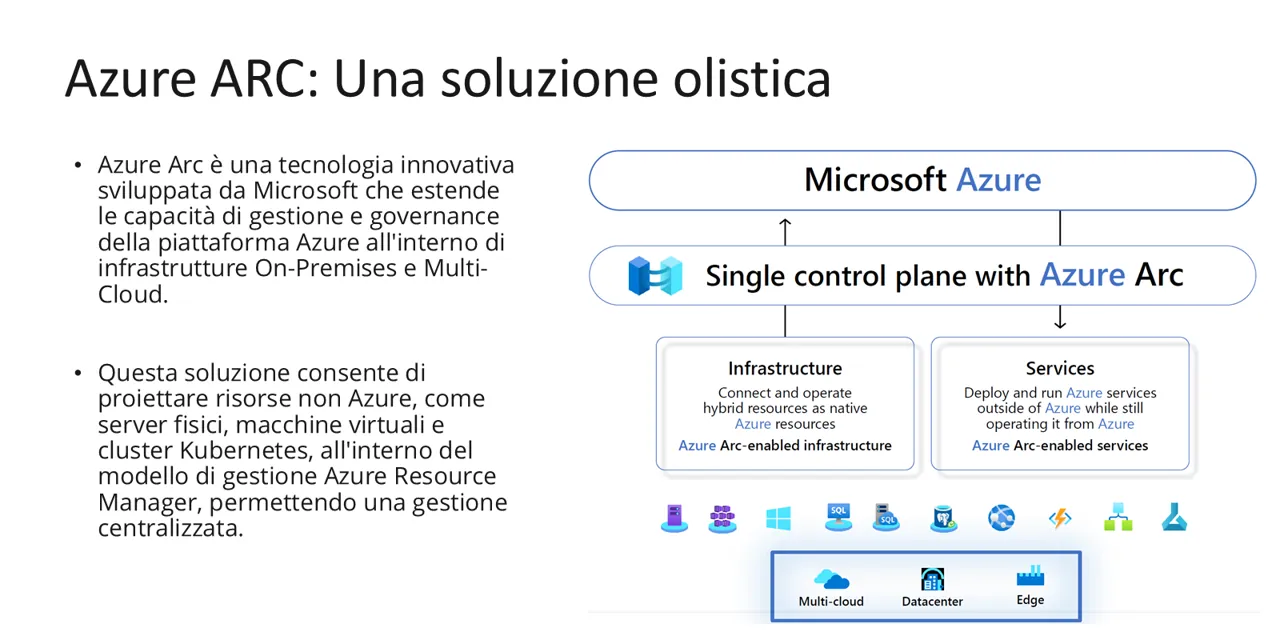
Azure Arc as a holistic solution
The starting point is understanding what Azure Arc really does: it extends the Azure Resource Manager management and governance plane to resources that don’t live in Azure. An on-premises server, a VM in another cloud or a Kubernetes cluster becomes a fully fledged Azure resource, with a resource group, tags, RBAC and policies. Everything goes through a small agent, the Azure Connected Machine agent. Once it’s installed and registered, the server shows up in the subscription and can receive management services.
In the session I sum up the value in four areas. You get a single pane of glass for Windows and Linux, wherever they run. Arc integrates natively with Microsoft security solutions, in a Zero Trust approach. Azure Monitor and Azure Policy handle monitoring and compliance. Azure Update Manager orchestrates updates, and ESUs can cover out-of-support operating systems such as Windows Server 2012.
Requirements first
Before touching a server, get the prerequisites in order. You need an active Microsoft Entra ID tenant and subscription, the RBAC roles the documentation lists for onboarding, a supported operating system, and a local administrator (or root on Linux). Above all, you need connectivity: machines must reach the public Azure endpoints, or the private ones. This is where projects lose the most time, so check it with the network team from day one. I wrote a dedicated step-by-step guide for the first onboarding: Azure Arc: what it is and how to onboard your first machine.
The project challenge
The customer already had an Azure environment with an active subscription, plus Microsoft 365 licenses that included Microsoft Intune. There were three goals:
- orchestrate updates from a single central point;
- have baseline monitoring on every server;
- protect all Windows and Linux servers with one unified solution.
Security: Intune, Defender for Endpoint and Defender for Cloud
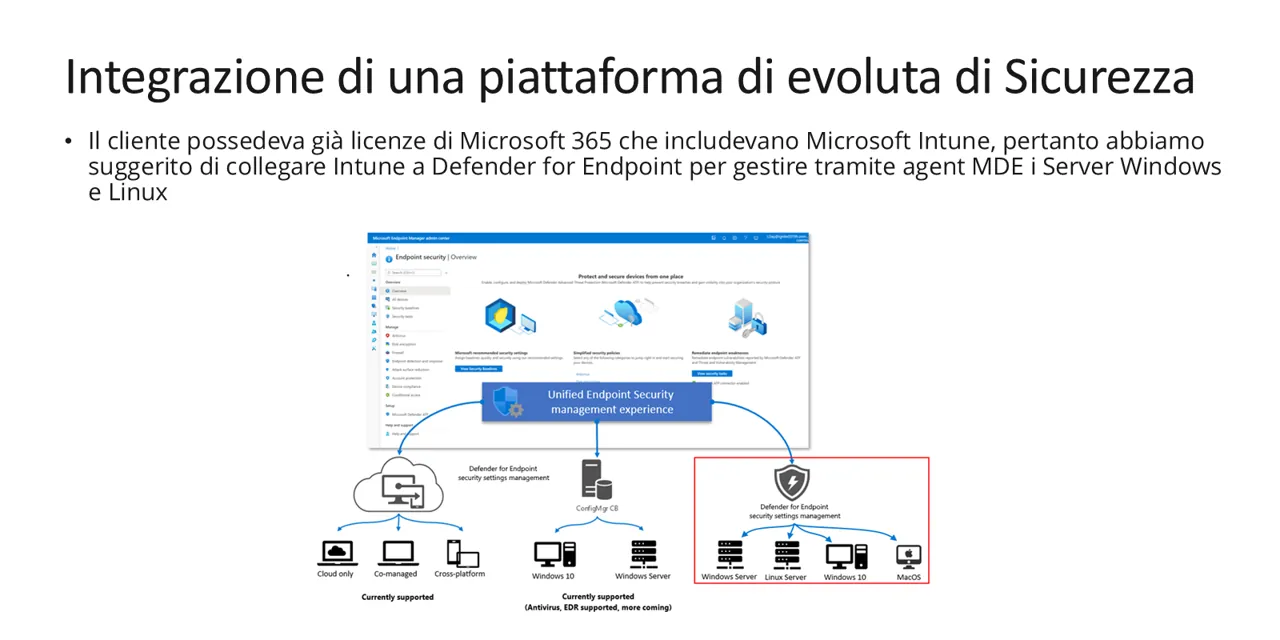
Since the Intune licenses were already there, we proposed connecting Intune to Microsoft Defender for Endpoint and managing the servers through the MDE agent. With this integration, Intune endpoint security policies also apply to devices that can’t enroll in Intune, such as Windows servers. Microsoft Defender for Cloud, integrated with Azure Arc, rounds things out by extending Azure protection to hybrid and multi-cloud workloads.
Essential monitoring
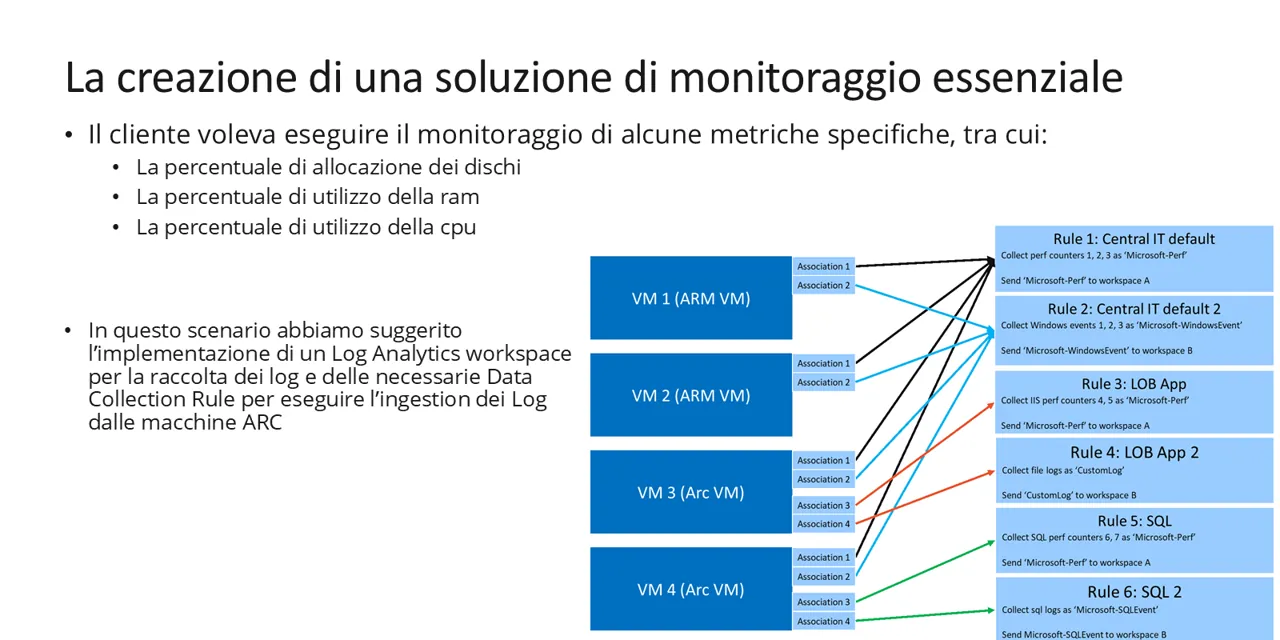
The customer wanted to track only a few metrics: disk allocation, RAM usage and CPU usage. We deployed a Log Analytics workspace to collect the data, plus the Data Collection Rules needed to ingest it from the Arc machines. Azure Policy is what makes this scale. Policies deploy the Azure Monitor Agent and automatically associate the DCRs with Arc servers, including the ones added later, and mass remediation brings the existing ones into line.
With Azure Arc I’m not adding yet another console: I bring on-premises servers into the same Azure management model and let Policy keep them aligned.
Orchestrated updates
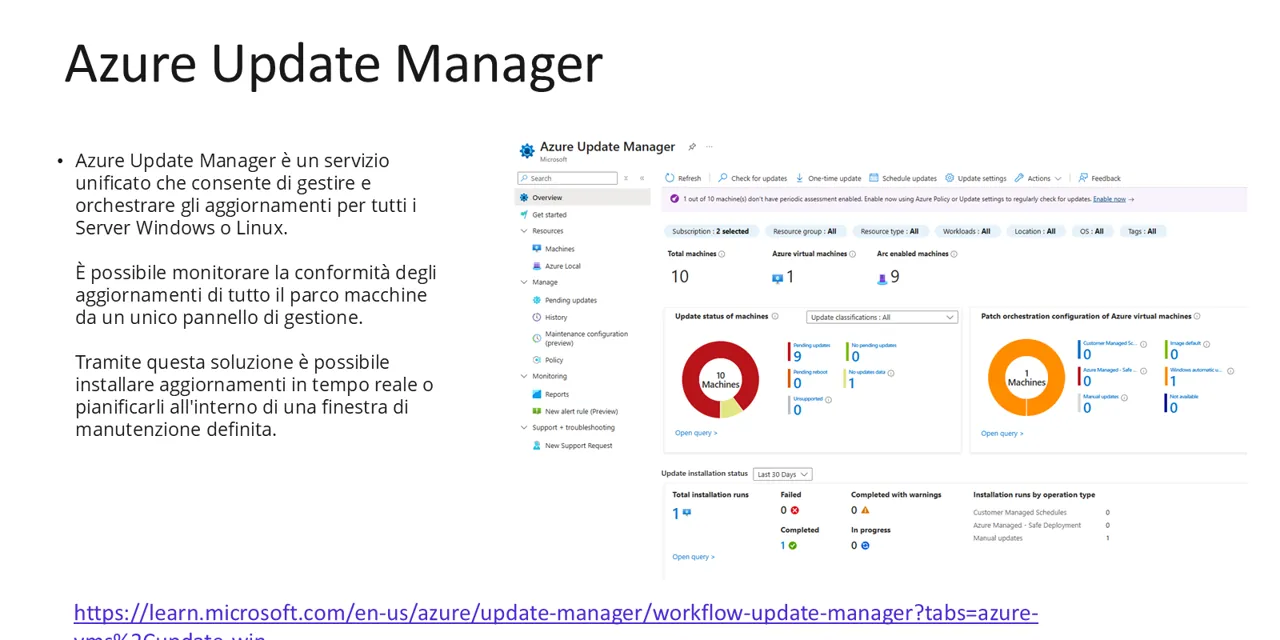
The last requirement was a single patching solution for Windows and Linux. Through Azure Arc and Azure Policy we extended Azure Update Manager to every supported server. A single pane shows update compliance for the whole fleet, where you can install patches on demand or schedule them within defined maintenance windows.
One more thing: SSH through Azure Arc
To close, I show one of my favorite features: SSH access to servers through Azure Arc. There’s no public IP and no exposed ports, it works on Windows and Linux, and it uses Microsoft Entra authentication with centrally managed permissions.
Architectures and demos
The first diagram in the session shows Azure Arc as a single control plane: multi-cloud, datacenter and edge infrastructure projected into Azure, where you switch on management services.
For the security part, I use the Intune–Defender for Endpoint integration diagram. It shows how servers that aren’t enrolled in Intune still receive endpoint security policies.
Monitoring is explained with the Data Collection Rules diagram: several VMs, both Azure and Arc, associated with different rules that send data to one or more workspaces.
The demos follow the project path. First comes Defender protection, then metric collection and policy configuration. Then comes Azure Update Manager, with the compliance dashboard for the whole fleet, where Arc machines sit alongside Azure VMs.
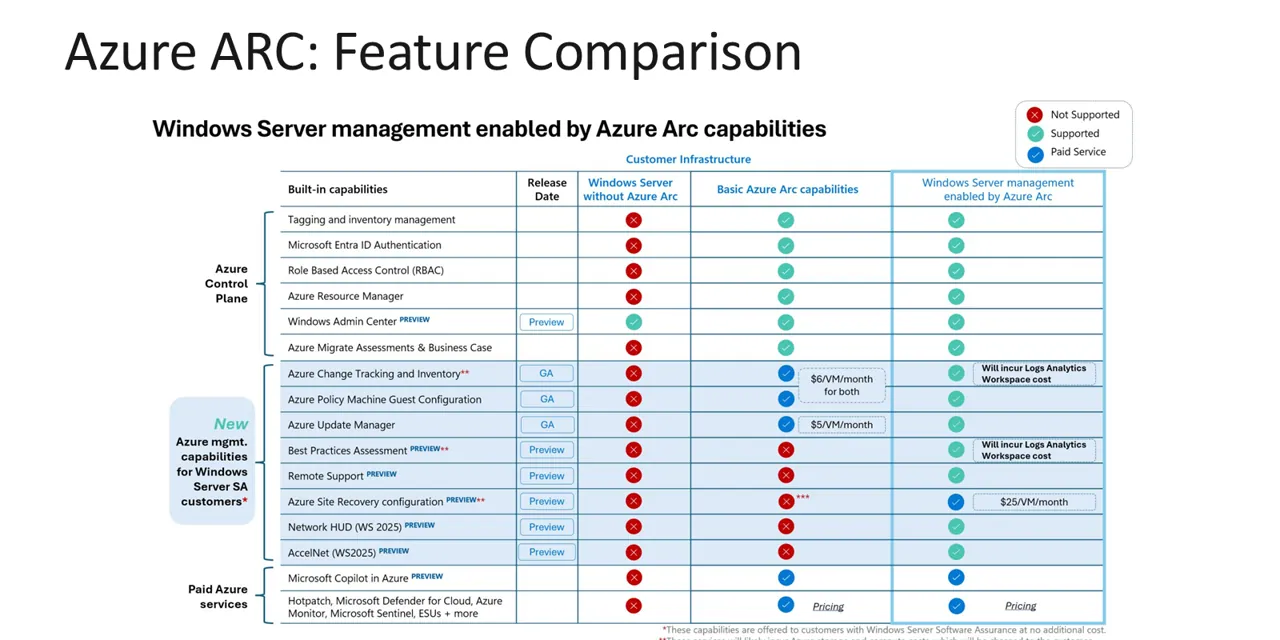
The last demo is SSH access through Arc. I wrap up with the feature comparison matrix for Windows Server management with and without Azure Arc, which shows what you unlock by enabling the agent.
Lessons from the field and takeaways
- Azure Arc brings cloud-born services into your datacenter, wherever it is. With a small agent, even small businesses and SMBs get enterprise-grade capabilities.
- Check connectivity to the Azure endpoints first: it’s the prerequisite that slows onboarding down the most.
- Start from the licenses the customer already owns. In my case, Intune made managing Defender for Endpoint on servers the natural choice.
- Use Azure Policy to deploy agents and associate DCRs. That’s what keeps the solution sustainable as the server count grows.
- You pay only for the features you need, only on the machines that need them, and most features have fixed, predictable costs.
- The RBAC model lets you delegate access to and management of machines with precise rules.
- To experiment safely, Azure Jumpstart ArcBox and the Applied Skill on Microsoft Learn are where I recommend starting.
Resources
Microsoft Learn documentation
- Azure Arc-enabled servers overview
- Connected Machine agent prerequisites
- Manage Microsoft Defender for Endpoint with Microsoft Intune
- Deploy Azure Monitor Agent with Azure Policy
- About Azure Update Manager
- SSH access to Azure Arc-enabled servers
Recordings
Related blog posts
Other sessions
Azure Copilot Agents: build, deploy, observe… survive
Six specialized Azure Copilot agents and GitHub Copilot for Azure put to work across a workload's lifecycle: where they help, where they don't, and how to keep them under control in production.
- Azure Copilot
- GitHub Copilot for Azure
- Azure Migrate
- Azure Monitor
- Azure MCP Server
- Azure Advisor
Hybrid is the New Normal: bring the power of the Microsoft Azure cloud into your datacenter
A webinar on Microsoft hybrid scenarios: Azure Arc to govern on-premises and multi-cloud servers, Azure Local to virtualize the cloud way, and Azure Site Recovery for disaster recovery.
- Webinar WeAreProject — Hybrid is the New Normal · 11 June 2026
- Azure Arc
- Azure Local
- Azure Site Recovery
- Azure Update Manager
- Microsoft Defender for Cloud
- Azure Monitor
- +1