Azure Virtual Desktop: from scratch to delivery
The full path of an AVD project: identity model, hub-spoke networking with firewall, golden image and Custom Image Templates, FSLogix profiles on private storage, host pools and application groups.
- Events
-
- WPC 2025 · · Assago (Milan) · Conference
- Level
- Intermediate
- With
- Yuri Gasparini
The problem and the context
Spinning up an Azure Virtual Desktop host pool from the portal takes minutes. Delivering an AVD environment that can survive production is another story: behind it are identity, network, security, image, profile and management decisions that, if wrong at the start, you pay for years.
In this session at WPC 2025, with Yuri Gasparini, we set out to do exactly that: walk an AVD project from blank page to delivery, in the order we tackle it in real projects, with an Azure lab built for the occasion and three demos. It’s for sysadmins and architects who have to design or inherit an AVD environment and want a reasoned checklist, not yet another product overview.
Key content
Everything starts with identity
The first decision shapes all the others. There are three models:
| Model | How it works | Intune management |
|---|---|---|
| Active Directory (AD DS) | Session hosts joined to a domain, on-premises or in Azure; hybrid identities synced with Microsoft Entra Connect | Yes, by making VMs Hybrid Joined |
| Microsoft Entra Domain Services | Managed domain in Azure (domain join, Kerberos/NTLM, LDAP, GPO) fed by Entra ID identities | No, not supported |
| Microsoft Entra ID | Entra joined session hosts, cloud-only scenario with no AD DS dependency | Yes, with automatic enrollment at host pool creation |
If you go with AD DS and domain controllers in Azure, there are precise requirements: database, logs and SYSVOL on a separate data disk with host caching set to None, and at least two DCs in different availability zones.
The network: hub-spoke and firewall
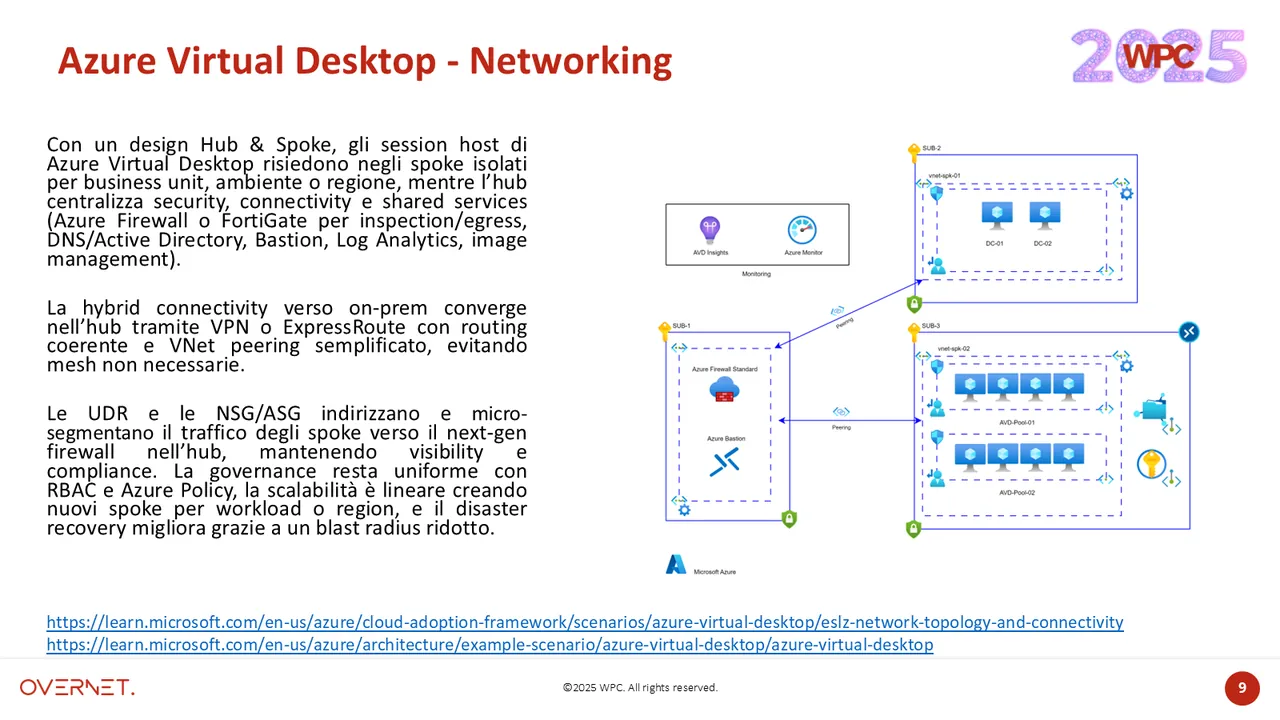
Our model is hub-spoke: session hosts live in spokes isolated by business unit, environment or region, while the hub centralizes security and shared services (firewall, DNS/AD, Bastion, Log Analytics, image management). Hybrid connectivity converges in the hub via VPN or ExpressRoute; UDRs and NSGs/ASGs steer spoke traffic to the firewall. The payoff is uniform governance with RBAC and Azure Policy, linear growth (new workload, new spoke) and a smaller blast radius.
For the firewall we compared Azure Firewall, a PaaS service deployable across availability zones with a 99.99% SLA and manageable through Azure Firewall Manager, with FortiGate as an IaaS NVA with L3–L7 inspection, IPS, web filtering, antivirus and VPN. Which is better? It depends: on team skills, company standards and required features. I wrote a deep dive on FortiGate routing and UDRs too: FortiGate in Azure: routing, UDRs and AVD traffic under control.
Azure is your datacenter and must be run like one: the firewall is mandatory, and the new perimeter to protect is identity.
Everything starts with the master
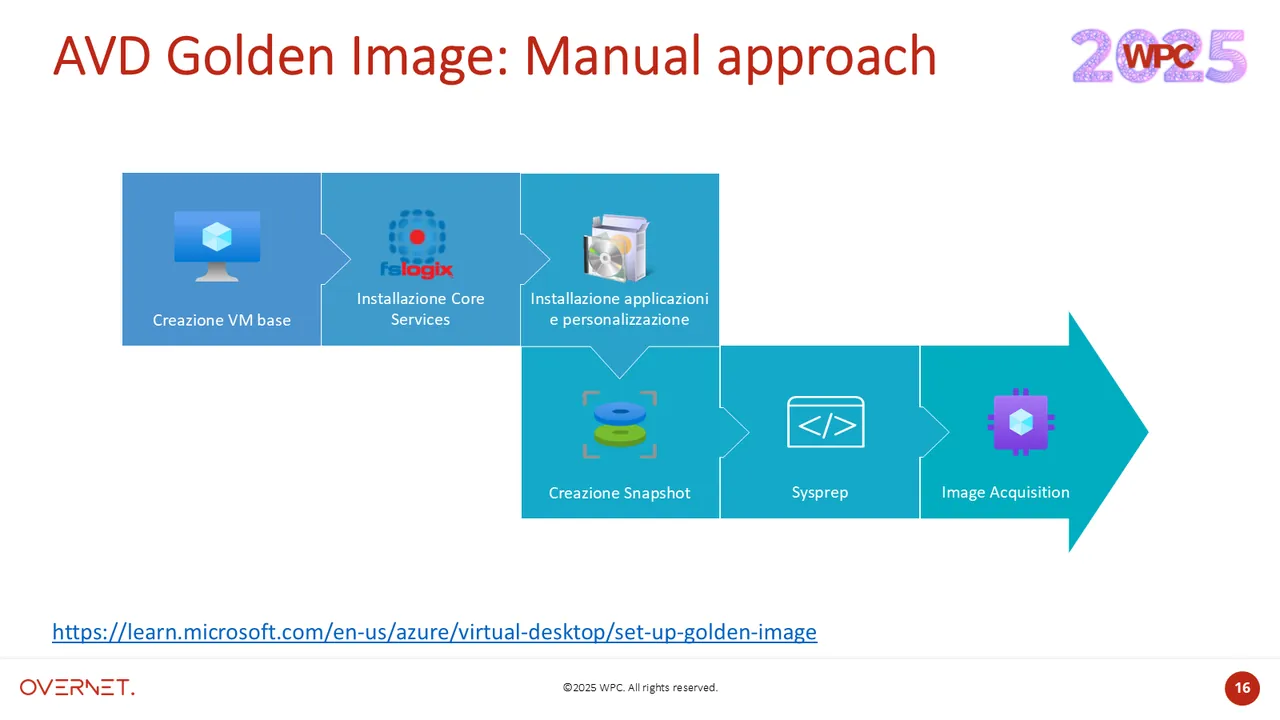
The image is the heart of the environment. The manual approach is well known: base VM, core services, apps and customizations, snapshot, sysprep, capture. It works, but it’s error-prone. Custom Image Templates make the process repeatable and consistent across session hosts. Can you use the Marketplace directly as the source? Yes, but factor in the time it takes to deploy customizations.
For managing the master and session hosts we compared Configuration Manager, powerful but costly in an increasingly BYOD world; Microsoft Intune, included in almost every plan that enables AVD, with the limit that it can’t manage the master; and supported RMM tools, effective but with extra costs.
FSLogix and profile storage
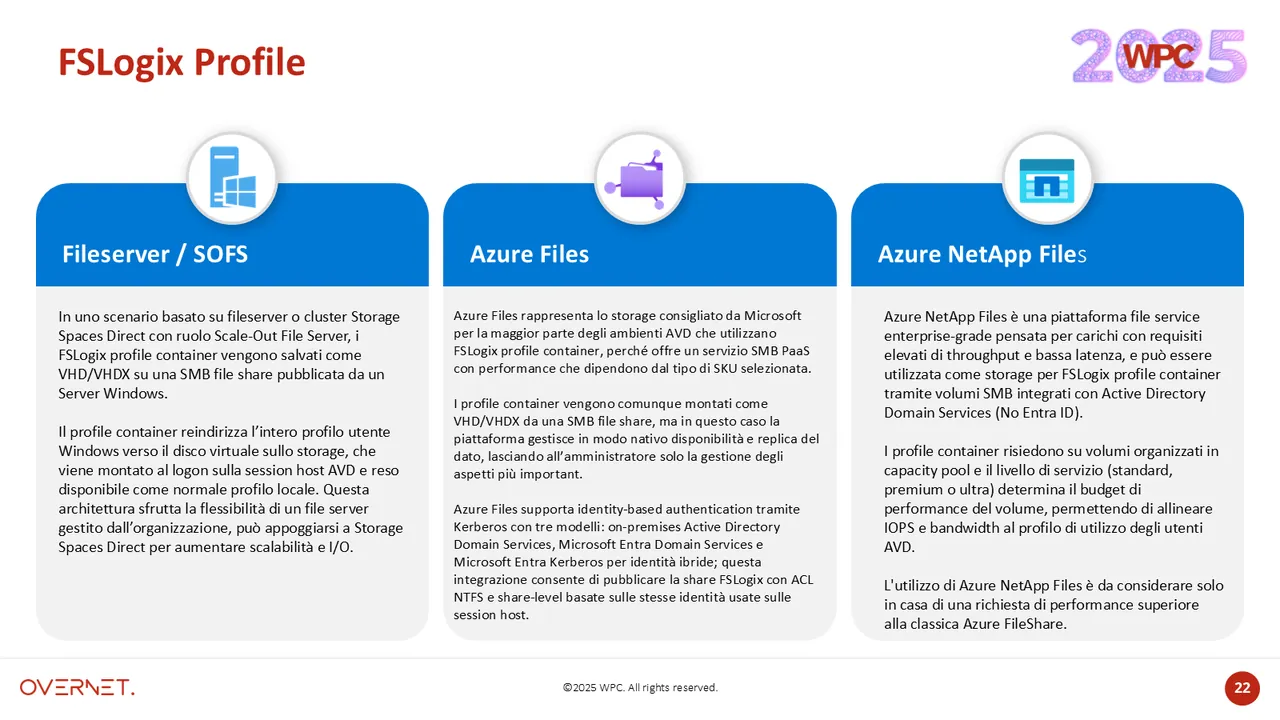
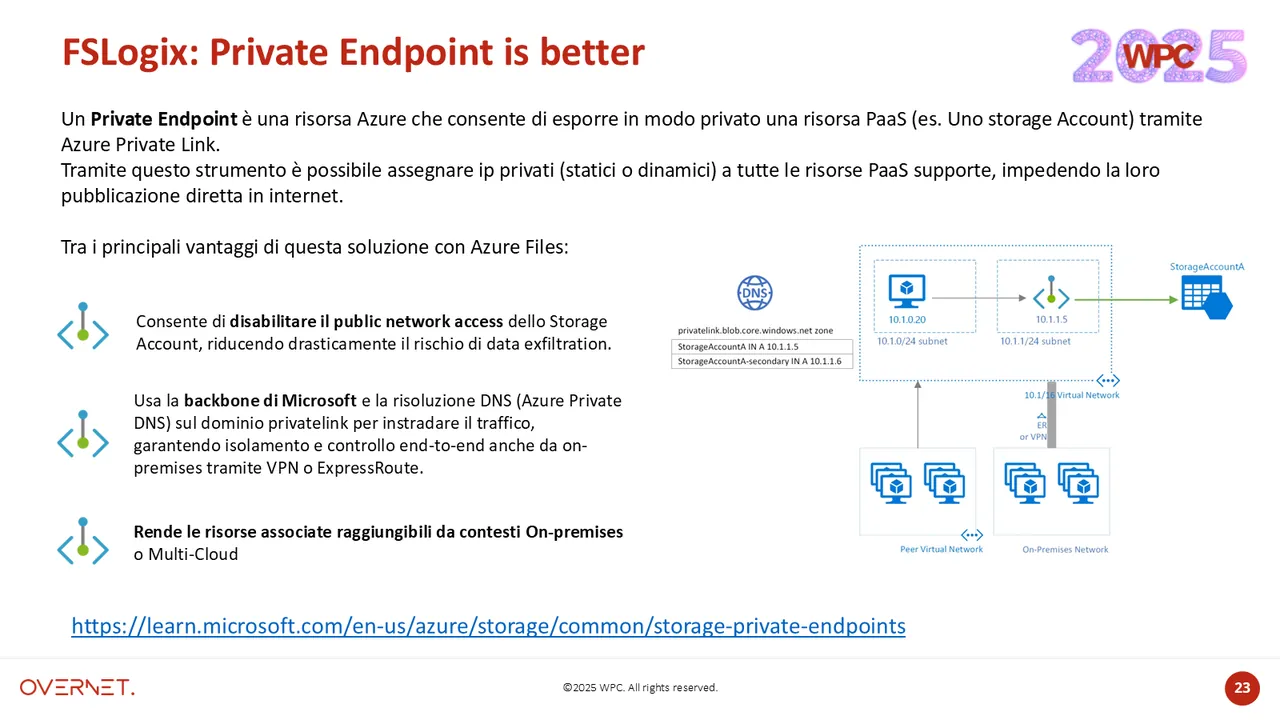
FSLogix is more than a profile container: there’s the service that mounts containers and applies rules, the RuleEditor for hiding, redirection and specify-value rules, and Cloud Cache for resilience and BCDR scenarios (at the cost of more I/O and local space). For profile storage the options are file server/SOFS, Azure Files (the recommended choice in most cases, with Kerberos authentication via AD DS, Entra Domain Services or Microsoft Entra Kerberos) and Azure NetApp Files for workloads with high throughput and low latency needs, integrated with AD DS only. Either way: private endpoint, with public access to the storage account disabled.
Architectures and demos
The opening diagram (at the top) is the reference topology: a hub with Azure Firewall and Bastion, an identity spoke with the domain controllers and an AVD spoke with the host pools, plus Azure Monitor and AVD Insights. We built the demo lab on this foundation.
The first demo took us inside the Azure lab, starting from the domain controller VM.
The second demo followed the section on the master and its management.
Finally, session host deployment: workspace, host pool (pooled or personal) and application group, plus the choice between full desktop and RemoteApp. The third demo showed the end result from the user’s point of view, connecting to the environment from a mobile device as well.
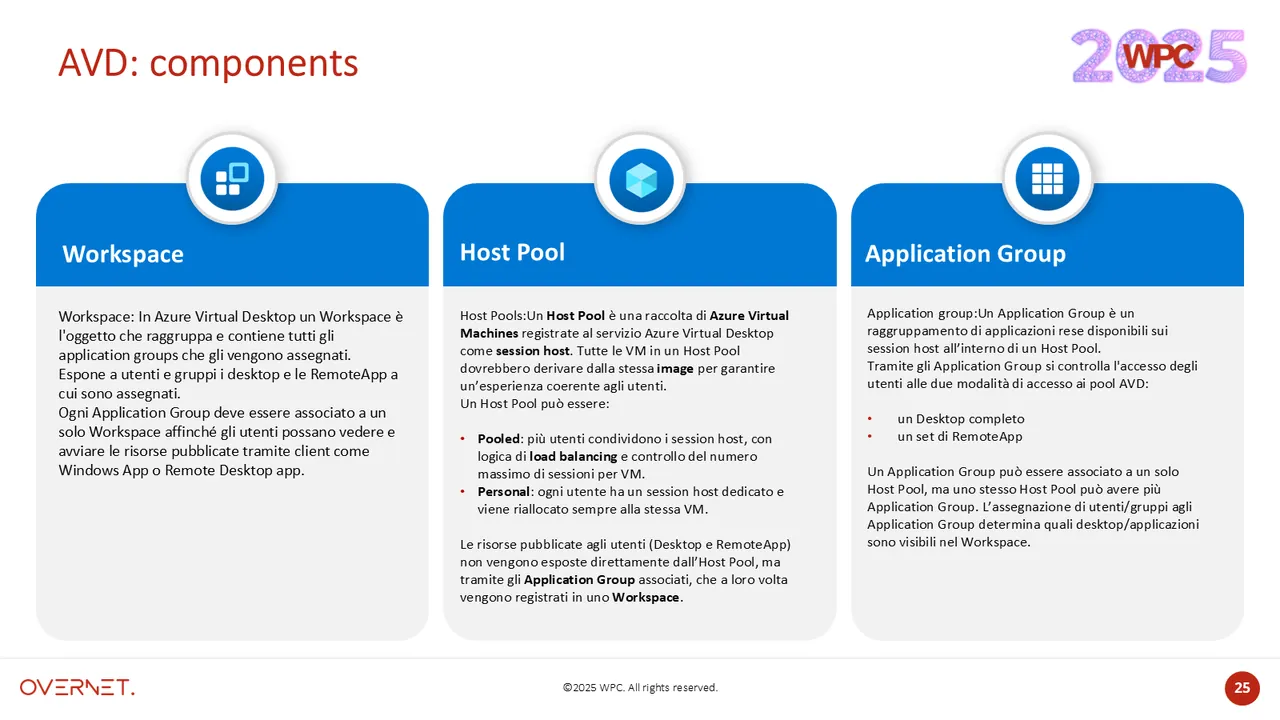
As a closing “one more thing”: AVD Insights for monitoring and scaling plans, with power management autoscaling and dynamic autoscaling (in preview at the time of the session) to keep costs in check.
Lessons from the field and takeaways
- Pick the identity model first: it decides whether you can use Intune and how much infrastructure you’ll have to maintain.
- Hub & Spoke is the right approach: network segregation adds management effort but makes security and control easier.
- A firewall is mandatory; Azure Firewall vs FortiGate depends on skills and requirements, not on a ranking.
- Image management matters as much as host management: automate it with Custom Image Templates.
- Remember Intune doesn’t manage the master: plan the tooling for the image.
- FSLogix profiles on Azure Files behind a private endpoint, with public access disabled.
- AVD is an exposed resource: the new perimeter to protect is identity.
- Plan monitoring and scaling plans as part of delivery, not afterwards.
Resources
Microsoft Learn documentation
- Network topology and connectivity for Azure Virtual Desktop
- Create a golden image in Azure
- Custom image templates in Azure Virtual Desktop
- What is FSLogix?
- Use private endpoints for Azure Storage
- Azure Virtual Desktop terminology
Recordings
Related blog posts
Other sessions
Hybrid is the New Normal: bring the power of the Microsoft Azure cloud into your datacenter
A webinar on Microsoft hybrid scenarios: Azure Arc to govern on-premises and multi-cloud servers, Azure Local to virtualize the cloud way, and Azure Site Recovery for disaster recovery.
- Webinar WeAreProject — Hybrid is the New Normal · 11 June 2026
- Azure Arc
- Azure Local
- Azure Site Recovery
- Azure Update Manager
- Microsoft Defender for Cloud
- Azure Monitor
- +1
From Personal Computer to Microsoft Desktop as a Service: the desktop that is no longer a desktop
A journey from the physical PC to the desktop delivered as a service: why virtualize, how to choose between Windows 365 and Azure Virtual Desktop, and two case studies with landing zone, firewall and FSLogix.
- BeConnected Day 13 · 5 June 2025
- Azure Virtual Desktop
- Windows 365
- FSLogix
- Azure Firewall
- Microsoft Entra ID
- Azure Monitor