From Personal Computer to Microsoft Desktop as a Service: the desktop that is no longer a desktop
A journey from the physical PC to the desktop delivered as a service: why virtualize, how to choose between Windows 365 and Azure Virtual Desktop, and two case studies with landing zone, firewall and FSLogix.
- Events
-
- BeConnected Day 13 · · Pioltello (Milan) · Conference
- Level
- Intermediate
- With
- Yuri Gasparini
The problem and the context
For years “desktop” meant one thing: a PC under the desk, holding the operating system, the apps and the user’s data. But business needs have changed: remote work, external consultants, mergers, personal devices, legacy apps that can’t run just anywhere. In these scenarios the desktop stops being a physical object and becomes a service.
This session, which I delivered with Yuri Gasparini at BeConnected Day 13, starts right there: how we got to Microsoft’s Desktop as a Service and, above all, how to pick the right platform between Windows 365 and Azure Virtual Desktop. It’s aimed at IT managers, sysadmins and architects who know the RDS/VDI world and want to understand what changes when the desktop lives in the cloud.
Key content
A bit of history
We started with a trip back in time: Citrix in 1995, Windows NT Terminal Server 4.0 in 1998, multi-user, Remote Desktop Services with Windows Server 2008 R2 and 2012, up to 2019 and the arrival of Azure Virtual Desktop. Remote desktops are almost thirty years old: what changes is who runs the brokering, gateway and load-balancing infrastructure. With AVD Microsoft runs that part; we keep the subscription, meaning VMs, network and storage.
Why virtualize desktops
Before technology, the why. In my projects the drivers almost always fall into four families:
- Security and control: regulated industries such as finance, healthcare and government, where data must not leave the perimeter.
- Agility: mergers and acquisitions, seasonal staff, consultants and partners to onboard quickly.
- Remote access: personal and mobile devices, call centers, branch offices.
- Special workstations: design and engineering, legacy apps, dev/test environments.
Windows 365 or Azure Virtual Desktop?
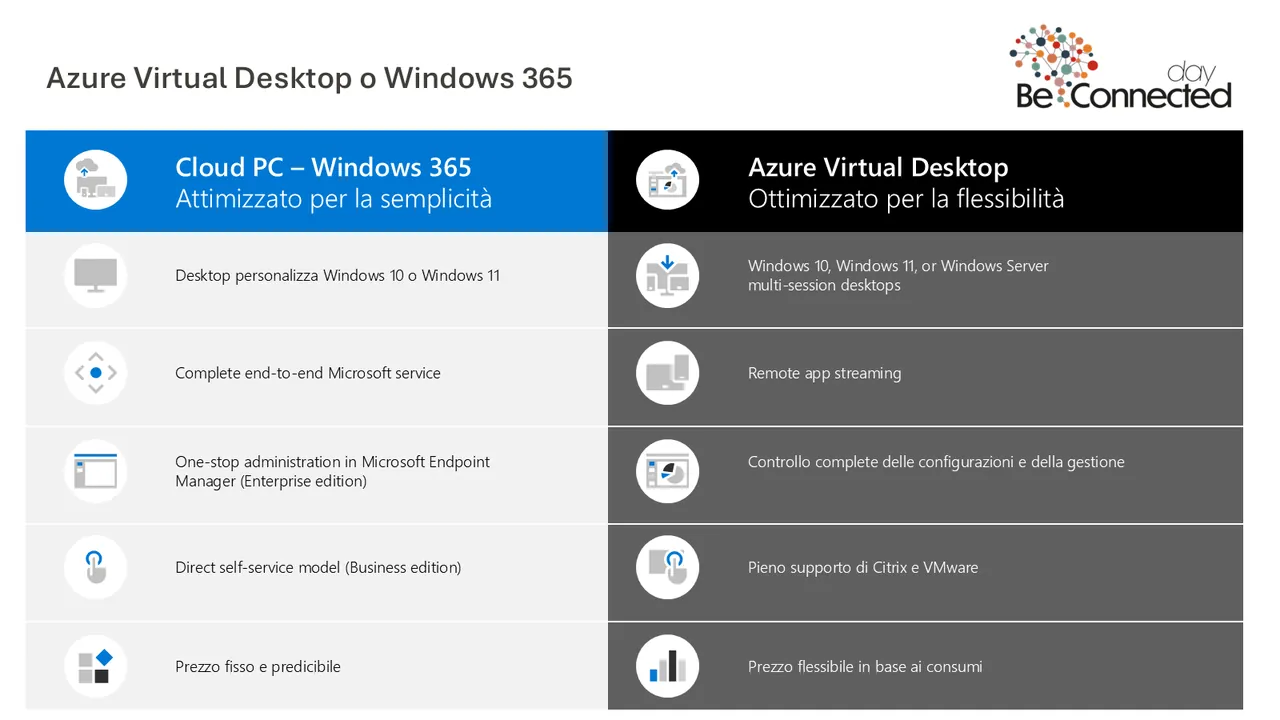
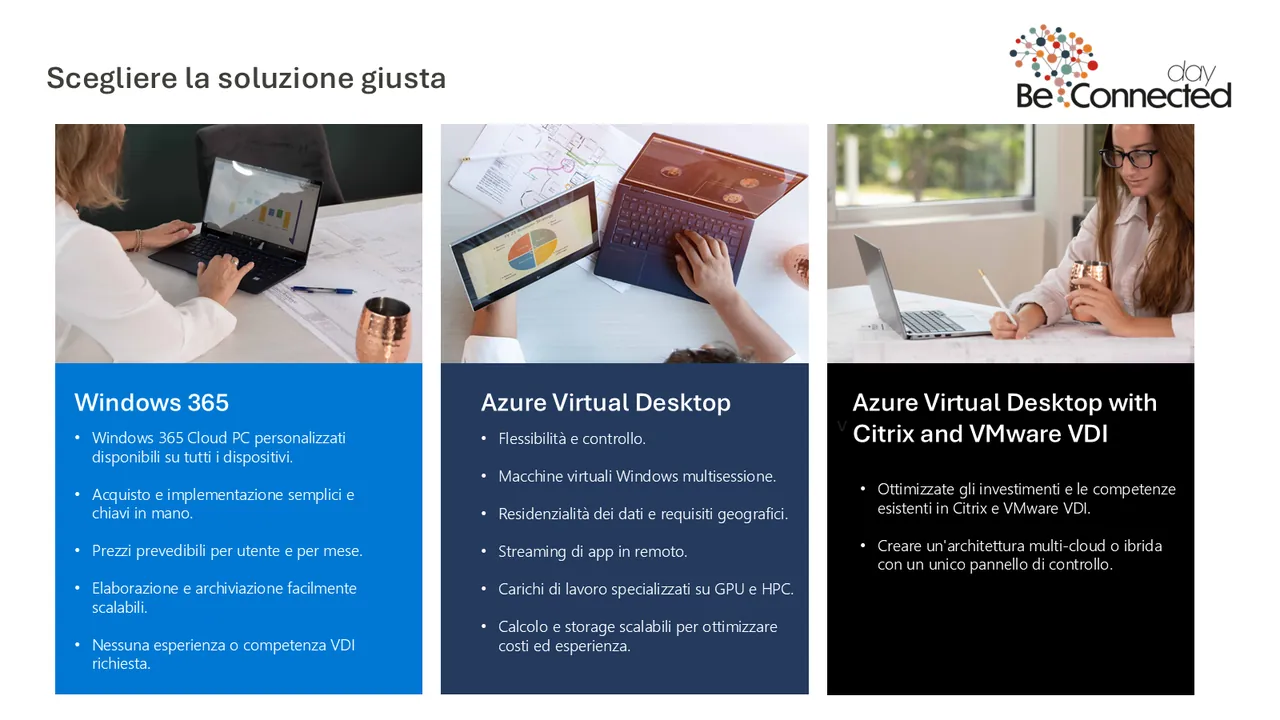
The core of the session is the choice. Microsoft offers three paths: Windows 365, turnkey personal Cloud PCs at a fixed per-user price; Azure Virtual Desktop, with full control, multi-session, RemoteApp, GPU and scalability; and AVD with Citrix or VMware, for those who want to leverage existing VDI investments and skills.
| Windows 365 | Azure Virtual Desktop | |
|---|---|---|
| Optimized for | Simplicity | Flexibility |
| Operating system | Personal Windows 10/11 desktop | Windows 10/11 multi-session, Windows Server |
| Model | End-to-end Microsoft service | Infrastructure in your subscription |
| Apps | Full desktop | Full desktop and RemoteApp streaming |
| Management | Microsoft Intune (Enterprise), self-service (Business) | Full control of configuration and management |
| Third parties | — | Full Citrix and VMware support |
| Cost | Fixed and predictable per user | Flexible, consumption-based |
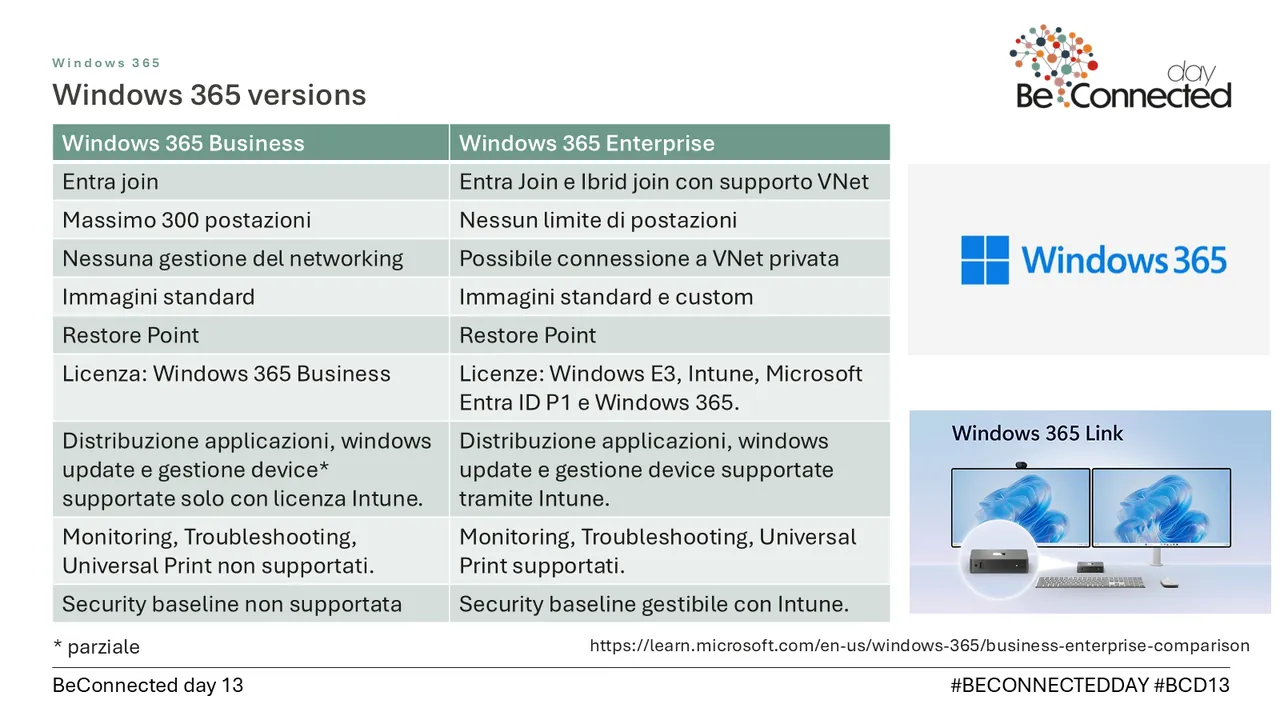
Within Windows 365 there’s another choice: Business is capped at 300 seats, Entra join only, no networking control and standard images; Enterprise has no seat limit, supports Entra join and Hybrid join with a private VNet connection, custom images and Intune management.
There’s no absolute best platform: Windows 365 wins on simplicity, Azure Virtual Desktop on flexibility. The choice starts from user requirements, not from technology.
Licensing, clients and deadlines you can’t miss
An often-overlooked point: many customers are already entitled to AVD through existing licenses (Microsoft 365 E3/E5, A3/A5, F3, Business Premium, Windows Enterprise E3/E5, Windows VDA per user); publishing Windows Server requires RDS CALs instead. The client runs everywhere: Windows App, macOS, iOS/iPadOS, Android, Chrome OS and the browser.
We also recalled two deadlines that directly affect projects: Windows 10 end of support (14 October 2025) and the retirement of default outbound access for new Azure VMs (30 September 2025), which forces you to plan an explicit egress method such as NAT Gateway, load balancer outbound rules or a public IP.
Architectures and demos
To make it concrete we presented two case studies built on a sample company.
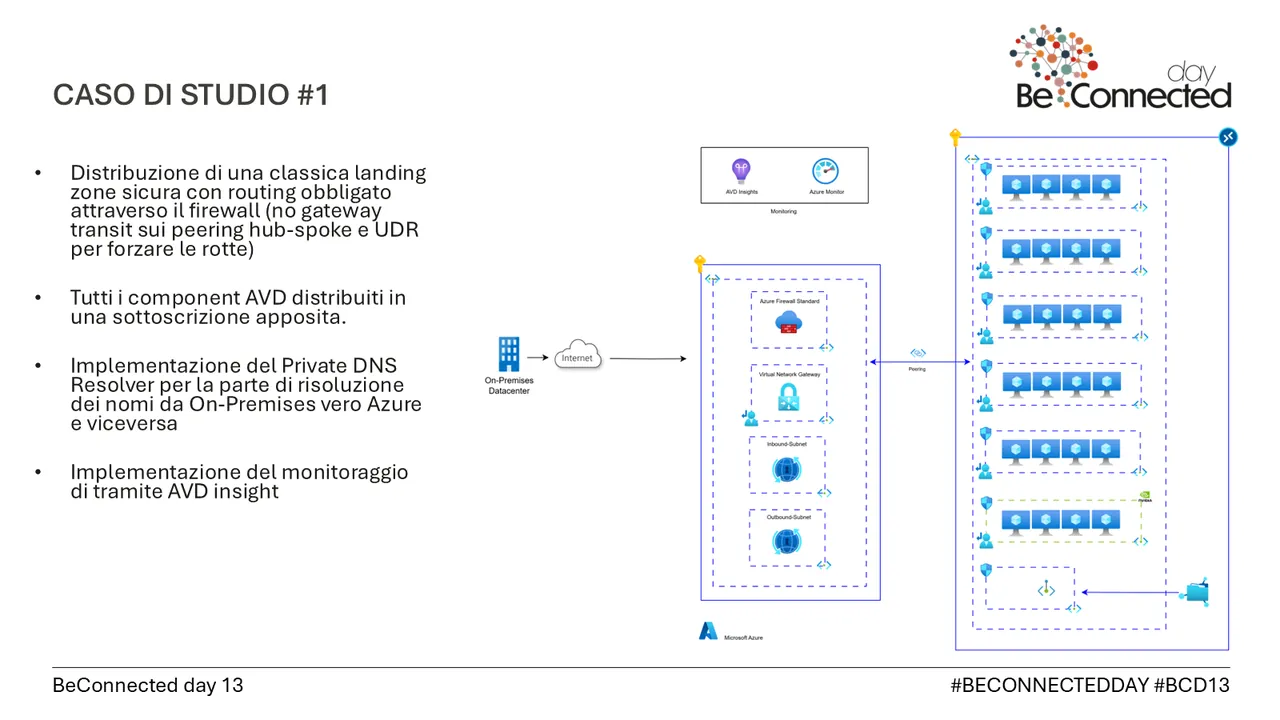
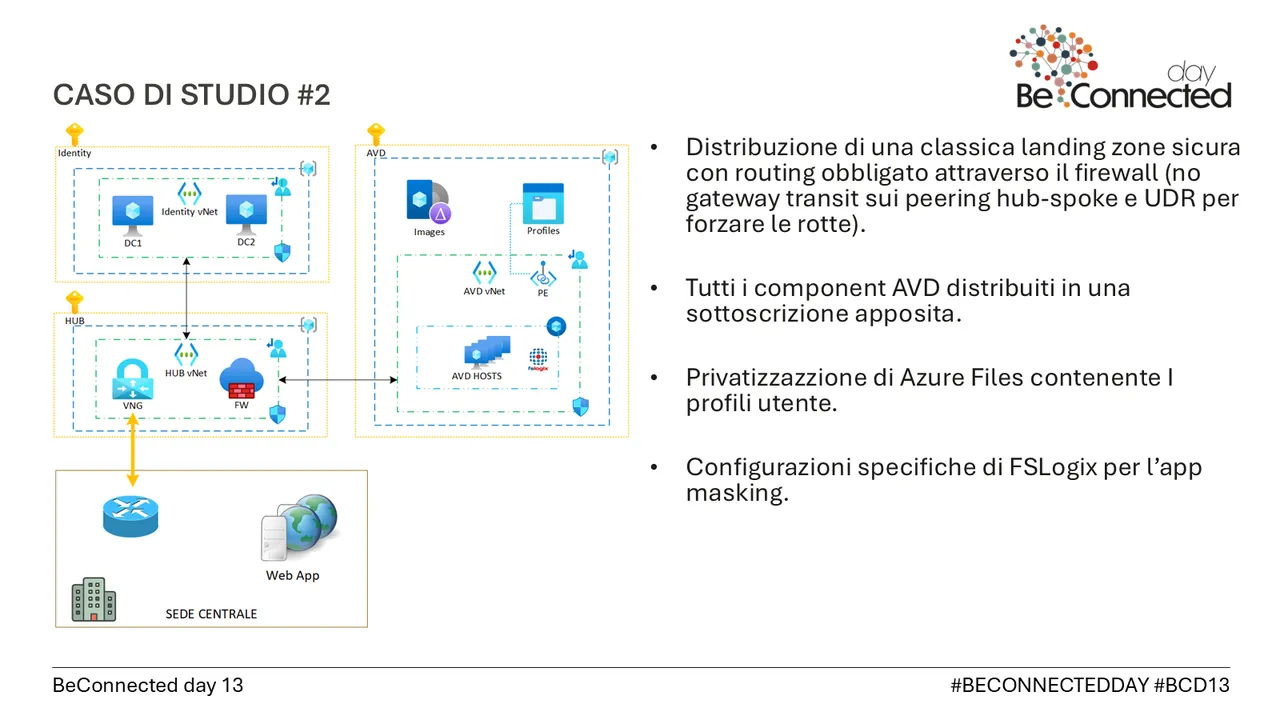
In the first case study the request was a new AVD infrastructure with domain controllers kept on-premises, routing to manage between VNets and the datacenter, outbound traffic to protect and dedicated monitoring. The solution is a classic hub-spoke landing zone with routing forced through Azure Firewall (no gateway transit on peerings, UDRs to enforce routes), all AVD components in a dedicated subscription, Azure DNS Private Resolver for name resolution in both directions between on-premises and Azure, and monitoring with AVD Insights.
The second case study was messier, and therefore more interesting: a legacy web application optimized for Internet Explorer 11, with Java applets tied to a specific JRE version that write to a local path shared by all users. On top of the same secure landing zone, we privatized the Azure Files storage holding the profiles and used specific FSLogix configurations for app masking, also leveraging Java redirection.
The demos showed the environment from the user side and image building with AVD Custom Image Templates, which make adding apps, configurations and updates to the session host image repeatable.
In the “What’s next” part we covered AVD Insights on Azure Monitor, Session Host Update (in preview at the time of the session, and only for AD-joined or hybrid machines, not Entra joined) and scaling plans: power management autoscaling, which starts and stops session hosts based on usage, and dynamic autoscaling, in preview, which creates and deletes VMs in pooled host pools based on demand.
Lessons from the field and takeaways
- Start from the why (security, agility, remote access, special workstations): it drives the platform choice.
- Windows 365 is the right answer when you need simplicity and predictable cost; AVD when you need multi-session, RemoteApp, GPU or full control.
- Check the licenses you already own: AVD entitlement is often already there.
- An AVD environment is a datacenter in every sense: landing zone, firewall, routing and DNS come before session hosts.
- FSLogix isn’t just profiles: app masking and Java redirection solve legacy cases that would otherwise require multiple images.
- Plan explicit internet egress for new VMs from day one.
- Monitoring and scaling plans aren’t an afterthought: they keep user experience and costs under control.
- Identity is the new perimeter: desktop access goes through Microsoft Entra ID and its security layers.
Resources
Microsoft Learn documentation
- What is Azure Virtual Desktop?
- What is Windows 365?
- Custom image templates in Azure Virtual Desktop
- Azure Virtual Desktop Insights
- Autoscale scaling plans in Azure Virtual Desktop
- What is Azure DNS Private Resolver?
Recordings
- Watch / listen to the recording — BeConnected Day 13
Related blog posts
Other sessions
Hybrid is the New Normal: bring the power of the Microsoft Azure cloud into your datacenter
A webinar on Microsoft hybrid scenarios: Azure Arc to govern on-premises and multi-cloud servers, Azure Local to virtualize the cloud way, and Azure Site Recovery for disaster recovery.
- Webinar WeAreProject — Hybrid is the New Normal · 11 June 2026
- Azure Arc
- Azure Local
- Azure Site Recovery
- Azure Update Manager
- Microsoft Defender for Cloud
- Azure Monitor
- +1
Azure Virtual Desktop: from scratch to delivery
The full path of an AVD project: identity model, hub-spoke networking with firewall, golden image and Custom Image Templates, FSLogix profiles on private storage, host pools and application groups.
- WPC 2025 · December 2025
- Azure Virtual Desktop
- Microsoft Entra ID
- FSLogix
- Azure Files
- Azure Firewall
- FortiGate
- +1