Beyond the Desktop: the new era of work with Azure Virtual Desktop and Windows 365
A webinar on Microsoft Desktop as a Service: when to pick Windows 365 or Azure Virtual Desktop, a case study with a GPU-based CAD pool and the features that simplify images, updates and scaling.
- Events
-
- Webinar WeAreProject — Beyond the Desktop · · Online · Webinar
- Level
- Intermediate
The problem and the context
Desktop virtualization is nothing new: from the first Terminal Servers in the ’90s to Remote Desktop Services, up to Azure Virtual Desktop in 2019, the core idea hasn’t changed. What changed is the model: the desktop is now a cloud service, and the question is no longer “whether” to virtualize but “with which solution”.
This webinar tries to answer that question. I start from the reasons companies virtualize workstations (security and control, agility for mergers, seasonal staff and consultants, remote access from personal devices and branch offices, specialized workstations for design, legacy applications or dev/test) and end with a full case study. The session is for IT managers and sysadmins who manage workstations and are evaluating Azure Virtual Desktop or Windows 365, also with the Windows 10 end of support on 14 October 2025 in mind.
Key content
Choosing the right solution
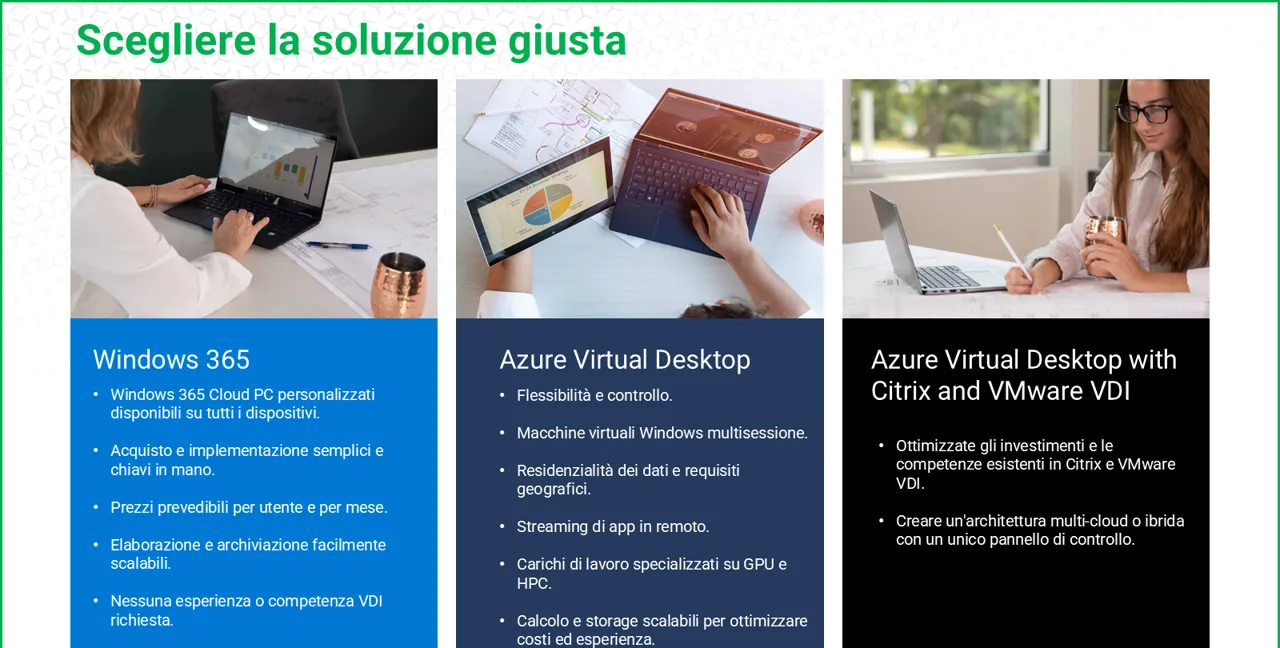
Microsoft Desktop as a Service comes in three flavours, and in my projects the choice mostly depends on how much control you need and how much VDI expertise you have in-house:
| Windows 365 | Azure Virtual Desktop | AVD with Citrix / VMware VDI | |
|---|---|---|---|
| Model | Personal Cloud PC, turnkey | Flexible platform with full control | AVD as the foundation for third-party products |
| Costs | Predictable, per user per month | Scalable compute and storage to optimize | Leverages existing investments |
| VDI skills | Not required | Required | Existing Citrix/VMware skills |
| Strengths | Simple to buy and deploy | Multi-session, data residency, RemoteApp, GPU and HPC | Hybrid or multicloud architecture with a single console |
Windows 365 comes in Business and Enterprise editions, with significant differences in management and integration, which I summarized using Microsoft’s comparison table. Azure Virtual Desktop lets you deploy Windows 10/11 multi-session with Microsoft 365 optimizations, or migrate desktops and published apps from Windows Server (RDS).
Licensing and clients
Licensing always raises questions. To access Windows 10/11 Enterprise single or multi-session on AVD you need one of the eligible user licenses (for example Microsoft 365 E3/E5, A3/A5, F3, Business Premium, Windows Enterprise E3/E5 or Windows VDA per user). To access Windows Server published through AVD you need RDS CALs with active Software Assurance or RDS User Subscription Licenses. On the client side, you can connect from Windows App, the Windows (MSI) client, macOS, iOS/iPadOS, Android/ChromeOS and the web browser.
Key design components
The case study relies on three services I consider essential in any serious AVD deployment:
- Azure Firewall, to protect North-South and East-West traffic, outbound included, deployed across Availability Zones and managed centrally with Firewall Manager;
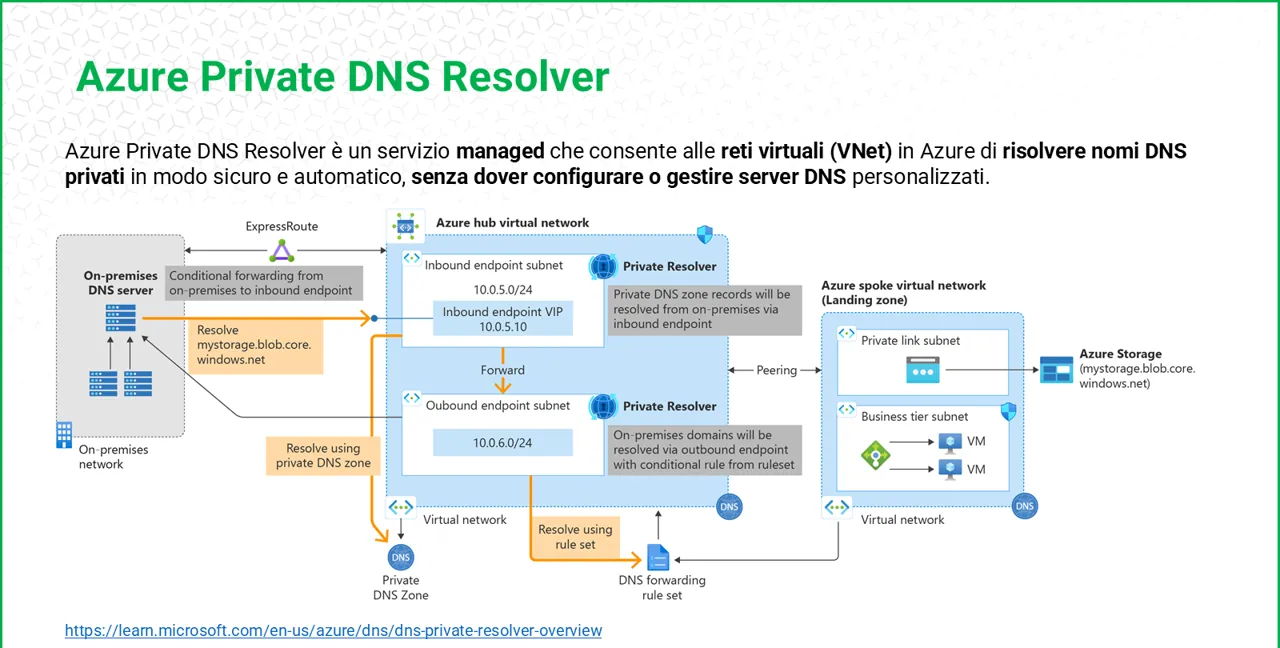
- Azure Private DNS Resolver, the managed service that resolves private names between VNets and on-premises without running custom DNS servers;
- FSLogix, which replaces roaming profiles and folder redirection, speeds up logon and app launch, roams the Office cache (OST, OneDrive) and the search index with the user, and with App Masking keeps the number of gold images to a minimum.
Power is nothing without control: an AVD infrastructure must be designed with networking, identity and monitoring from day one, not just session hosts.
Platform improvements
In the last part I cover the tools that make day-2 operations easier:
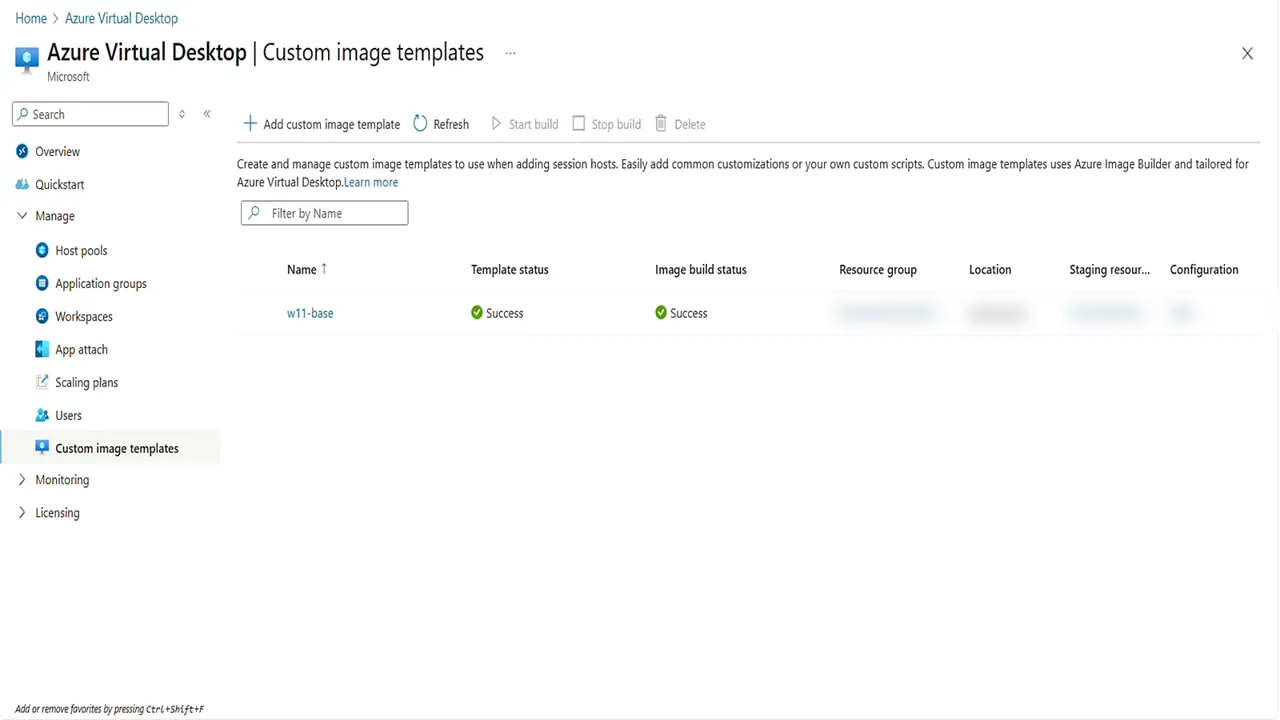
- Custom Image Templates, to standardize and automate image creation with apps, configurations and updates in a repeatable process;
- Session Host Update, in preview at the time of the session, to centrally and automatically update VMs in pooled host pools (at the time supported only for AD-joined or hybrid-joined machines, not Entra-joined);
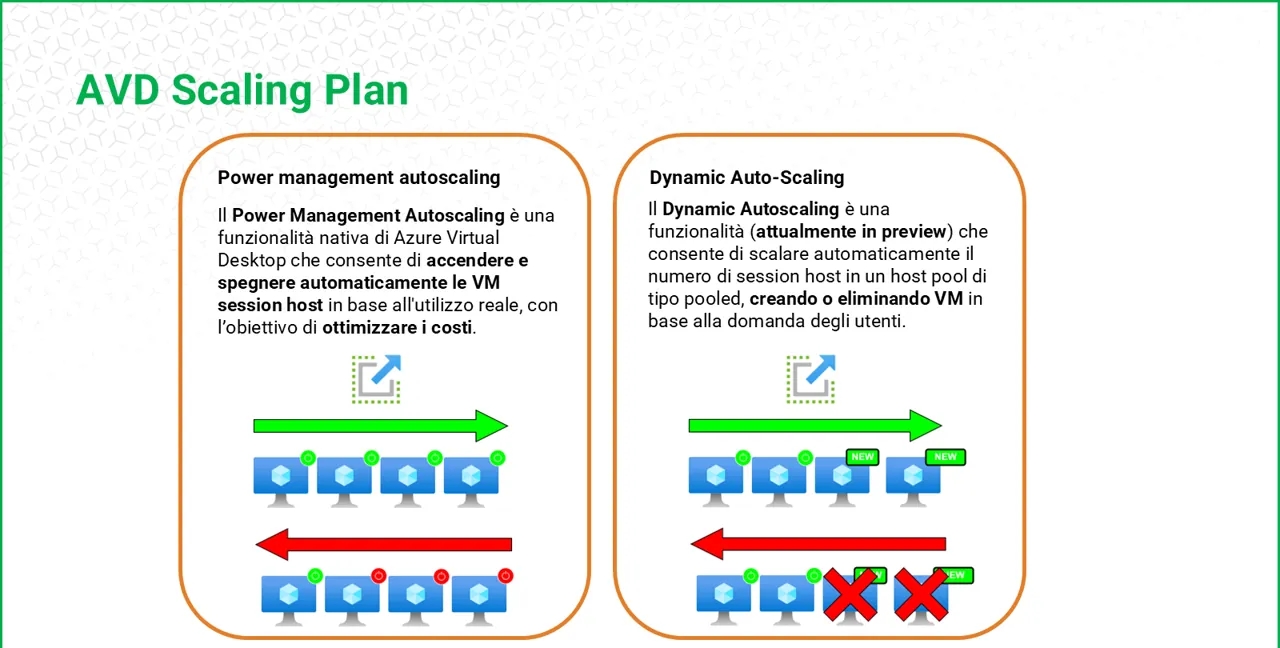
- Scaling plans: power management autoscaling powers session hosts on and off based on actual usage, while dynamic autoscaling (in preview) creates and deletes VMs based on demand;
- AVD Insights, built on Azure Monitor, Workbooks and Log Analytics, for visibility into performance, usage and connectivity.
I also mention the retirement of default outbound access for new VMs from 30 September 2025: session hosts need an explicit outbound method, which a design with a central firewall already solves.
Architectures and demos
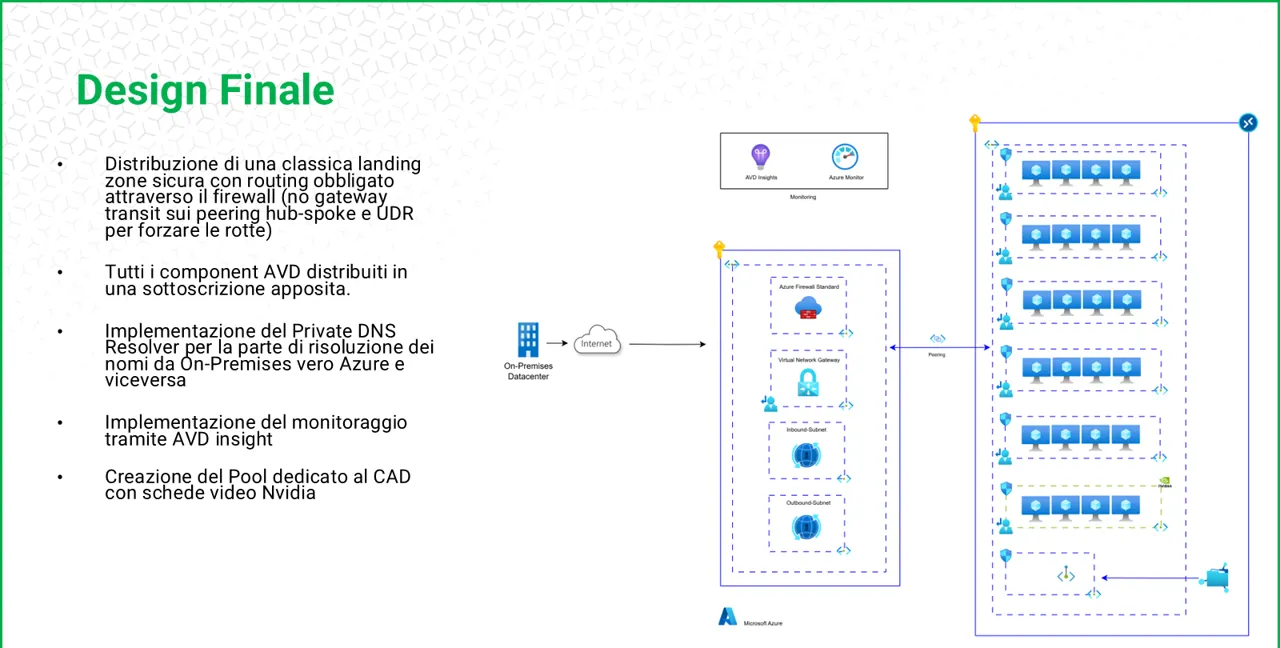
The case study is about a company that wants to move all its workstations to a new AVD infrastructure in Azure. There were three constraints: a dedicated pool for CAD design software, routing between VNets and on-premises while protecting outbound traffic, and keeping the domain controllers on-premises.
The final design, shown in the cover image, is a classic secure landing zone with forced routing through the firewall: no gateway transit on hub-spoke peerings and UDRs to force the routes. All AVD components live in a dedicated subscription, the Private DNS Resolver handles name resolution from on-premises to Azure and back, monitoring is done with AVD Insights and the CAD pool uses VMs with NVIDIA GPUs. I went deeper on forced routing in the post on routing and UDRs with FortiGate.
There were two demos: the first on the case study infrastructure, the second on building a Windows 11 image with Custom Image Templates straight from the AVD portal.
Lessons from the field and takeaways
- Azure Virtual Desktop and Windows 365 let you deliver workstations quickly and flexibly: the choice depends on the control you need and the VDI skills you have.
- Virtual workstations can be managed and controlled simply and centrally.
- Service continuity is backed by the Azure platform and can be extended to Disaster Recovery scenarios.
- Desktop access goes through multiple security layers and identity management with Microsoft Entra ID.
- Design the network before the session hosts: forced routing through the firewall and private DNS avoid production headaches.
- Automate images, updates and scaling: Custom Image Templates and scaling plans cut errors and costs.
- AVD integrates with third-party tools such as Citrix, Omnissa and Nerdio when needed.
Resources
Microsoft Learn documentation
- Windows 365 Business and Enterprise comparison
- What is Azure DNS Private Resolver?
- What is FSLogix?
- Custom image templates in Azure Virtual Desktop
- Autoscale scaling plans in Azure Virtual Desktop
- Azure Virtual Desktop Insights
Related blog posts
Other sessions
Hybrid is the New Normal: bring the power of the Microsoft Azure cloud into your datacenter
A webinar on Microsoft hybrid scenarios: Azure Arc to govern on-premises and multi-cloud servers, Azure Local to virtualize the cloud way, and Azure Site Recovery for disaster recovery.
- Webinar WeAreProject — Hybrid is the New Normal · 11 June 2026
- Azure Arc
- Azure Local
- Azure Site Recovery
- Azure Update Manager
- Microsoft Defender for Cloud
- Azure Monitor
- +1
Azure Virtual Desktop: from scratch to delivery
The full path of an AVD project: identity model, hub-spoke networking with firewall, golden image and Custom Image Templates, FSLogix profiles on private storage, host pools and application groups.
- WPC 2025 · December 2025
- Azure Virtual Desktop
- Microsoft Entra ID
- FSLogix
- Azure Files
- Azure Firewall
- FortiGate
- +1