Microsoft Azure: the cloud is a process to adopt
You don't buy the cloud, you adopt it. An introductory journey through Microsoft Azure: Cloud Adoption Framework, Landing Zones, identity and governance, core IaaS resources and the usual objections to address.
- Events
-
- DevMarche — Cloudy with a chance of devs · · User group
- Level
- Introductory
The problem and the context
When you talk about the cloud with a company, the first picture that comes up is almost always the same: take my virtual machines, move them to Azure, done. That is exactly where most problems start: runaway costs, permissions assigned at random, networks designed without a plan, security left “for later”.
I brought this session to DevMarche “Cloudy with a chance of devs” with a simple message: the cloud is not a product you buy, it is a process you adopt. It is aimed at people approaching Microsoft Azure, developers and IT Pros alike, who want to understand where to start without getting lost among hundreds of services.
Key content
Why Azure, and who is responsible for what
I start from the basics: Azure’s global infrastructure, regions, availability zones, and four reasons to consider it: reliability through geographic distribution, a pay-for-what-you-use model, scalability based on load, and a broad set of security certifications.
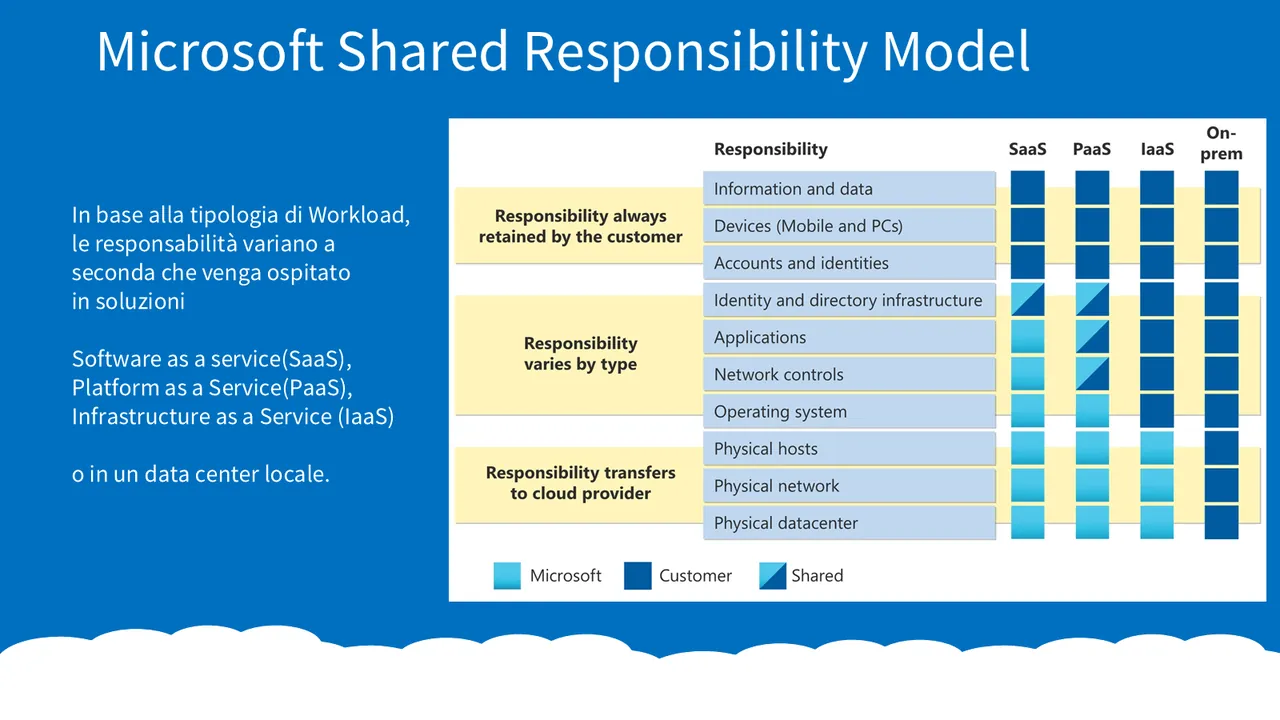
Right after that I put the Shared Responsibility Model on the table: depending on whether a workload runs on-premises, in IaaS, PaaS or SaaS, the line between what Microsoft manages and what stays with us moves. On an IaaS VM the operating system, patches, identities and data are still ours. It is the first thing I clarify with anyone who thinks “going to the cloud” means delegating everything.
Cloud Adoption Framework: the method
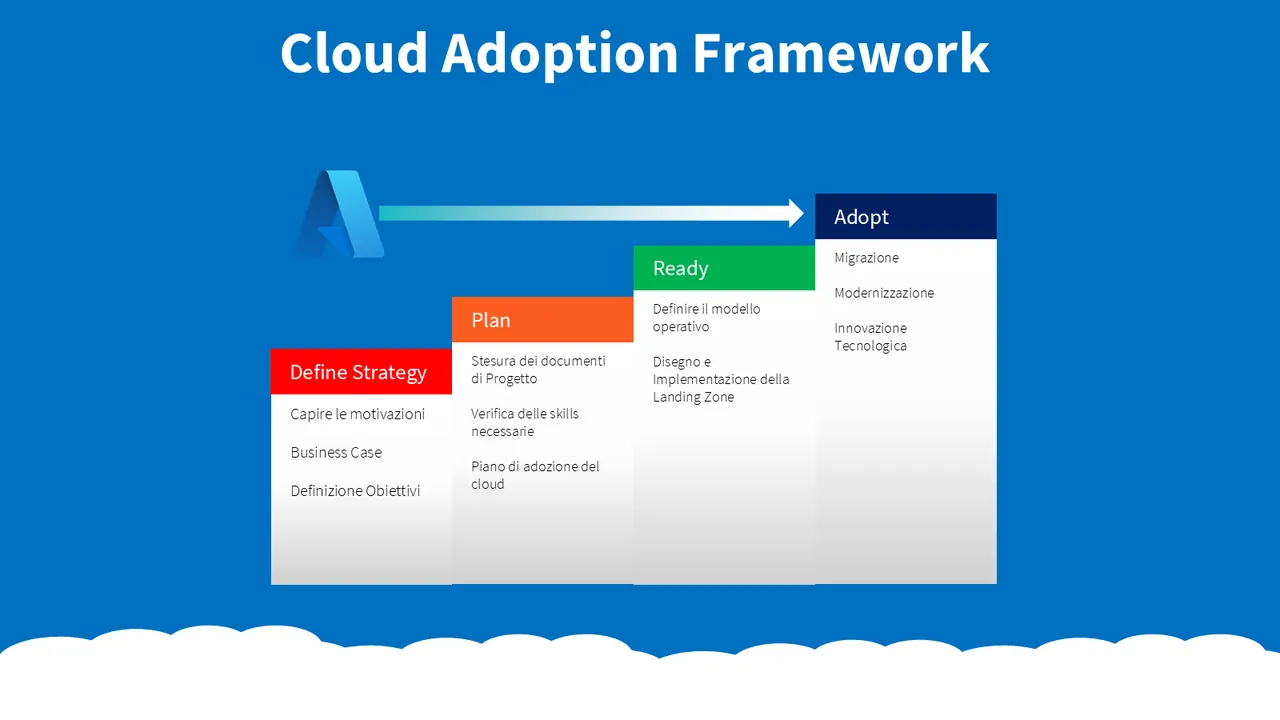
The core of the session is the Cloud Adoption Framework (CAF). I present it as a sequence of phases: Define Strategy (understand motivations, build the business case, set goals), Plan (project documents, skills assessment, adoption plan), Ready (operating model, Landing Zone design and implementation) and finally Adopt (migration, modernization, innovation). Running continuously alongside are Govern, Manage and Secure: risk management, policy and compliance, operational baselines, ongoing protection of every resource.
Of course, as I say on stage, every plan works until the first assault. That’s why I pair CAF with the Well-Architected Framework, a set of practices to check that what you built actually follows best practices, and with the Microsoft Cybersecurity Reference Architectures. The risk, I admit, is a “documentation bombardment”: the value lies in taking what fits your context, not in reading everything.
The cloud is not a destination: it is a process made of strategy, readiness, governance and continuous security.
From traditional infrastructure to Landing Zone
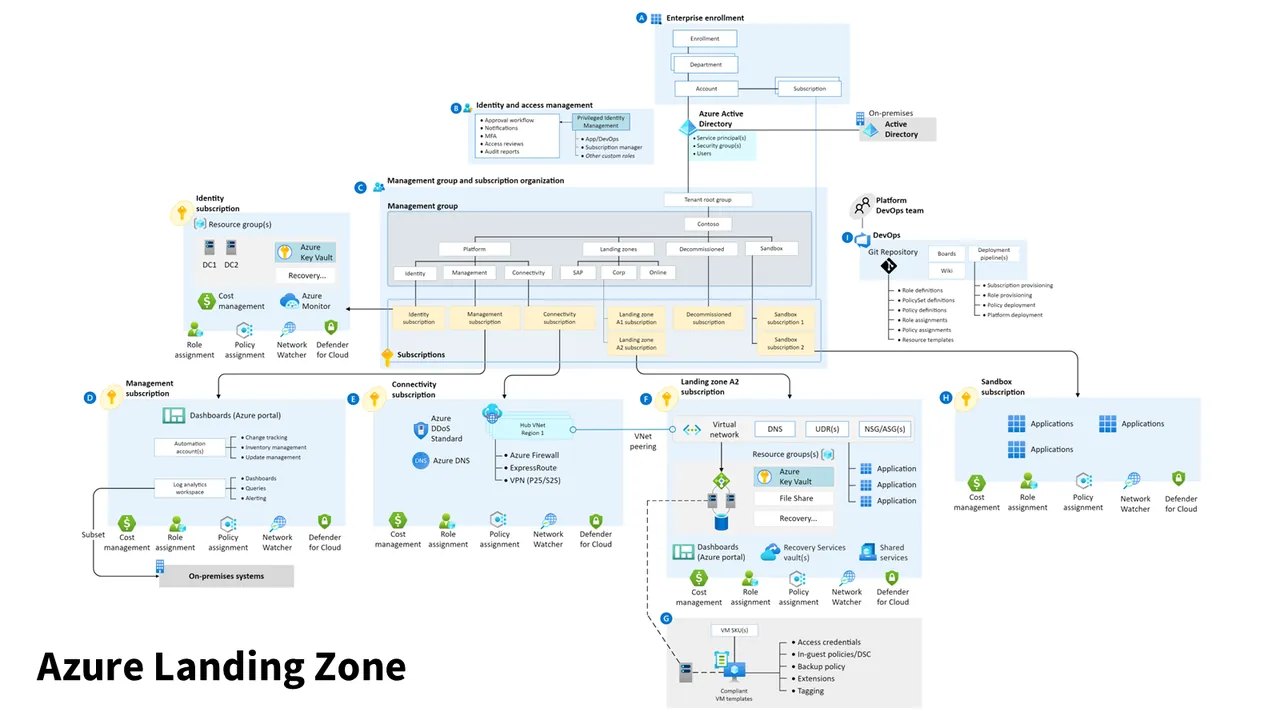
I compare a “traditional” on-premises infrastructure with the Azure Landing Zone reference architecture: separate subscriptions for identity, management, connectivity and applications, organized under a management group hierarchy, with policies, role assignments, monitoring and security applied consistently.
Identity and the management model
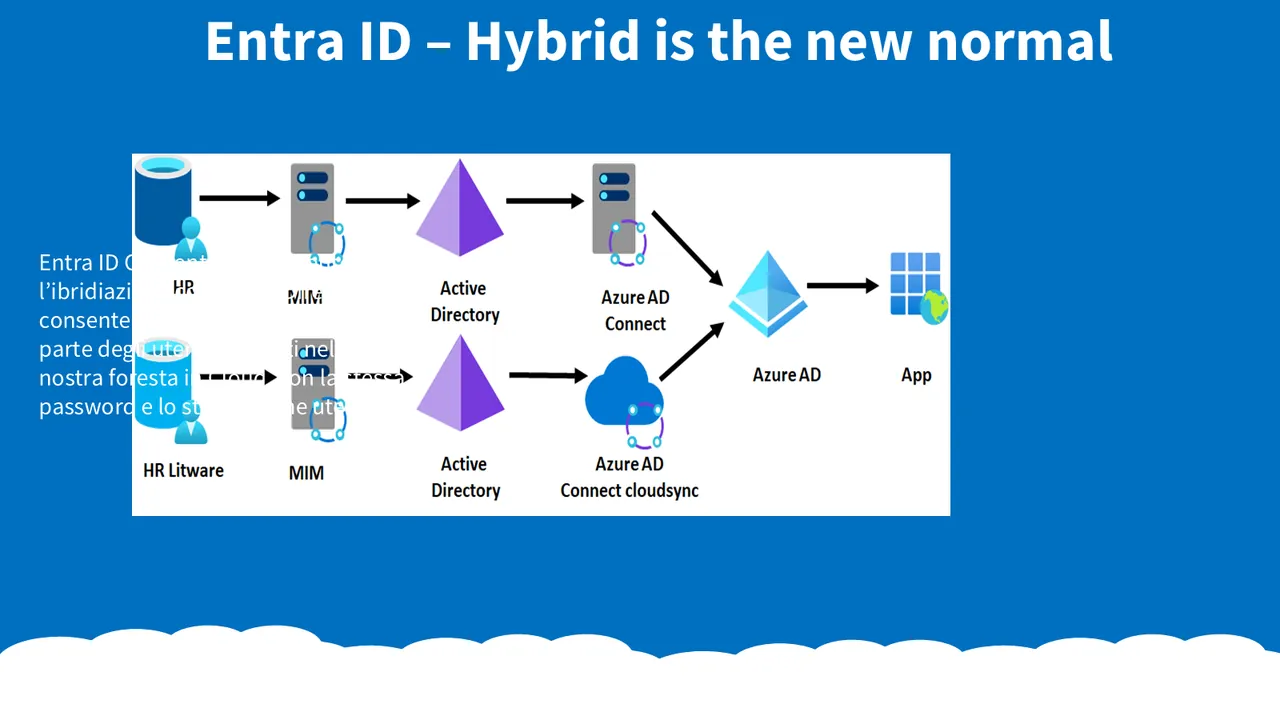
No identity, no governance. Microsoft Entra ID is the cloud identity and access management service, integrated with Azure through RBAC, and hybrid by nature: it can synchronize all or part of your on-premises Active Directory forest, with the same username and password. “Hybrid is the new normal” is how I reassure people who fear they’ll have to throw away their AD.
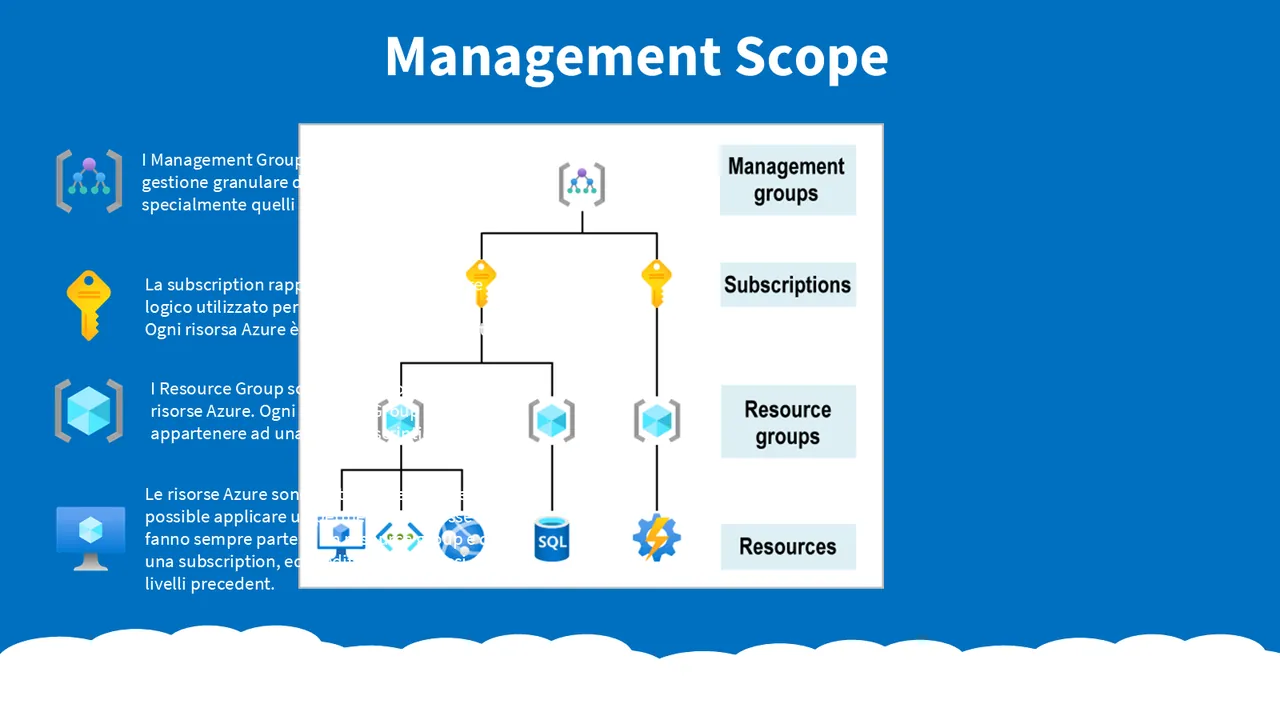
On top of identity I build the management model: management groups, subscriptions, resource groups and individual resources. RBAC permissions (built-in or custom roles) are inherited top-down, so where you assign a role matters as much as the role itself. For just-in-time access, see my post on Entra ID PIM.
| Level | Purpose |
|---|---|
| Management group | Granular governance of multi-subscription environments |
| Subscription | Logical container every resource is tied to |
| Resource group | Logical container of resources; belongs to a single subscription |
| Resource | Lowest RBAC assignment level; inherits permissions from above |
Architectures and demos
The opening image is the Azure Landing Zone reference architecture, which I use to show how identity, management, connectivity, application landing zones and sandboxes fit together.
The session alternates theory and portal demos. In the first demo I work on the management model and permissions; then I move to core IaaS resources: VM families, SLAs depending on availability options (single VM, availability sets, availability zones) and Storage Accounts. Then networking: Virtual Networks and subnets, control over IPs, DNS and security rules, and hybrid connectivity options (Virtual Network Gateway, ExpressRoute, firewall virtual appliances). I also wrote a dedicated post on hub & spoke design.
I close with an overview of opportunities: for DEVs (GitHub Enterprise, Azure DevOps, AKS, Container Registry, App Service, Cosmos DB, Azure SQL, PostgreSQL) and for IT Pros (Azure Site Recovery, VMs, Azure Virtual Desktop, Azure Stack HCI, Azure Arc, Azure File Sync).
Lessons from the field and takeaways
- Before spinning up a VM, ask yourself why you’re moving to the cloud: without motivations and a business case, a migration is just a house move.
- Explain the Shared Responsibility Model up front: in IaaS, patches, identity and data are still yours.
- Design the Landing Zone before the workloads, not after.
- Management groups, subscriptions and resource groups are the backbone of governance: design them around who needs to do what.
- Entra ID doesn’t necessarily replace Active Directory: hybrid is the natural starting point.
- Common objections (costs, security control, datacenter depreciation, “the cloud is only for enterprises”, “IT won’t be needed anymore”) should be addressed openly, with numbers and training, not ignored.
- The cloud doesn’t take work away from internal IT: it changes the skills required, and investing in training avoids depending forever on whoever built the solution.
Resources
Microsoft Learn documentation
- Microsoft Cloud Adoption Framework for Azure
- What is an Azure landing zone?
- Azure Well-Architected Framework
- Shared responsibility in the cloud
- What is Azure role-based access control (Azure RBAC)?
- What are Azure management groups?
Related blog posts
Other sessions
Cloud Governance & Security: Azure at its best
From Landing Zone to Zero Trust: how to set up governance, networking, identity and workload protection in Azure with Azure Policy, Microsoft Defender for Cloud, Azure Bastion and Entra ID PIM.
- Webinar WeAreProject — Cloud Governance & Security · 2026
- Azure Policy
- Azure Monitor
- Microsoft Defender for Cloud
- Microsoft Entra ID
- Azure Bastion
- Azure Firewall
- +1
Secure your Azure Landing Zone
A well-designed Landing Zone is not enough: it has to be protected. Identity as the new perimeter, just-in-time access, Zero Trust networking and compliance, with PIM and Bastion demos and a serverless case study.
- 1nn0va Saturday 2024 · September 2024
- #POWERCON2024 — Rivoluzione digitale in azione · 14 June 2024
- Microsoft Entra ID
- Azure Bastion
- Azure Firewall
- Azure Application Gateway
- Microsoft Defender for Cloud
- Azure Policy
- +1