Azure Monitor – Deep dive
A deep dive into Azure Monitor as a single observability platform: data, Log Analytics, agents deployed via Azure Policy on Azure Arc servers, and AVD Insights to keep Azure Virtual Desktop under control.
- Events
-
- Webinar WeAreProject — Azure Monitor · · Online · Webinar
- Level
- Intermediate
The problem and the context
As an infrastructure grows, monitoring tends to fragment: one tool for on-premises servers, another for Azure VMs, some improvised dashboard for the virtual desktop environment, and no overall view. The result is that problems get discovered when users report them.
This webinar, organized by WeAreProject, shows how Azure Monitor can become the single place where cloud, hybrid and on-premises workloads are collected and analyzed. It’s aimed at sysadmins, IT managers and architects who already work on Azure and want to move from patchy monitoring to a structured, governed approach.
Key content
Azure Monitor as a platform, not a single tool
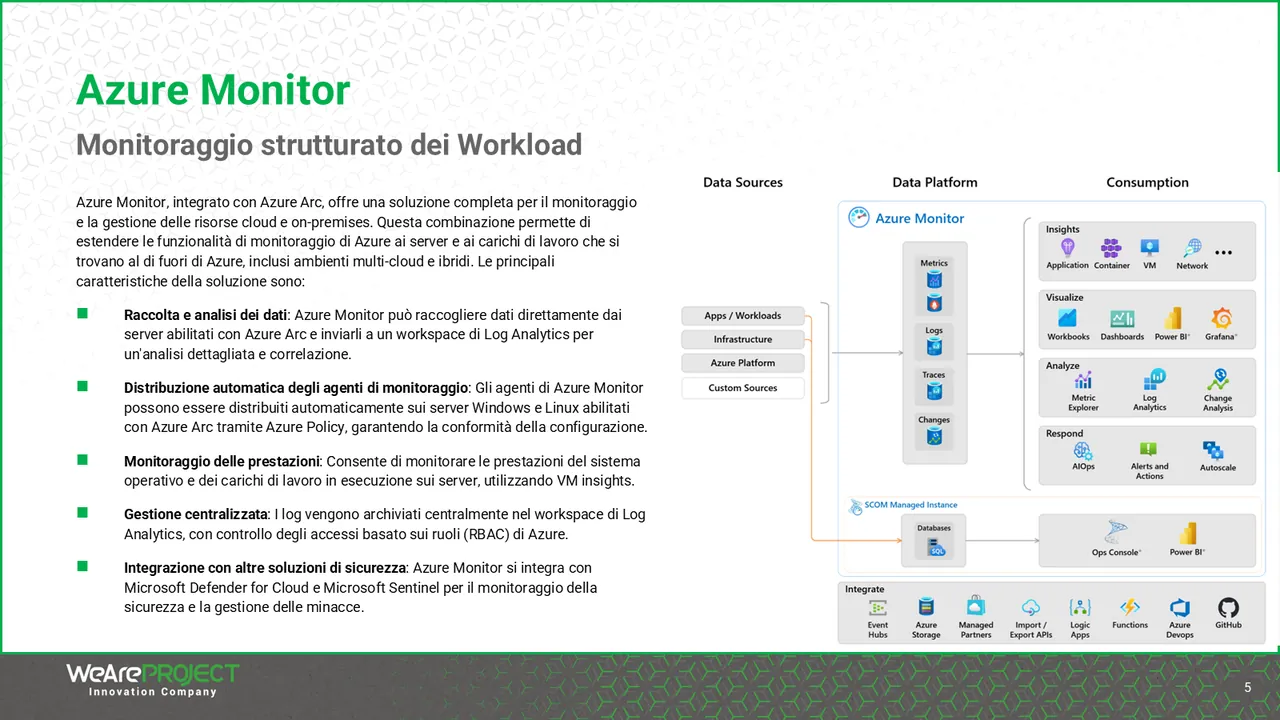
The first idea I push is that Azure Monitor is not “an alerting console” but a data platform. On one side you have the sources: applications and workloads, infrastructure, the Azure platform itself and custom sources. In the middle sits the data platform, organizing everything into metrics, logs, traces and changes. On the other side are the consumption tools: Insights (applications, containers, VMs, network), visualization with Workbooks, dashboards, Power BI and Grafana, analysis with Metrics Explorer and Log Analytics, and response with alerts, actions and autoscale.
Thinking this way changes the design: first decide which data you need and where it lands, then build views and alerts on top.
Hybrid servers with Azure Arc
In my projects the most interesting part is almost always the Azure Arc integration. Once a Windows or Linux server is Arc-enabled, Azure Monitor can collect its data and send it to a Log Analytics workspace, exactly as it would for an Azure VM. This applies to multi-cloud and hybrid environments too. If you’ve never connected a server to Arc, start from this guide to onboarding your first machine.
The points I cover:
- Centralized collection: logs land in a Log Analytics workspace, with access controlled through Azure RBAC.
- Performance: VM insights monitors the operating system and the workloads running on the servers.
- Security: Azure Monitor integrates with Microsoft Defender for Cloud and Microsoft Sentinel, so the same data also feeds security monitoring.
Deploying agents with Azure Policy
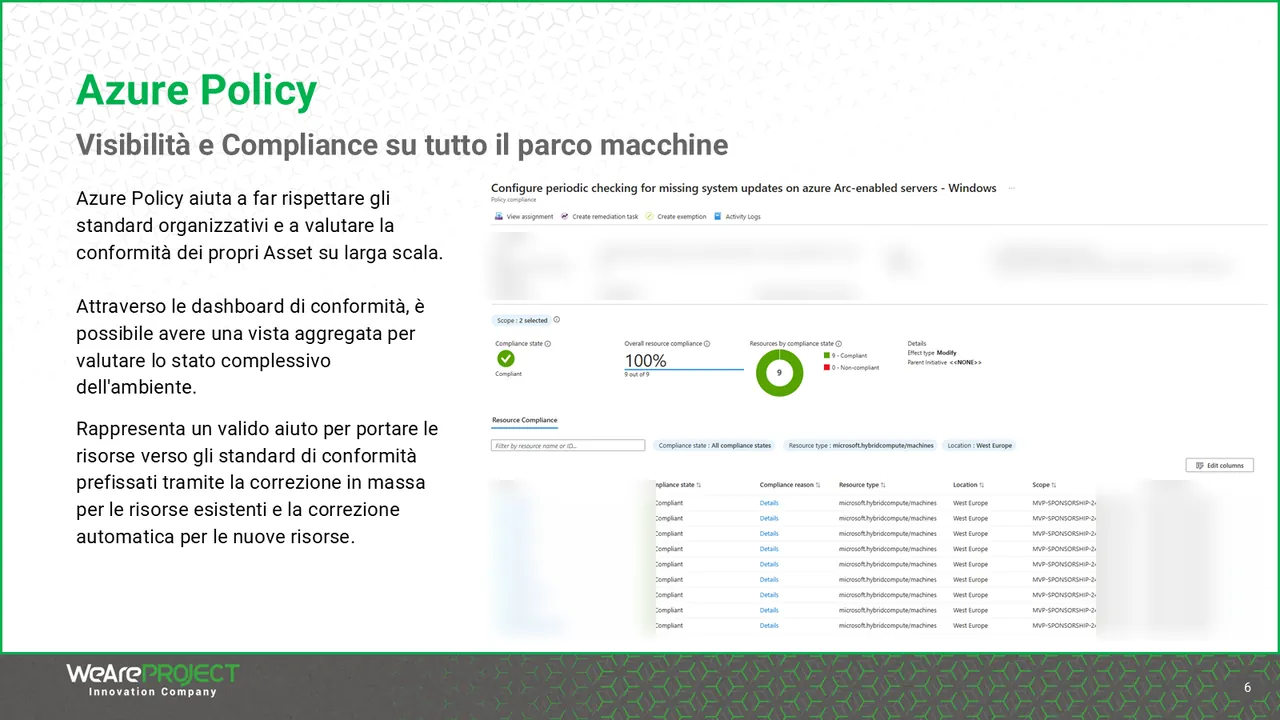
Installing the agent by hand on dozens of servers doesn’t scale and, above all, doesn’t guarantee that new machines are born already monitored. That’s why I use Azure Policy to automatically deploy Azure Monitor agents to Arc-enabled servers. Compliance dashboards give an aggregated view of the fleet, bulk remediation fixes existing resources and automatic remediation covers new ones.
Monitoring only really works when it’s governed: Azure Policy makes sure every server, in Azure or outside it, starts life with the right agent and workspace.
AVD Insights: “power is nothing without control”
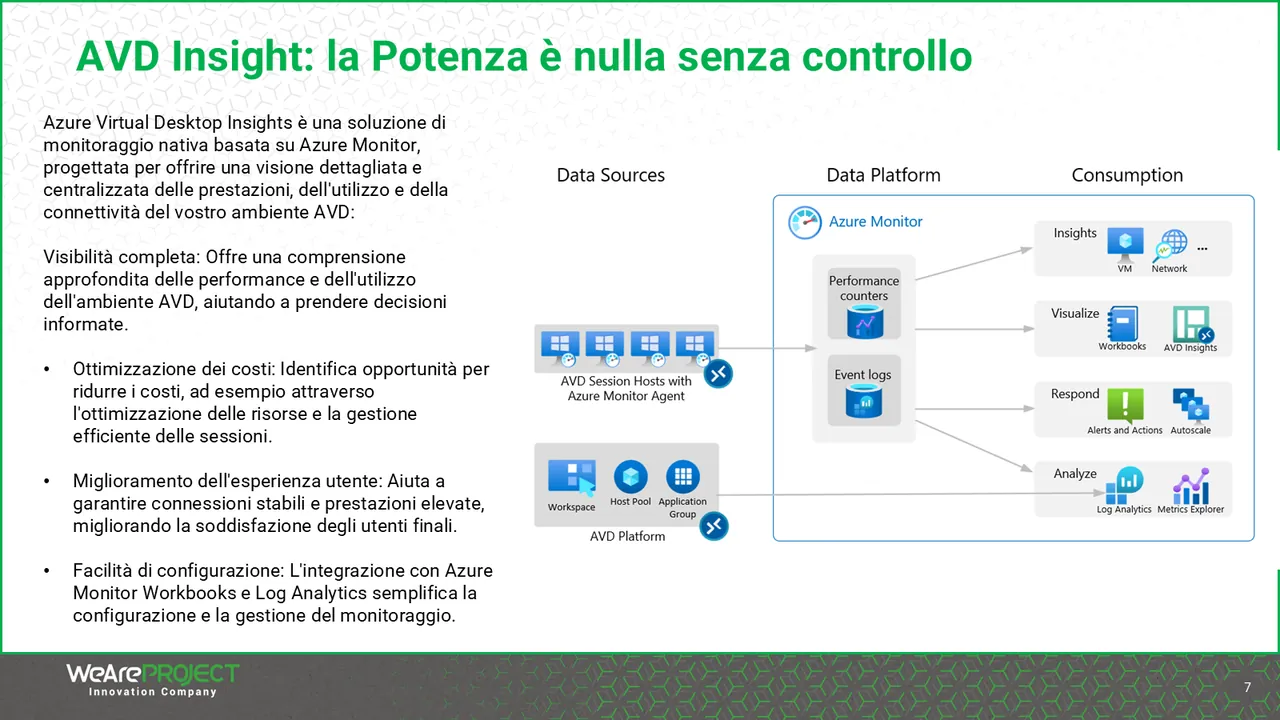
The last block is about Azure Virtual Desktop. AVD Insights is a native solution built on Azure Monitor, Workbooks and Log Analytics: session hosts running the Azure Monitor agent send performance counters and event logs, alongside data from the AVD platform (workspace, host pool, application group). What I get out of it:
- visibility into performance, usage and connectivity of the environment;
- hints to optimize costs, for example in resource sizing and session management;
- concrete input to improve the user experience, aiming for stable connections and consistent performance;
- easy setup, since everything relies on tools already part of Azure Monitor.
Architectures and demos
The opening image is the Azure Monitor reference architecture I use to explain the sources → data platform → consumption flow, including the integration block with services such as Event Hubs, Logic Apps and Azure Functions.
The second step shows the compliance view of a policy that configures periodic checking for missing updates on Azure Arc-enabled Windows servers: a good example of the same governance logic applied to operations.
Finally, the AVD Insights architecture: session hosts and the AVD platform as sources, Azure Monitor as the data platform and, downstream, Insights, Workbooks, alerts, autoscale, Log Analytics and Metrics Explorer.
The session closed with a live demo section, which I don’t cover in detail here.
Lessons from the field and takeaways
- Treat Azure Monitor as a data platform: decide first which signals you need and where they go.
- Azure Arc brings on-premises and multi-cloud servers into the same monitoring model as Azure VMs.
- A central Log Analytics workspace with RBAC simplifies analysis, correlation and access control.
- Deploy agents with Azure Policy: automatic remediation prevents “forgotten” servers.
- Reuse the same data for security by integrating Microsoft Defender for Cloud and Microsoft Sentinel.
- For Azure Virtual Desktop, AVD Insights gives you an immediate view of performance, connectivity and usage without building everything from scratch.
Resources
Microsoft Learn documentation
- Azure Monitor overview
- Azure Arc-enabled servers overview
- VM insights overview
- Overview of Azure Policy
- Azure Virtual Desktop Insights
Related blog posts
Other sessions
Azure Copilot Agents: build, deploy, observe… survive
Six specialized Azure Copilot agents and GitHub Copilot for Azure put to work across a workload's lifecycle: where they help, where they don't, and how to keep them under control in production.
- Azure Copilot
- GitHub Copilot for Azure
- Azure Migrate
- Azure Monitor
- Azure MCP Server
- Azure Advisor
My first Azure Arc project: from scratch to delivery
The story of a real Azure Arc project: on-premises Windows and Linux servers managed from the Azure portal, with unified security, essential monitoring and updates orchestrated from a single place.
- #POWERCON2026 — L'IT tra innovazione, sicurezza e controllo · 23 January 2026
- Azure Arc
- Azure Update Manager
- Azure Monitor
- Azure Policy
- Microsoft Defender for Cloud
- Microsoft Defender for Endpoint
- +1